How I Moved Databases and a Log Archive Across Major Versions Without a Way Back
On this page
- Introduction
- A. What the numbers in a version actually mean
- B. Why stored data makes a major version dangerous
- C. Why this could not be postponed any longer
- D. The two shapes of an upgrade
- E. What I was moving
- F. Five obstacles in the way
- Method
- A. Ask each component what upgrade it actually requires
- B. The upgrade that could not be undone
- C. Refusing to start when the data is too old
- D. Export and import as separate steps
- E. The file that was not in version control and had to travel
- Results and Discussion
- A. Which failure would you rather have
- B. What made this survivable
- C. What it cost
- D. What generalises
- Conclusion
- Terms
A server had been running the same software versions for years. Not because anyone decided to leave it there, but because it worked, and there was always something more urgent. Then the versions it was running stopped being supported — and the upgrade turned out to be the kind that cannot be undone.
That asymmetry, more than the version numbers, is what this article is about.
Introduction
Every piece of software you run has a version: a number that identifies exactly which release you have. Servers accumulate them — a database has a version, the thing storing your files has a version, the search engine indexing your logs has a version — and each of those numbers moves forward on its own schedule.
Most of the time you can ignore this completely. Software updates, the number goes up, nothing you care about changes. This article is about the handful of times a year when that is not true, and about how to tell those times apart from the ordinary ones before you start.
A. What the numbers in a version actually mean
Version numbers are usually written as three numbers separated by dots — something like 14.2.7. The convention behind them is widely followed, and each position promises something different.
The last number is the patch version. It goes up when something is fixed and nothing else changes: a bug, a security hole. Upgrading is meant to be invisible.
The middle number is the minor version. It goes up when something is added that did not exist before. Anything that worked before still works; there is simply more available now.
The first number is the major version, and it is the one that matters here. It goes up when the maintainers allow themselves to break a promise they had been keeping. Something that worked in the previous version may stop working, and they are telling you so by changing that first digit.
For most software, "breaking a promise" means a command was removed or an option renamed — annoying, but you find out immediately and you can go back. For software that stores data, it can mean something much worse: the way the data is arranged on disk has changed.
B. Why stored data makes a major version dangerous
When a database saves your records, it does not write them the way you would write a letter. It arranges them in a structure designed for fast searching and safe recovery — the on-disk format. That structure is an internal detail, which is precisely why the maintainers feel free to change it between major versions.
The consequence: a newer version may look at a directory written by an older one and simply not recognise it. And there are two ways that can go.
In the good case, it refuses to start and says why. Nothing is touched, you have lost a few minutes, and the old version still works exactly as before.
In the bad case, it recognises the directory well enough to begin converting it — rewriting the data into the new arrangement as it goes. If that finishes, fine. If it does not, or if you change your mind halfway, the directory is now in a state that neither version fully understands. The old software cannot read it any more, and it is the only copy you had.
That second case is what "cannot be undone" means in the title of this article. Not that the software forbids going back, but that after a certain point there is nothing left to go back to.
C. Why this could not be postponed any longer
The system in question signs documents for a public institution. When someone submits a document and gets it back signed, that signature has to remain verifiable for years, and the record of who signed what and when has to survive just as long.
In practice, "no longer supported" means one specific thing: when a security flaw is found in that software, there will be no fix for that version. The flaw becomes public, the patch goes to current versions only, and the old one stays open. Every month that passes adds to a list of known problems with no available remedy.
So the upgrade was not optional, and it was not a matter of keeping up with fashion. It was the difference between a system that receives security fixes and one that does not.
What made it difficult was the second half of the same sentence. The records that must survive are stored in the very components that needed upgrading — including one whose upgrade is a one-way door. The question was never "can this be upgraded". It was: how do you cross a boundary you cannot step back over, when what is on the other side is years of records you are responsible for?
D. The two shapes of an upgrade
Every component in the system fell into one of two categories, and telling them apart was the first real work.
The first is reversible. The new version reads the old data; if something goes wrong, you stop the new version and start the old one. Nothing was consumed. You can try again next week.
The second is one-way. The moment the new version touches the data directory, it writes something the old version cannot read. There is no stopping and going back — not because the software forbids it, but because the data on disk is now in a shape the old version does not understand.
A one-way upgrade is not a deployment. It is a migration with no rollback, which means every bit of confidence has to come from preparation, because none of it will come from the ability to retreat.
E. What I was moving
The system holds four kinds of stored state, and I will describe them by what they do rather than by name.
Three relational databases hold the authoritative records — the tables that answer "what was signed, by whom, when". A search cluster holds the logs, which in this system are not disposable: they are the operational record of every signing operation, and they must survive to the end of a retention period measured in years. An object store holds uploaded files. Two caches hold work in progress — data that exists only to make things faster, and that can be rebuilt from scratch.
Four categories, four different answers.
F. Five obstacles in the way
The goal, then: move four kinds of stored state onto supported versions, and lose none of it. With one constraint that shapes everything below — part of what is being moved is a legally-significant record with a retention period measured in years, and at least one component offers no way back once it has been touched. Confidence could not come from the ability to retreat, because for that component there is no retreat. It had to come from preparation instead.
Easy to state, awkward to build. Five obstacles stood in the way, and the first one is what makes the other four possible to see at all.
The first is that there is no uniform procedure, and looking for one is itself the hazard. Four categories of state, four different answers — and the instinct to find a single migration path is how a database's rules end up applied to a search cluster. The two are not alike: one refuses to start when it meets data it cannot read, the other begins converting it. A uniform procedure is the rejected alternative here, and rejecting it is what forced the question that mattered: not "how do I upgrade this system", but "what does each component actually require".
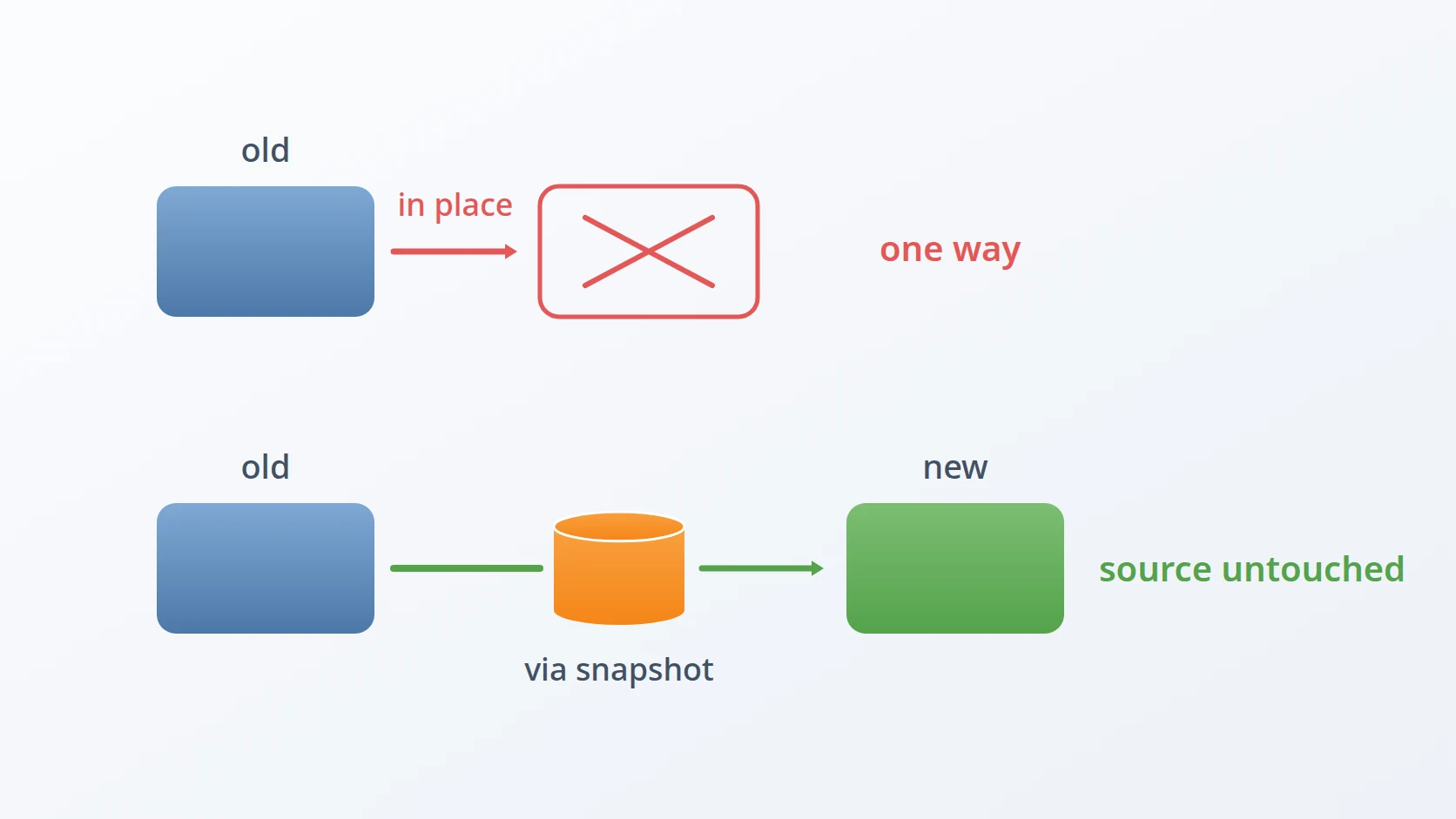
The second is that an in-place upgrade rewrites the data as it reads it. The search cluster's new major version can read what the immediately previous one wrote, and nothing older — and the cluster held indices from several eras. Point the new version at the existing directory and it starts converting; stop it halfway and the directory is in a shape neither version fully understands. The in-place upgrade is the rejected alternative, and rejecting it is uncomfortable precisely because it would have been fast and would have worked most of the time. The times it did not work, it would have consumed a record that cannot be regenerated. So the cluster was moved through its snapshot mechanism instead: read from the old one, restore into a new one standing separately, and never modify the source at all.
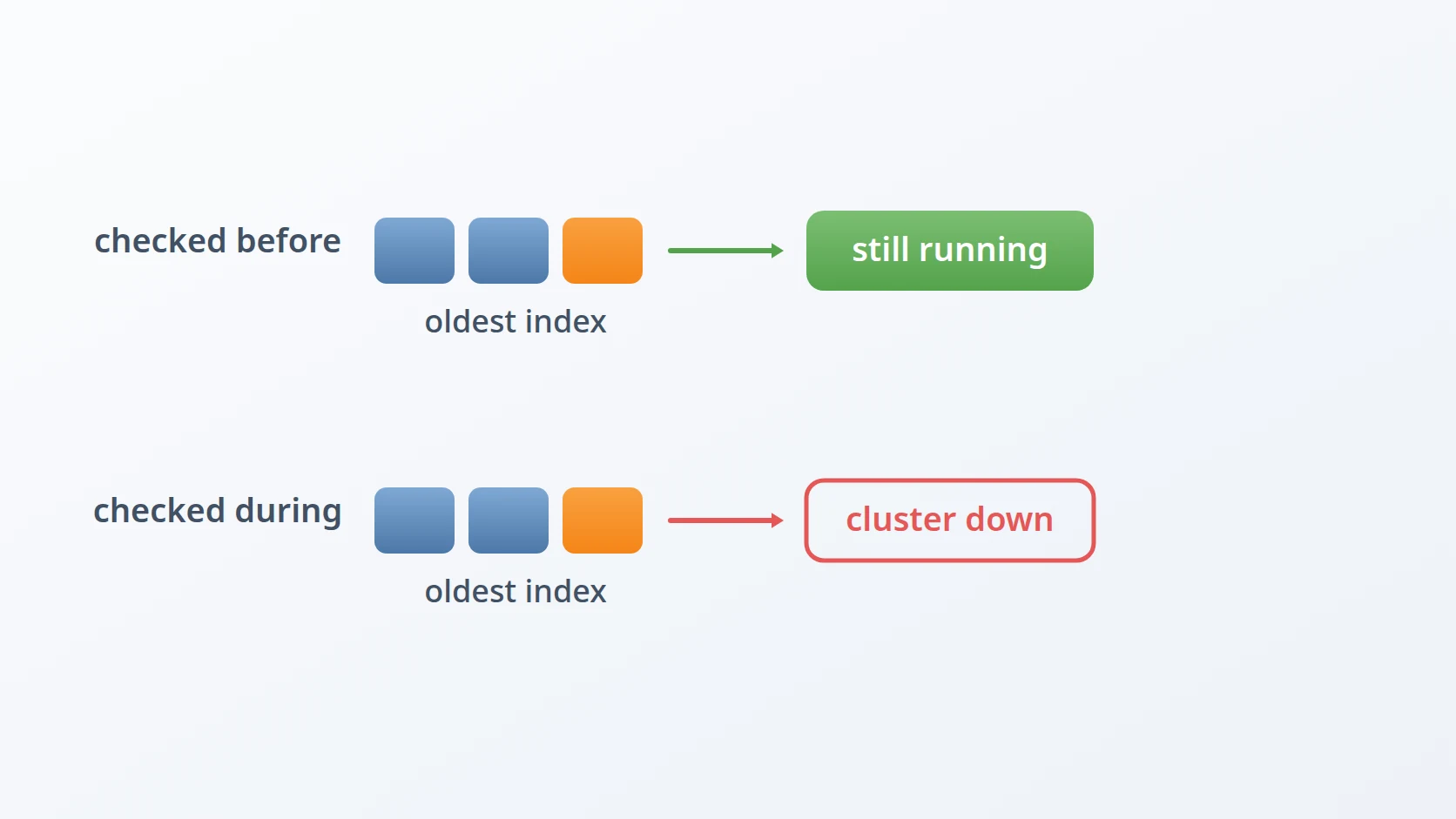
The third is that a single index too old to read stops the entire new cluster from starting. Not "skips that index" — refuses to start, because it cannot open part of its own state. The timing of that discovery is everything: found during the migration, it means the old cluster is already shut down, the new one will not come up, the service is unavailable, and the operator is reading documentation about reindexing at two in the morning. Letting it surface at runtime is the alternative I rejected, and the replacement costs nothing — the export step records which version wrote each index and refuses to begin if it finds one past the boundary, while the old system is still running and nothing is under time pressure.
The fourth is that the data has to be secured before the destination exists. The old server is running, the new structure is not yet built, and doing these in sequence keeps the window open in which everything depends on hardware that is about to be decommissioned. A single tool that migrates in one pass is the rejected alternative; instead export and import are separate programs, run possibly days apart, with export treating its source as strictly read-only. Between the two, the old system is still fully operational — it has been read, not changed.
The fifth is that one file falls through every mechanism that is supposed to catch it. The certificate authority's revocation list is state, so it is correctly excluded from version control. It lives in no database, so a database migration does not carry it. And its absence stops nothing from starting, so no failure announces it. "Everything in the database plus everything in version control" is the assumption that fails here, and it fails silently. What replaces it is inventorying what is stored rather than what is managed, because the files that fall outside every management mechanism are exactly the ones a migration forgets.
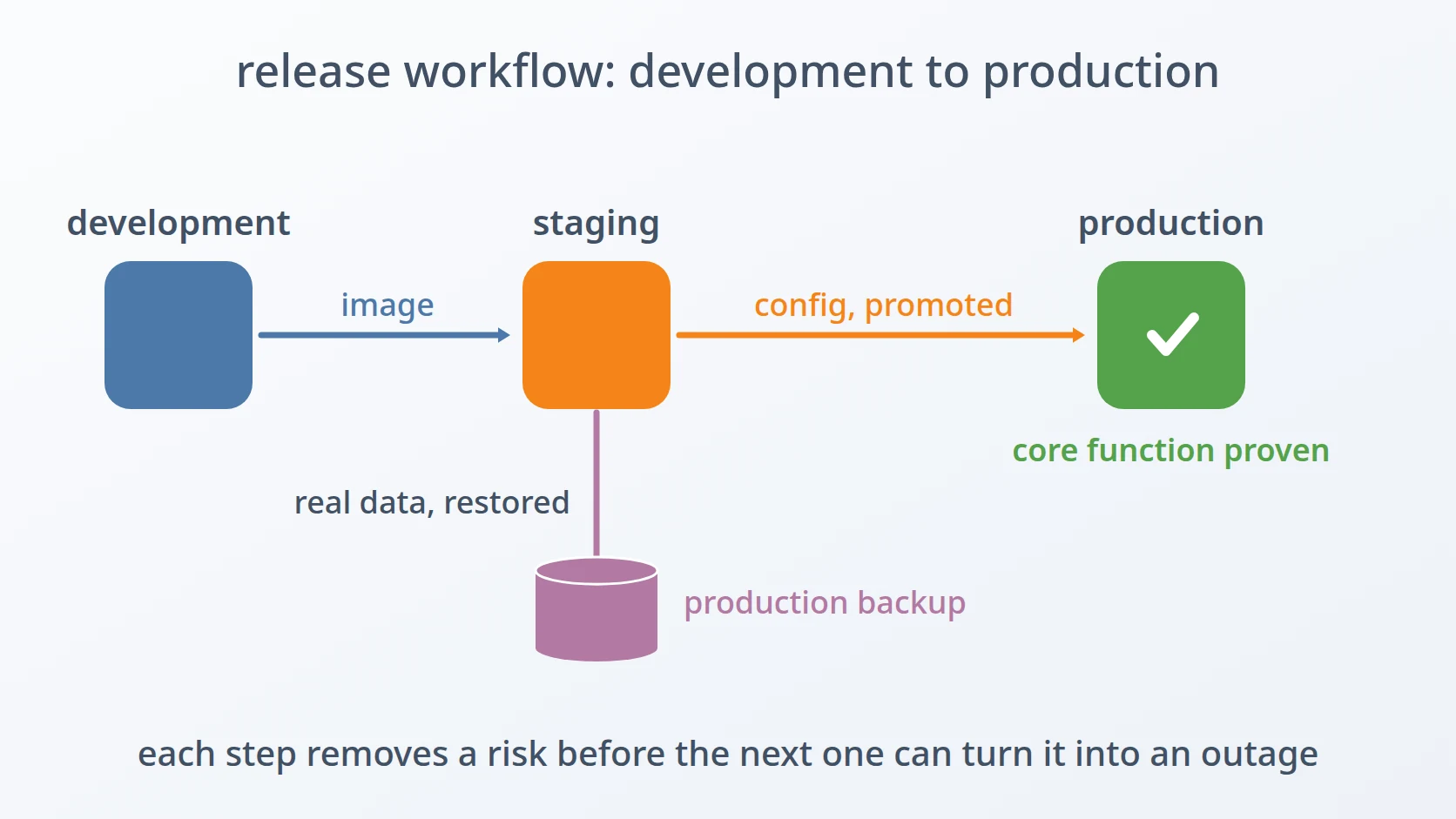
The order reflects how much each one constrains the rest. The first has to come first because it decides that every later question is asked per component rather than once. The second and third both belong to the most dangerous component, and they split cleanly: the second is how to move it, the third is how to learn in advance that it cannot be moved yet. The fourth is about when, and the fifth about what is easiest to leave behind. Two properties run through all five — the source is never modified, and every blocking check runs before the commitment rather than during it. Those are the two things that make an operation with no rollback survivable rather than merely careful.
Method
A. Ask each component what upgrade it actually requires
This is the answer to the first obstacle, and it is what the other four are asked on top of.
The relational databases jumped several major versions. Their data directory format is version-specific and the software checks it at startup: pointed at a directory written by an older major version, the newer one refuses to start and says so clearly. That refusal is a gift. It is a loud, early, harmless failure — the best kind. The migration path is to export the contents as a logical dump and load it into a fresh instance.
The search cluster was the dangerous one, and I will come back to it.
The object store was the easy case: its on-disk format was forward-compatible across the versions in question, so copying the directory was sufficient. I verified that claim rather than assuming it.
The caches were not migrated at all. They hold derived data and queued work, not records. Anything lost is recomputed. Recognising that a component does not need migrating is as useful as knowing how to migrate it — and cheaper.
B. The upgrade that could not be undone
This is the answer to the second obstacle: the one component with no way back.
The search cluster had two properties that combined badly.
First, the new major version could read data written by the immediately previous major version, but not by anything older. The cluster held indices from several eras, and some of them predated that boundary.
Second — and this is the part that makes it a one-way door — an in-place upgrade rewrites the data as it goes. Start the new version against the existing directory and it begins converting. Stop it halfway and you have a directory that neither version fully understands.
The obvious approach, then, was the wrong one. Upgrading in place would have been fast and would have worked most of the time. The times it did not work, it would have destroyed a legally-significant record with no way back.
So the search cluster was migrated through its snapshot mechanism instead: take a snapshot from the old cluster, stand up a new cluster separately, restore the snapshot into it. Slower, and it needs disk space for both at once.
What it buys is that the old cluster is never modified. It is read from, and it stays exactly as it was. If the restore fails, or the new cluster misbehaves, the original is still there, still readable by the version that created it. The snapshot format is also portable across versions in a way the raw data directory is not.
# the source is read from, never written to
The principle I would extract: when an operation is irreversible, restructure it so that the irreversible part happens somewhere else. Copying data into a new place is reversible — you delete the copy. Transforming data in place is not. Where the choice exists, buy reversibility with disk space, because disk space is cheap and the record is not.
C. Refusing to start when the data is too old
This is the answer to the third obstacle, and it is entirely about when the discovery happens.
The version boundary created a hazard that would otherwise surface at the worst moment.
If any index in the cluster was written by a version older than the compatibility boundary, the new cluster fails to start at all. Not "skips that index" — refuses to start, because it cannot open part of its own state.
Discovered during the migration, that means: old cluster shut down, new cluster will not come up, service unavailable, and the operator now reading documentation about reindexing. At two in the morning.
So the export step records the version that created each index and stops before doing anything if it finds one too old, naming it and asking for it to be reindexed first. The check costs nothing and it moves the discovery from the middle of a migration to the beginning, where the old system is still running and there is no time pressure.
# read the creating version of every index BEFORE anything is stopped
| | 
This is the same shape as a dry run, which appears in most of the operational tools I write: find out what will fail before you are committed.
D. Export and import as separate steps
This is the answer to the fourth obstacle: securing the data before the destination exists.
The migration is two tools rather than one, and the split is deliberate.
Data usually needs to be secured before the destination is ready. The old server is running, the new structure is not yet built, and waiting for the second before doing the first means the window where everything depends on hardware you are about to decommission stays open longer than it needs to.
So export runs first and treats its source as strictly read-only. Import runs later, possibly days later, from the exported artefact. Between them, the old system is still fully operational — it has been read, not changed.
E. The file that was not in version control and had to travel
This is the answer to the fifth obstacle, and the only one found by looking rather than by failing.
The certificate authority maintains a revocation list — a signed file recording which certificates have been withdrawn. It is state, so it is correctly excluded from version control. It is also not held in any database, so a database migration does not carry it. And its absence does not prevent anything from starting.
It sits in a gap: not code, not database, not obviously anyone's responsibility. The migration checklist now names it explicitly, because "everything in the database plus everything in version control" is not everything.
# state, so excluded from version control — and carried by nothing else
The general lesson: inventory what is stored, not what is managed. Files that fall outside every management mechanism are exactly the files a migration forgets, and they are often the ones that matter.
Results and Discussion
A. Which failure would you rather have
The relational databases and the search cluster differed in one respect that matters more than any technical detail: what happens when you make a mistake.
Point a newer database at an older data directory and it refuses to start, with a clear message. You have lost a few minutes.
Point a newer search cluster at an older data directory and it begins converting. If it succeeds, fine. If the data was older than it can handle, you now have a directory that the old version can no longer read either.
Same operator mistake. One costs minutes; the other costs the archive. The difference is visible in what each one prints.
# Database: refuses, names the mismatch, changes nothing.
# Search cluster: accepts, and starts rewriting what it just read.
This is why I stopped treating "does it work?" as the interesting question about an upgrade path. The interesting question is what happens when it does not work — and the answer determines how much preparation is proportionate. A component that fails loudly and harmlessly can be tried. A component that fails by consuming its input must be rehearsed elsewhere first.
B. What made this survivable
Two of the three properties below were named at the outset. Setting them down together is worth doing anyway, because none of them is specific to the software involved — and the third only becomes visible once the first two are in place.
The source was never modified. Every step read from the old system and wrote somewhere new. At no point was there an operation that, if interrupted, left the original in an unusable state. It is visible in the shape of the commands themselves — every one of them names a destination that did not exist beforehand.
# Every step names somewhere new. Nothing writes back into the source.
# The property to check for: no command takes the source as its output.
The blocking checks ran before the commitment. Finding an index too old to migrate was a precondition, not a runtime error.
Each component was migrated by its own rules. The temptation to find one procedure that covers everything is strong, and yielding to it means applying the weakest technique to the most valuable data.
C. What it cost
Running two clusters simultaneously needs disk space for both, and for a while the machine held two copies of the log archive. That is the price of not modifying the source, and it is a price paid in the cheapest resource available.
The export and import also take time proportional to the data, during which the system is not serving. This was acceptable for an internal service with a maintenance window. It would not be acceptable for a system that cannot stop, and such a system would need a different approach entirely — replication to a new version, then a cutover — which is more machinery than this situation justified.
D. What generalises
Whatever you are upgrading, three questions are worth answering before starting.
Is this reversible? Specifically: does the new version modify the data as it reads it? If yes, do not do it in place.
What is the oldest thing in here? Compatibility is usually stated against the previous version, and long-lived systems accumulate data from several versions ago.
What is stored outside the things I know how to migrate? Every system has files that are neither code nor database rows. They are the ones that get left behind.
Conclusion
Crossing a major version boundary is not one procedure. It is a separate decision per component, and the decision hinges on what happens when it goes wrong rather than on what happens when it goes right.
The choice I would defend most is the slow one: migrating the log archive through snapshots instead of upgrading it in place. It took longer, it needed disk space for two copies, and it meant the whole thing could be abandoned at any point with the original still intact. In-place would have been faster and would probably have worked.
"Probably worked" is a reasonable standard for something you can retry. For a record that has to survive years of retention, and that the old software can no longer read once the new software has touched it, the standard has to be different. Where an operation cannot be undone, the work is not in performing it carefully. It is in restructuring it so that it does not have to be undone.
Terms
- Major version
- A release permitted to change stored data formats, so that a newer version may not read an older version's data.
- In-place upgrade
- Starting a newer version against an existing data directory, letting it convert as it goes. Fast, and frequently irreversible.
- Snapshot
- A portable copy of a datastore's contents, readable across versions in a way the raw data directory is not.
- Logical dump
- An export of a database's contents as instructions to recreate it, rather than a copy of its files.
- Forward compatibility
- The property of a stored format being readable by later versions, which is what makes copying a directory sufficient.
- Reindexing
- Rewriting stored data in a current format, needed when it is too old for the version being moved to.
Technologies covered
- Linux
- Elasticsearch
- PostgreSQL
- Docker