How I Promote Config Between Environments Without Overwriting the Key That Decrypts Production
On this page
- Introduction
- A. What an environment is, and why there is more than one
- B. What actually moves when a release goes live
- C. What is at stake when this goes wrong
- D. Why this is not a file copy
- E. Five obstacles in the way
- Method
- A. Promote the structure, not the contents
- B. A new secret is a hard stop, not a copy
- C. Comparing structured formats by key, not by line
- D. Dry run first, and a backup of every file it writes
- E. The migration that never ran
- F. Green containers are not a verified release
- Results and Discussion
- A. Why identical key counts are the dangerous case
- B. Failures that wait
- C. What the tool deliberately does not do
- D. Where this generalises
- Conclusion
- Terms
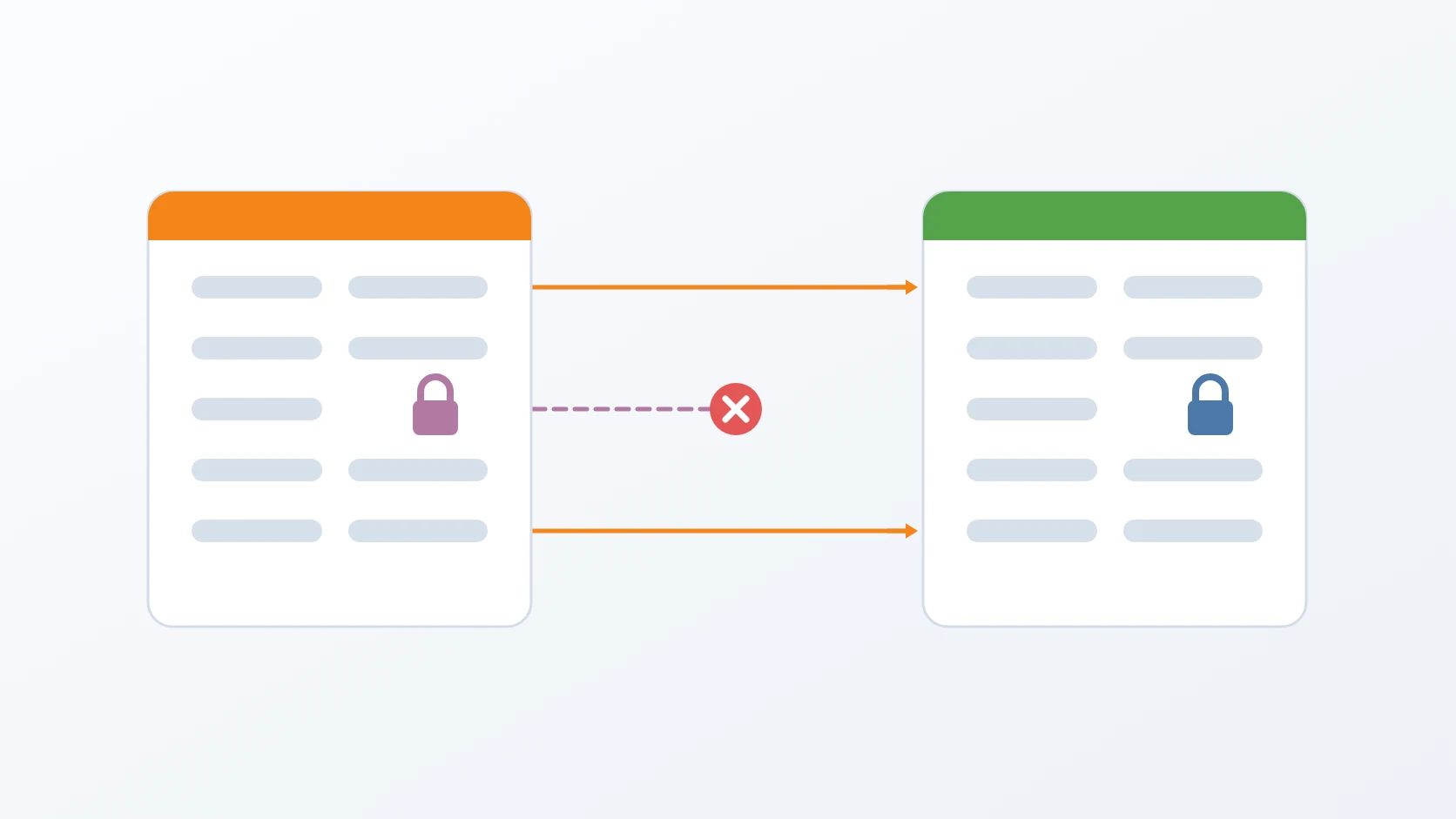
A release is ready and tested. The same changes now have to reach the machine real people use — but not all of them, because the settings files on the two machines are identical in shape and different in meaning.
Copying the file across is the obvious move. It is also how you hand the live system the database password of your test system, and how you overwrite the one key that makes years of stored data readable.
Introduction
Every program that does anything useful needs to be told a few things it cannot work out for itself: where its database is, what password to use, how many requests per minute to allow. These are its settings, and they are kept in a configuration file — a plain list of names and values, stored outside the program itself.
That separation is deliberate, and it is what makes everything in this article both possible and dangerous. Because the settings live outside, one single build of a program can run in several places, behaving differently in each. Because they live outside, moving a program from one place to another means moving — or deliberately not moving — that file.
A. What an environment is, and why there is more than one
An environment is a complete running copy of a system: the program, its database, its files, its settings. Most projects end up with more than one, and they are not interchangeable.
Development is where new work happens. It usually runs on a laptop, holds invented data, and breaking it costs an afternoon.
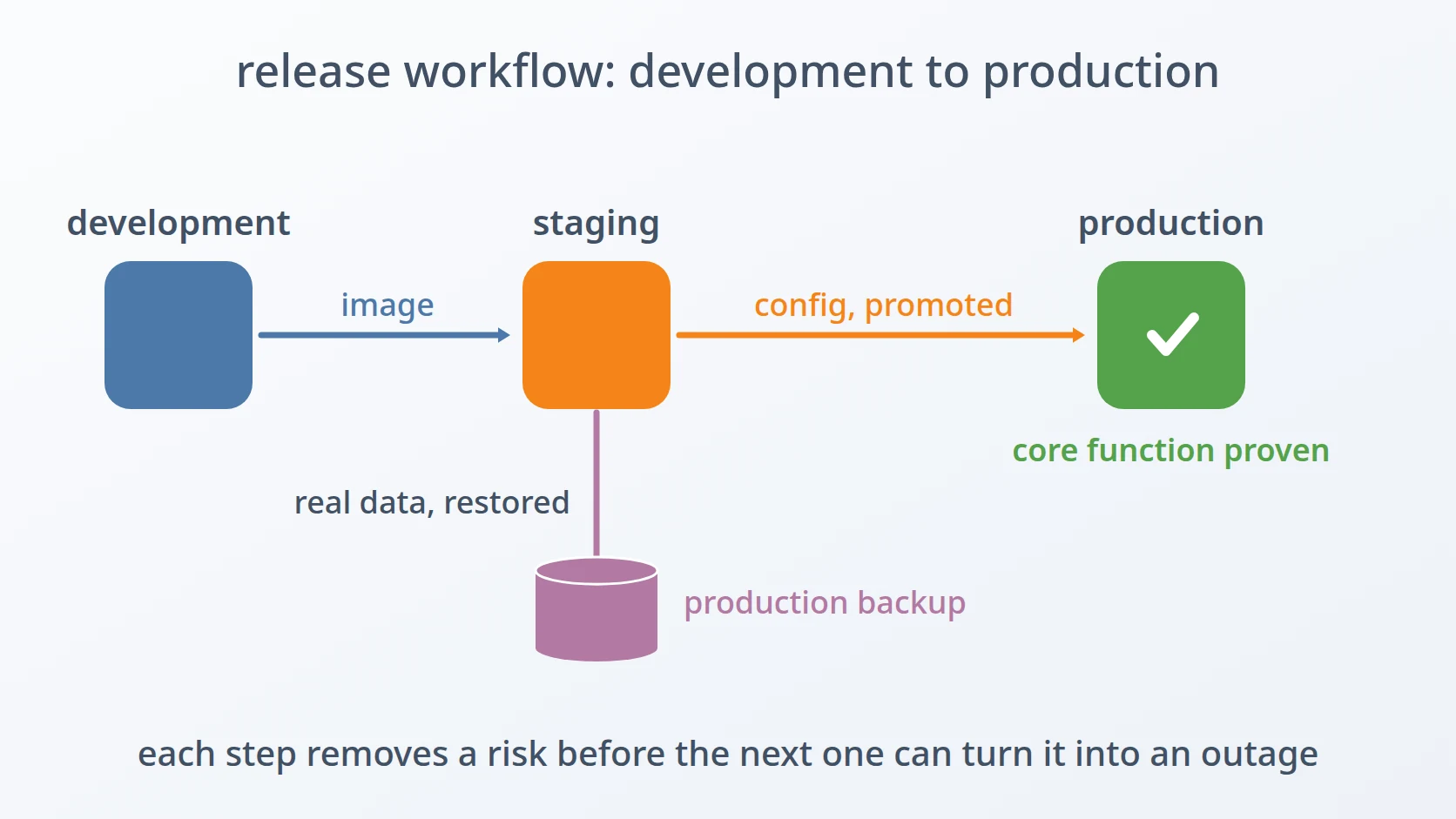
Staging is a rehearsal. It runs the exact release that is about to go live, against data that resembles the real thing — often restored from a recent backup. Its purpose is to make failures happen in front of the people who can fix them, rather than in front of users. Access to it is looser: more people can log in, dumps get taken, experiments happen.
Production is the one real users depend on. It holds the only copy of the data that matters, and a mistake there is measured in incidents rather than afternoons. Access is tightest, changes are rarest, and each of those changes is recorded.
That last difference — looser access in staging, real data in production — is the whole reason a boundary between them has to exist. If a credential leaked in staging also opened production, keeping them separate would accomplish nothing.
B. What actually moves when a release goes live
A release is a specific, finished version of the software: built once, labelled, and then run unchanged wherever it goes. The thing that gets built is the artefact — a packaged copy of the program. Moving a release from one environment to the next is called promoting it.
What makes promotion harder than copying a file is that a release is not one thing. It has two halves, and they travel by different means.
The first half is the artefact plus its settings. The artefact itself is genuinely identical everywhere — that is the point of building it once. The settings are not: some of them describe the release, and some describe the place it is running.
The second half is the database schema — the structure of the tables the program expects to find. When a release adds a feature, it often needs a new column or a new table. The artefact carries the code that uses that column, but it does not carry the column itself. Something has to change the database separately, and that step is called a schema migration.
-- the artefact carries the code that reads this column;
-- it does not carry the column itself
documents ADD COLUMN signed_at timestamptz;These two halves fail in different ways, and I got caught by both. Config that travels when it should not takes production down, or worse. A schema migration that never runs takes nothing down at all — it waits, silently, until a request arrives that needs the column that is not there.
That is why this article covers both. They are not two topics that happen to sit near each other; they are two halves of the same event — moving a release to the place people use. Solving only one of them leaves half the journey unhandled.
C. What is at stake when this goes wrong
Most configuration mistakes cause an outage. The service cannot reach its database, the health check fails, someone notices within minutes, and the previous value goes back. Unpleasant, and entirely recoverable.
One of them is not like that. Among the settings is a key used to encrypt certain database columns — personal details, in this system. That key is not a password the service presents to something else; it is what makes previously stored values readable at all. Overwrite it in production and every value encrypted under the old key becomes unreadable. Restoring the old key restores access, but only if you still have it. If the overwrite has been saved and the previous file is gone, so is the data.
So the two failure modes are not comparable. Most cost minutes. One is permanent, and it looks exactly like the others right up until someone tries to read an old record.
That asymmetry is what shaped everything below. A tool that treats all settings the same is a tool that will, eventually and quietly, make the expensive mistake.
D. Why this is not a file copy
I measured it, because I wanted to know the real shape of the problem before writing anything. Until then all I had was a suspicion that copying the file was dangerous, and a suspicion is not a sound basis for deciding what may and may not travel.
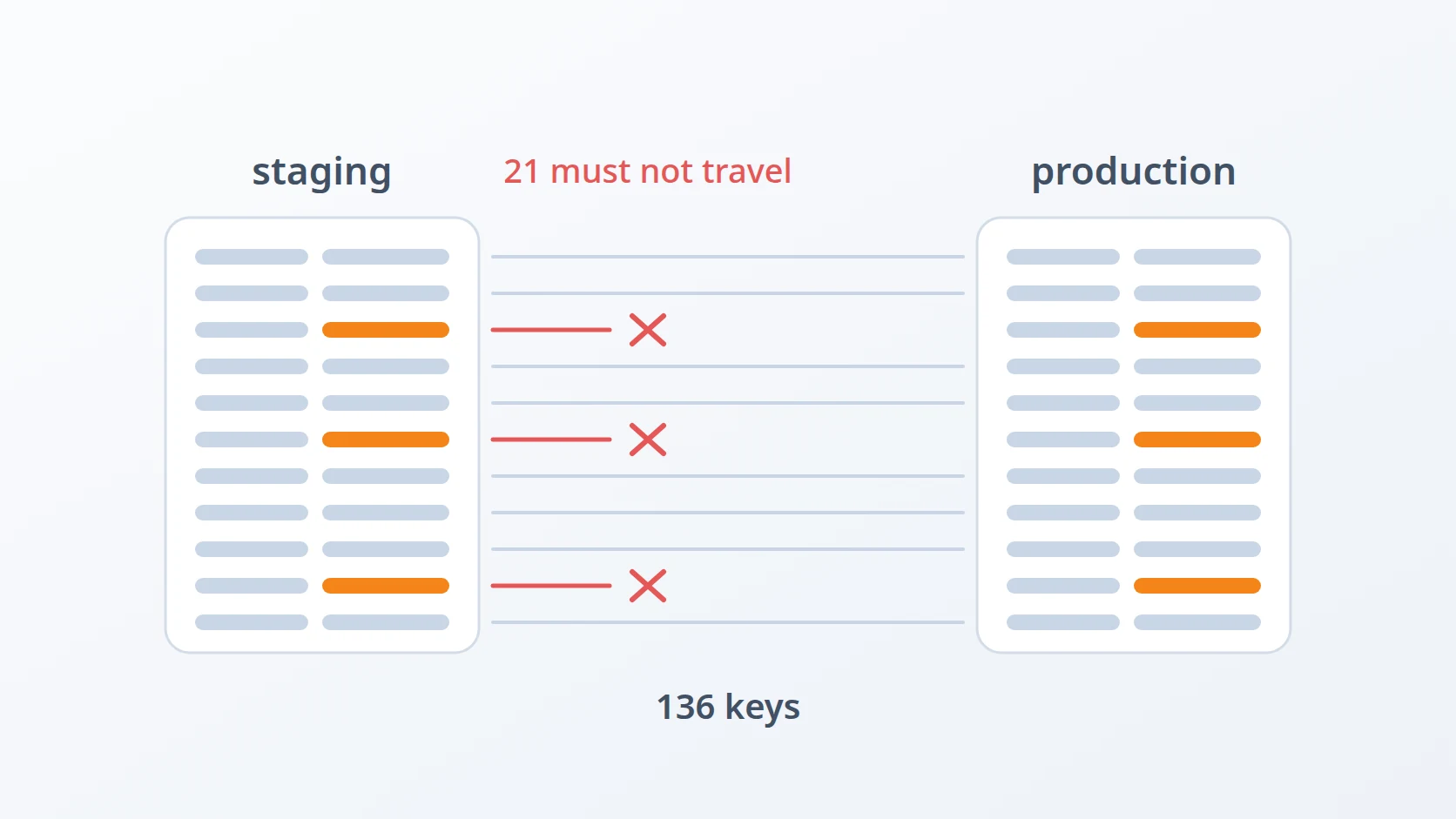
The main service's configuration held 136 keys in both staging and production. Not similar — identical, key for key. And of those 136, roughly 21 held different values, deliberately, and had to keep holding them.
Those 21 fall into two groups. The first is secrets: database passwords, signing keys, and the encryption key described above. The second is addresses: hostnames, service URLs, the list of proxies each environment trusts. Every environment has its own network, so every address differs.
Copying the file sets all 136. It gets the 115 that should travel, and it also overwrites the 21 that should not — pointing production at staging's database, with staging's password, trusting staging's network.
# same key, same position, values that must never be swapped
DB_HOST=db.staging.internal        # staging
DB_HOST=db.production.internal     # production
APP_ENCRYPTION_KEY=...             # differs, and decrypts stored columns
E. Five obstacles in the way
So the goal is narrow and awkward: move a release's configuration from staging to production so that production ends up running the new release, while every one of those 21 values stays exactly where it is. Without a human reading 136 lines and deciding one by one, because that is a task nobody performs correctly twice.
Easy to state, awkward to build. Five obstacles stood between that sentence and a promotion I would run without reading it first, and the last two share a property the first three do not: they pass every automated check and collect their debt later.
The first is that the two files look interchangeable, and that is exactly what makes them dangerous. Same keys, same count, same order — nothing about opening them side by side suggests a fifth of the values are load-bearing in a way the rest are not. Had the two environments held visibly different configuration, nobody would consider copying one over the other; it is the similarity that makes the shortcut tempting. The rejected alternative is the obvious one, copying the file, which gets the 115 keys that should travel and silently takes the 21 that should not along with them.
The second is that a new secret must not be copied from staging at all. When a release introduces a credential that did not exist before, the value sitting in staging is the wrong one to promote — not because it is malformed, but because sharing it means a leak in staging also unlocks production. Staging is where experiments happen, where dumps are taken, where access is granted more freely; that is its purpose. Two alternatives had to be ruled out: copying the staging value, and having the tool invent one. Both end with a credential nobody chose deliberately, so the tool refuses to proceed and names the key instead.
The third is that nested configuration cannot be compared line by line. Reindent a structured document, reorder its keys, move a value onto a new line, and a line-based comparison reports a large difference that means nothing at all — while a genuine change buried deep in a nested section is one line that looks like more of the same noise. Line-based diffing is the rejected alternative here, and the replacement is to walk both documents and compare values at matching key paths, so that reformatting becomes invisible, which is what it deserves to be.
The fourth is that a schema migration can silently never run. One service applies its schema through an initialisation script, and the database image executes such scripts only when its data directory is empty. For a genuinely new environment that is correct. Staging is not a new environment — it is generated fresh and then restored from a production backup, precisely so the release is rehearsed against realistic data, and the moment that restore finishes the directory is no longer empty. The container starts, the health check passes, and the old schema remains perfectly valid for every column the service already knew about. Trusting the initialisation script is the alternative that fails, and it fails by doing nothing at all.
The fifth is that green containers are not a verified release. After promotion and migration everything reports healthy, and that is worth precisely as much as the checks are broad. A health check asks a component whether it is running; it cannot ask whether the system works. The alternative I stopped relying on is the health check itself, and what replaced it is not a check — it is using the system, signing one document end to end, which exercises the certificate authority, the signing service, the object store, the database and the revocation list in a single action and fails loudly if any of them is misconfigured.
The five divide cleanly. The first three are about what may travel and how to tell what changed — they are solved inside the promotion tool, and they fail while you are watching. The last two are about what happens after it reports success, and both belong to a category worth naming: failures that wait. Neither shows up at deploy time, both survive every automated check, and by the time the symptom arrives the change that caused it is no longer the recent change. That is why the ordering matters — the first three can be verified by reading output, and the last two can only be verified by exercising the thing.
Method
A. Promote the structure, not the contents
This is the answer to the first obstacle: two files that look interchangeable and are not.
The insight that made this tractable: what a release actually needs to carry is not values but structure.
A new release adds keys, removes keys, and changes the meaning of some non-sensitive ones. It does not need to change production's passwords or addresses — those belong to the environment, not the release.
So the tool compares the two files and promotes exactly three categories:
Keys that are new in the release, added with the release's default value so that the service does not start up looking for a setting that is not there.
Keys that were removed, deleted so that configuration does not accumulate settings nothing reads any more.
Non-sensitive values that changed — rate limits, cache lifetimes, feature switches. These are part of what the release is.
Everything else is left exactly as production has it. The result is a file with the release's shape and the environment's identity.
B. A new secret is a hard stop, not a copy
This is the answer to the second obstacle, and it is the one place the tool deliberately stops rather than deciding.
When a release introduces a new secret — a new signing key, a credential for a service that did not exist before — the tool refuses to proceed. It does not copy the value from staging, and it does not invent one.
Copying would mean staging and production share a credential. That is worse than it sounds: staging is the environment where experiments happen, where dumps get taken, where access is granted more freely. A leak in staging that also unlocks production removes the point of having a boundary at all.
So the tool stops, names the key, and asks the operator to set it in production deliberately. It is an interruption, on purpose. The alternative is a tool that silently erodes the separation between the environment where mistakes are cheap and the environment where they are not.
if [ && ; then
C. Comparing structured formats by key, not by line
This is the answer to the third obstacle: telling a real change apart from a reformatted one.
Not every service uses the same configuration format. Some read simple key-value files; others read nested structured documents.
For the nested ones, a line-based comparison is the wrong tool. Reformatting a document — different indentation, reordered keys, a value moved to a new line — produces a large difference that means nothing. Meanwhile a genuine change deep inside a nested section can be a single line that looks like noise among the reformatting.
So structured documents are compared by key path: the tool walks both documents, builds the set of paths each contains, and compares values at matching paths. Reordering and reformatting become invisible, which is correct, because they are.
# compare by meaning, not by line: flatten to key paths first
|
|
D. Dry run first, and a backup of every file it writes
The tool has a mode that reports every change it would make and makes none, and using it first is not optional in my process. A configuration promotion is not a step you want to discover the shape of while it is running.
When it does write, it backs up each file first, with a timestamp. The backup is what makes the previous paragraph's worst case survivable: if a value is promoted that should not have been, the previous file is still on disk.
# Report-only unless --apply is asked for, and never write without a copy.
if ! ; then
fi
E. The migration that never ran
This is the answer to the fourth obstacle, and the first of the two that fail by waiting.
Promoting configuration is only half of moving a release. The other half is the database schema, and that is where the failure I would not have predicted sits.
A service written in a language without an automatic migration framework in its startup path can apply its schema through an initialisation script. The database image runs such scripts only when its data directory is empty. For a brand new environment, that is exactly right.
volumes:
  # runs on first initialisation only — never again once data exists
  - ./config/schema.sql:/docker-entrypoint-initdb.d/schema.sql:ro
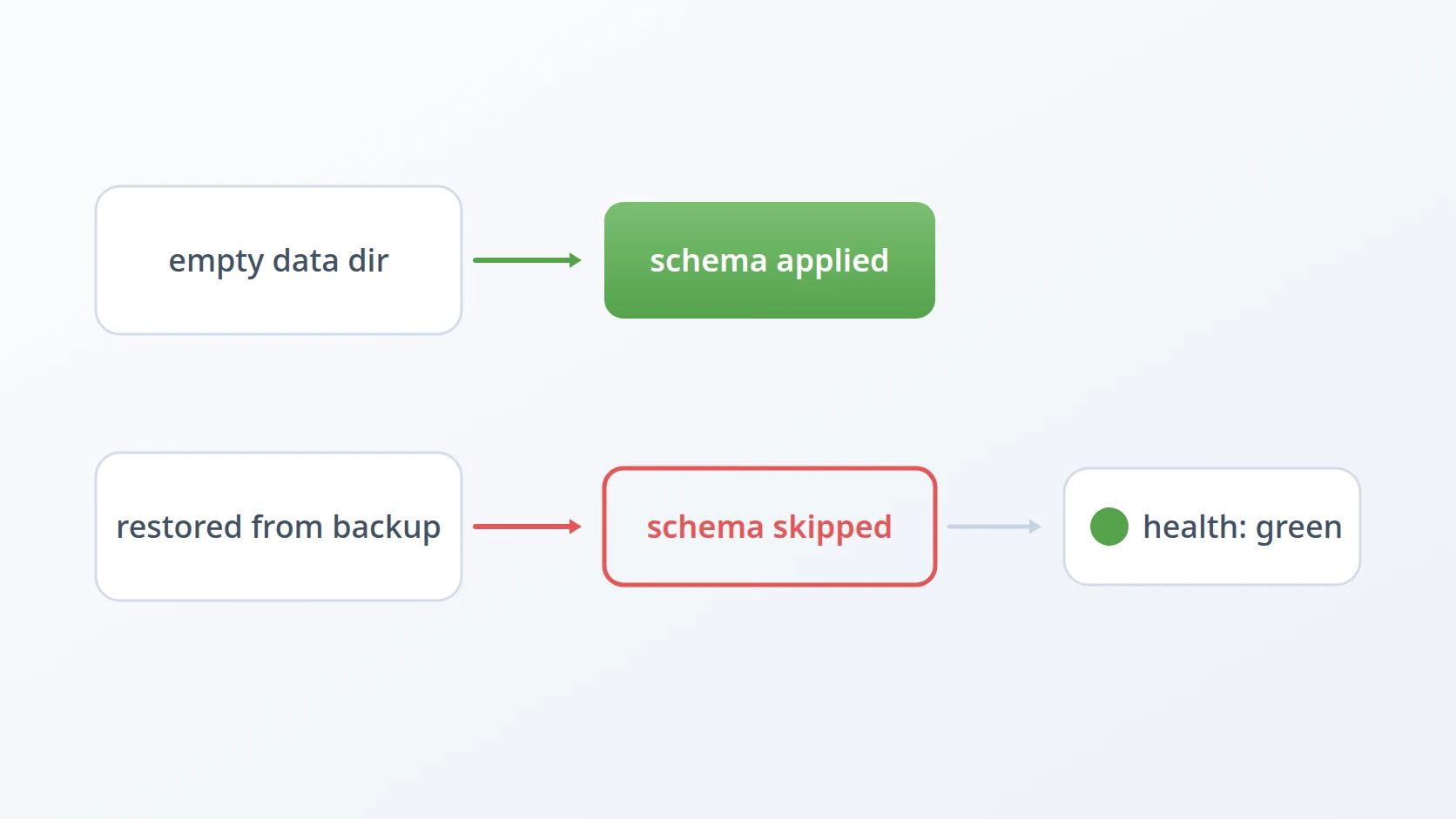
Staging is not a brand new environment. It is generated fresh and then restored from a production backup, precisely so that a release is rehearsed against realistic data. The moment that restore completes, the data directory is not empty.
So the schema changes would never apply. And the way that failure presents is the worst kind:
The container starts. The health check passes. The old schema is perfectly valid for every column the service already knew about, so anything not touching the new columns behaves normally. The failure waits until a request reaches code that expects a column which does not exist — which might be during the release review, or might be after promotion, in production.
The fix is a separate, explicit migration step. What makes it reliable is where it reads the migrations from: out of the running container image, not out of the repository. The migrations travel with the binary that needs them, so a server that has pulled a new image automatically has the matching migrations — there is no way for the two to disagree. Applied migrations are recorded in the schema itself, so running the step twice is harmless.
F. Green containers are not a verified release
This is the answer to the fifth obstacle, and it is what collapses the waiting interval to zero.
After promotion and migration, everything reports healthy. That is worth exactly as much as the checks are broad.
So the last step is not a check at all — it is using the system. In my case: sign one document, end to end. That single action exercises the certificate authority, the signing service, the object store, the database, and the revocation list, and it fails loudly if any of them is misconfigured.
# Not a health check: one real transaction through every component.
doc= # object store + database
sig= || || A health check asks a component whether it is running. Signing a document asks the system whether it works. Those are different questions, and only the second one is the one anybody cares about.
Results and Discussion
A. Why identical key counts are the dangerous case
The reason this problem is easy to get wrong is that the two files look interchangeable. Same keys, same count, same order. Nothing about opening them side by side suggests that a fifth of the values are load-bearing in a way the other four fifths are not.
If staging and production had visibly different configuration — different key sets, different structure — nobody would consider copying one over the other. It is precisely the similarity that makes the shortcut tempting.
I have come to treat that as a warning sign in general: when two things are structurally identical and semantically different, the difference is invisible and therefore expensive. The defence is to make the tooling encode the difference, because the human reading the files will not see it.
B. Failures that wait
The fourth and fifth obstacles were introduced as a pair. It is worth looking at why that pairing holds, because the reason is structural rather than coincidence.
The unapplied schema change does not fail at deploy time; it fails when a particular request arrives. The overwritten encryption key does not fail at promotion; it fails when something tries to read old data.
In both cases the moment of damage and the moment of discovery are separated — by hours, or by whatever interval passes before someone exercises that path. That separation is what makes them expensive. By the time the symptom appears, the change that caused it is no longer the recent change, and the investigation starts in the wrong place.
This is the argument for verification that exercises the system rather than inspecting it. Signing a document after a promotion collapses that interval to zero: whatever is broken is broken now, in front of the person who just changed something, rather than next Tuesday in front of a user.
C. What the tool deliberately does not do
It does not decide what counts as a secret. That list is maintained by hand, and it is the same kind of explicit list I use for credential rotation, for the same reason: a rule that infers sensitivity from a key's name will eventually be wrong, and the cost of being wrong is asymmetric.
It also does not promote automatically as part of a pipeline. A promotion is a decision, not an event. The tool makes the decision cheap to inspect — that is its whole contribution — but somebody still has to look at the dry run and agree with it.
D. Where this generalises
If your environments are configured entirely through a secret manager, much of this is handled for you: values are fetched at runtime by environment, and there is no file to copy. That is a better design and I would choose it for a new system.
What generalises regardless is the distinction underneath. Configuration holds two different kinds of thing: what the release is, and where the release is running. The first should travel. The second must not. Any mechanism that cannot tell them apart will eventually move something from the second category, and the most expensive key in that category is usually the one that decrypts your data.
Conclusion
Promoting configuration between environments comes down to a single question asked of every key: is this part of the release, or part of the environment? Answer that per key and the mechanism follows — promote structure and non-sensitive changes, leave secrets and addresses alone, stop entirely when a new secret appears.
The lesson I did not expect was about schema. A migration that runs only when a data directory is empty is a migration that works in every test and silently does nothing in the one environment that matters — the one rehearsing a release against real data. It reports success throughout.
Which brings both halves of this work to the same place. After a promotion, containers being green means the containers started. It says nothing about whether the release works. Sign a document.
Terms
- Configuration
- Settings kept outside a program so that one build can run in several environments.
- Promotion
- Moving a release, and the configuration changes it requires, from one environment to the next.
- Secret
- A configuration value that grants access or protects data. Distinguished from other values by consequence, not by format.
- Key path
- The position of a value inside a nested document, used to compare structured configuration by meaning rather than by line.
- Schema migration
- A change to a database's structure that must be applied deliberately, since an existing database will not receive it by starting up.
- Dry run
- A mode that reports what an operation would change without changing anything.
Technologies covered
- Linux
- PostgreSQL
- Docker