How I Gave Two Machines One Source of Truth They Can Both Trust
On this page
- Introduction
- A. A laptop that prepares, and a GPU that is borrowed
- B. Three readers, two machines
- C. Ten obstacles in the way
- Method
- A. Leaving Drive
- B. Mounting the bucket the way Drive used to be mounted
- C. The error that looked like a broken disk
- D. A signature error with the right key
- E. Success that meant "queued"
- F. The rules of a machine you borrow
- G. A window, not a workflow
- H. Deleting the second copy
- I. When one action is three hundred requests
- J. The retry that never retried
- Results and Discussion
- A. What the ten decisions add up to
- B. The shape they share
- C. What this does not cover
- Conclusion
- Terms
Introduction
A. A laptop that prepares, and a GPU that is borrowed
The laptop I work on has an RTX 3050 Ti with 4 GB of video memory. That is enough for a desktop, for a video encoder, for a small model. It is not enough for SDXL generating images at full resolution, or for a text-to-speech model that wants most of a T4 to itself. So the heavy half of several of my projects runs somewhere else: a Google Colab runtime with a T4 and roughly 15 GB of VRAM, borrowed for as long as the session lasts.
Moving the computation is the easy part. What cannot be moved so casually is the data. The laptop is where the work is prepared — scripts chunked into scenes, prompts written, reference images chosen — and the runtime is where that preparation is turned into images and audio. The results then come back to the laptop to be reviewed, and sometimes sent back again to be redone. The same files are read and written from two machines that never talk to each other directly and are rarely running at the same time.
The challenge is to give two machines one source of truth that both of them can trust.
The word doing the work in that sentence is trust. Putting files somewhere both machines can reach is a solved problem; there are a dozen products for it. What turned out to be hard is knowing, on either side, that what was read is what was written — that a file which looks complete is complete, that an upload which reported success actually landed, that a folder which looks like the shared store is not a local directory that will vanish when the runtime stops.
Easy to state, awkward to build. Almost every obstacle below has the same shape: something reported success, and the success was false.
B. Three readers, two machines
It helps to be precise about who touches the store, because each reader failed in its own way.
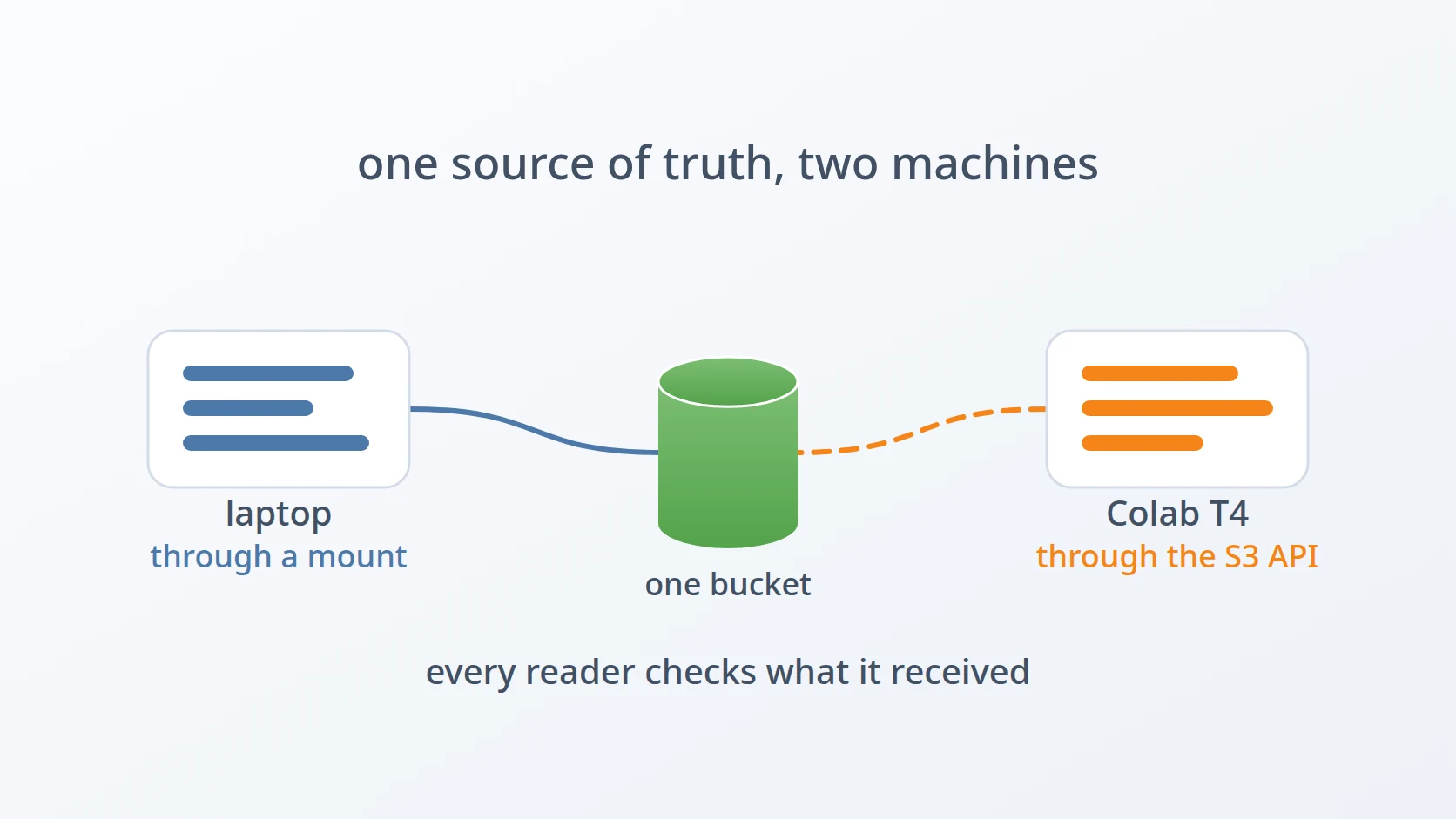
On the laptop, the preparation work is done by scripts and by an AI agent working in the source tree. They read and write the store as a local directory. Also on the laptop, a web interface runs in the browser, and opening a project there means fetching its records straight from the store. In Colab, a worker notebook reads the prepared jobs, runs the models, and writes images and audio back.
Three readers, two machines, one bucket. The bucket lives on a MinIO server I run myself, reachable from anywhere. MinIO is an object store: it keeps files as named objects inside buckets and serves them over the S3 protocol, the HTTP interface Amazon published for its own storage service and that most object stores now speak. That choice came late; the projects started on Google Drive, and the first obstacle is why they left it.
One scoping note. The story is told mostly through one project — a pipeline that turns written chapters into narrated slideshow videos — because its history is the most complete: every change was committed with the symptom, the cause, and the reasoning that isolated it. Two other projects, a PDF-to-Markdown converter and an AI image editor, share the same early history and appear where they add something.
C. Ten obstacles in the way
Google Drive ran out of room and speed. Drive was the obvious first store, because Colab mounts it with one line. It stopped being enough once the store had to hold gigabytes of model weights and hundreds of generated images, and once I already had an S3 server of my own that could hold everything in one place.
The notebook was written against paths, not an API. Every function read and wrote files under a directory. Rewriting all of that against an object store was the honest fix and a large diff; mounting the bucket so it looked like a directory, exactly as Drive had, was the small one. I chose the small one, and the next three obstacles are what it cost.
A dead mount answers with the wrong error. When the process serving a mount dies, the directory does not disappear. It stays, and it fails every operation with an error that looks like a disk fault rather than "not here".
A 403 that was not about the key. The credentials were correct, the configuration identical on both machines, and the server still refused every request with a signature error.
An exit code of zero that meant "queued", not "delivered". Copying into the mount returned success instantly, the files looked complete, and the uploads were cancelled when the mount was released.
A borrowed machine has rules of its own. Colab warned me about the mount and refused to run the runtime. The layer that had caused the previous three obstacles had to go entirely.
The person debugging needs to see what the worker is writing, while it writes. On the laptop the same kind of mount remained — for a completely different reason.
Two copies of the truth drift apart. A project folder in the repository and the same project in the bucket had already diverged by the time anyone looked.
A read that rarely fails, fails often when one action is 326 reads. Opening a project in the browser meant hundreds of requests, and any single one failing failed the whole open.
A retry that never retried. A request cut off halfway came back as a successful, shorter file, so the retry wrapped around it had nothing to catch.
The order follows the readers. The first obstacle is why the store changed at all. The next five belong to the Colab side, and they end with the layer being removed. The two after that belong to the laptop, and the last two to the browser. Seven of the ten are false successes, which is the thread that runs through all of them.
Method
A. Leaving Drive
Here is the answer to the first obstacle. Drive was where these projects began, because in Colab it costs one line:
=
= The image editor still works this way, and the PDF converter did in its first form. It is a reasonable start. It stops being reasonable when the store has to hold several gigabytes of model weights plus hundreds of generated images per project, because Drive's quota and its throughput from a Colab runtime both become the bottleneck.
The deciding factor was that a better store already existed. I run a MinIO server for other work, and it speaks S3 — which means it can be reached from a notebook, from a laptop, and from a browser, with one set of tools and without a Google account in the middle. Consolidating onto it removed a dependency rather than adding one.
B. Mounting the bucket the way Drive used to be mounted
This answers the second obstacle. The notebook assumed a directory, so the migration gave it one: the bucket mounted through rclone — a tool that presents cloud storage as an ordinary folder — and FUSE, at a path the notebook could treat exactly as it had treated Drive. The synchronisation code was not touched at all — only the destination path changed.
That plan rested on an assumption worth naming. Drive mounts in Colab through Google's own integration, and that says nothing about whether a generic FUSE filesystem is allowed inside the container. So a probe ran before anything was built on it: check for /dev/fuse, install rclone, validate credentials, mount, then exercise the exact I/O patterns the application uses and confirm that objects really appear on the server. It took three versions to pass — the first failure was a daemon flag, the second a missing fuse3 package.
The mount also brought a failure mode with it that the synchronisation code had to guard against:
# a dead mount leaves an ordinary folder behind: rsync into it
# succeeds, and the data vanishes when the runtime stops
return
If rclone dies, the mountpoint reverts to a plain directory on the runtime's disk. Copying into it succeeds. Nothing reaches the server, and the copy disappears with the runtime. That was the first false success, caught before it happened.
C. The error that looked like a broken disk
This answers the third obstacle. The first real run after the migration crashed on the line that prepared the mount:
: / : A probe from earlier had left a stale mount behind. The rclone process serving it was dead, but the kernel still routed the path to FUSE, so every system call on it returned EIO rather than the ENOENT a missing directory would give. The fix was to recognise three states instead of two — unmounted, live, and stale — because each needs a different action, and a stale mount must be forcibly detached before a new one can go on top.
What actually aborted the run was more instructive than the stale mount itself:
# "folder is not empty" — purely informationalA cosmetic warning, not a precondition, placed without protection — so listing a dead mount raised, and the warning cancelled the remount exactly when a remount was most needed. The repaired version makes the warning incapable of failing:
passD. A signature error with the right key
This answers the fourth obstacle, which arrived on the second run. Every listing was refused with 403 SignatureDoesNotMatch for sixty seconds, and then the notebook gave up with "mount not ready in 60s" — a message pointing in the wrong direction, while the real cause sat in the log directly above it.
Two things had to happen. The first was to stop guessing, which meant restoring something I had removed on purpose: a credential check before mounting. I had dropped it to save one round trip. Saving one second had cost sixty, plus a misleading message.
, =
Retries forced down to one, so a credential failure shows up in about two seconds, mapped to a cause rather than retried into a timeout.
The second was to find the cause. The obvious hypothesis — Colab was reading an old configuration — is plausible, because Colab does not overwrite a re-uploaded file of the same name; it creates config (1).json. So both machines print a fingerprint of the credentials, eight hex characters of a hash that cannot be turned back into the key:
=
return The fingerprints matched, so that hypothesis died. The 403 then reproduced on the laptop, which meant it could be narrowed down without going back to Colab at all:
# every variation tried on the laptop, same server, same key
V2_AUTH=true And a cross-check with a different client reversed the obvious conclusion:
The server accepted both signature versions. Each client succeeded with only one. That is the signature of a reverse proxy in front of the server altering something that gets signed on the way through — and it meant the right fix was to negotiate, not to hard-code: try V4, fall back to V2 only on a signature error, and let every other error through unchanged.
E. Success that meant "queued"
This answers the fifth obstacle. Model weights were cached in the bucket so a new runtime could copy them instead of downloading from scratch. A later run failed to load a model — the cache reported found, the files were missing. Inspecting the bucket showed the cache truncated: one model held about 0.25 GB of its roughly 7 GB.
The check that let it through looked at one file:
return The marker happened to be a small file that had finished uploading. The cause reproduced on the laptop: copying into the FUSE mount returns exit code zero immediately, and the files look complete in the mountpoint, while rclone has only queued the uploads in its cache. When the mount is released, the queue is cancelled — vfs cache: upload canceled — and nothing says so to the program that did the copying.
Testing the fix turned up a second problem, and this one was simply my own configuration. Uploads above 5 MB were being refused with a 413 whose body was HTML rather than S3's XML: the upload size limit on the storage side had been set far too low, and nothing had been large enough to reach it until generated images were. Raising the limit fixed it. What made a plain configuration mistake expensive was the way it failed. Every generated image above 5 MB had been failing to upload in silence, with the copy still returning zero and the interface still showing the image from the runtime's disk.
The model cache in the bucket was dropped entirely. The measurement decided it: at 2–4 MB/s to the bucket, uploading ten gigabytes of weights took far longer than downloading them again. What replaced the marker check was the principle that outlived it — verify the file you are about to open, not a file that stands in for it.
F. The rules of a machine you borrow
This answers the sixth obstacle. Colab warned me about running rclone inside the runtime, and then refused to run it. A borrowed machine is borrowed on its owner's terms, and a filesystem mount turned out to be outside them.
That ended the mount on the Colab side. The worker was rewritten to speak S3 directly through boto3, the Python library for talking to S3, and the whole mount stack went with it — twenty-one functions, the part of the setup cell that had grown from nothing to 40 KB shrank to 29 KB.
= What is striking is how much left along with it. The V4-to-V2 negotiation existed only because of rclone; boto3 had worked with V4 against the same server all along. The stale mount answering EIO could not happen without a mount. The uploads cancelled on release could not happen without a cache between the program and the network. Three obstacles did not get fixed one by one — they disappeared together, because they all lived in one layer.
The warning was the trigger. The lesson is the one that would have been worth learning without it: an abstraction that makes a network look like a disk keeps the disk's promises in its interface and breaks them in its behaviour.
G. A window, not a workflow
This answers the seventh obstacle, and it looks at first like a contradiction. The laptop kept an rclone mount of the same bucket — added, in fact, ten days after Colab dropped it.
ExecStart=/usr/bin/rclone mount minio:projects /home/<user>/cloud/s3.example-client.co.id \
    --vfs-cache-mode=writes \
    --dir-cache-time=30s \
    --poll-interval=1m
Restart=on-failure
The reason is what the mount is for. On the laptop it is a window. It makes the remote bucket appear as an ordinary path, so projects can be filled and emptied with ordinary tools, and — the part that mattered most — so an AI agent working in the source tree can look directly at what the Colab worker has just written, while debugging the worker. When something in the runtime misbehaves, the evidence is already sitting on the laptop, readable with the same tools as any local file.
The settings follow from that role. --dir-cache-time=30s is short so that new objects written by the worker become visible within half a minute. The mount is a user service that restarts itself, on a machine I control that is not going to be reclaimed in the middle of a session. The failure modes that sank the Colab mount were tied to a runtime that starts and stops constantly; on a laptop that stays up for weeks and unmounts cleanly, they do not come up.
The same tool, rejected on one machine and chosen on the other, and neither decision was wrong. The difference is between a mount as the path the work depends on, and a mount as a way of watching it.
H. Deleting the second copy
This answers the eighth obstacle. The repository still held a project folder from before the migration, and the bucket held the same project. Two copies, and they had already drifted: chapters from the third onward had been rewritten in the bucket while the repository still held the old text.
The fix was to have one copy. The source of truth moved to the laptop mount, and the folder in the repository was deleted and is not allowed to be recreated. The reasoning is simple and absolute: a local copy goes stale the moment the worker writes to the bucket, and a copy that might be stale is worse than no copy, because it will be read.
Worth recording is what happened just before the deletion. The repository folder turned out to hold 156 files that existed nowhere else and were not tracked by git. That was raised before anything was removed, confirmed as unwanted, and an archive of them was kept as a last resort. Establishing one source of truth is a destructive act, and it deserves a look at what it is about to destroy.
I. When one action is three hundred requests
This answers the ninth obstacle. Opening a project in the browser failed outright with a checksum mismatch. The data was fine — every one of 326 JSON files checked out against its stored checksum. The SDK's own message was misleading: its "expected" and "received" labels were reversed, so the body had arrived intact and a header had not. The bad value matched no object in the project at all; it came from some other response, somewhere in the proxy layer.
The reason a rare glitch mattered is arithmetic. Opening a project means fetching every record at once, and any failure fails the whole open:
>>> 1 - ** 326
0.6245At a failure rate of 0.3% per request, a single open fails more often than not. The fault could not be reproduced — hundreds of requests over HTTP/1.1 and HTTP/2 produced zero failures — so the fix was to tolerate rather than to chase: one retry wrapper around the single function every read passes through, three attempts with increasing delay.
J. The retry that never retried
This answers the tenth obstacle, a week later. Opening a project failed again, this time with a JSON parse error at position 3122. The file was 4,698 bytes, valid, and identical in size on the server and in the laptop mount. The browser had received 66% of it.
The retry from the previous fix was in place, and it never fired. It retries when the wrapped function throws, and transformToString() does not throw when the connection drops partway — it returns what it managed to read, as a success. The parse failed later, outside the wrapper, where nothing could retry it. So the check moved inside:
function assertComplete(text: string, contentLength?: number): void {
  if (contentLength == null) return
  const got = new TextEncoder().encode(text).byteLength
  if (got < contentLength) throw new Error(...)
}
One detail decides whether this works at all. ContentLength counts bytes, and String.length counts UTF-16 characters. For any text with non-ASCII characters in it, the two differ — so comparing against text.length would accuse complete files of being truncated and retry them three times before failing. The comparison has to be in bytes. The test for it was proven by sabotage: removing the length check broke the truncation test, and swapping bytes for characters broke the non-ASCII test.
Results and Discussion
A. What the ten decisions add up to
The store now holds one copy of each project, reached three ways: the Colab worker through the S3 API, the browser through the S3 API with a check on every body it receives, and the laptop through a mount that exists to be looked through.
| Decision | What it buys | Alternative rejected |
|---|---|---|
| own MinIO over S3 | one store reachable from notebook, laptop, and browser | Google Drive — quota and throughput |
| probe before mounting | the assumption tested before anything is built on it | trusting that Drive's mount proves FUSE works |
| three mount states | a stale mount detached, not mounted over | mounted / not mounted — EIO goes unexplained |
| credential check first | about 2 seconds and a named cause | 60 seconds and a timeout message |
| negotiate the signature | V4 when it works, V2 only on a signature error | hard-coding one version |
| check the file to be opened | truncation caught at load time | one marker file standing in for the whole |
| boto3 directly in Colab | three obstacles gone at once | keeping the mount — refused by Colab |
| laptop mount, 30s directory cache | the agent sees the worker's output as local files | downloading results by hand to inspect them |
| one copy, repository folder deleted | nothing to drift from | two copies kept in sync by discipline |
| retry plus byte-length check | a truncated body becomes a retried error | a retry that only sees exceptions |
B. The shape they share
Read down the list of obstacles and the same thing keeps happening. A copy into a dead mount succeeds. A copy into a live mount succeeds before the data has moved. A cache reports itself present because one small file is. A read returns two thirds of a file as a complete one. An upload above 5 MB fails and the copy still returns zero. A retry sits around a call that never reports failure. A local folder looks like the project and is a stale copy of it.
None of these are crashes. Crashes were the easy part — they stop, and they point. What cost time was success that was not true, discovered only downstream, far from the cause. That is what trust in the title means in practice: every reader either verifies what it received, or depends on a layer that cannot lie to it in that particular way.
The general version is worth stating. An abstraction that hides the network — a mount that looks like a disk, a string conversion that looks like a complete read — is most dangerous not when it fails but when it succeeds on the network's behalf, with the network's uncertainty removed from the answer.
C. What this does not cover
This is a store for one person's projects, with one writer active at a time for any given record. There is no locking, and no protection against two machines writing the same file at the same moment; the workflow simply never does that. A team sharing the same bucket would need both.
It also says nothing about how the two machines tell each other what to do. The store holds the state; the instructions to process it travel another way, with failure modes of their own — and none of what this store guarantees carries over to that channel.
Conclusion
A 4 GB GPU pushed the heavy work of several projects onto a borrowed runtime, and that made one question unavoidable: where does the data live, so that the laptop and the runtime can both rely on it? The answer went through Google Drive, a filesystem mount that made a remote bucket look local, and finally direct S3 access from the runtime and the browser, with the mount kept only on the laptop as a way of watching.
The obstacles along the way were rarely about storing data. They were about believing it — an exit code of zero that meant queued, a stale mount that answered with a disk error, a response cut at 66% returned as a success, a single glitch that failed one open in two when an open is 326 requests. The most useful move was removing the layer that produced three of them at once, and it was prompted by a warning rather than by insight.
What remains is a rule that applies well beyond this setup: every reader should check what it received against what it was promised, because the places where a network is made to look like something simpler are exactly the places where it can report success on your behalf.
Terms
- rclone
- A command-line tool that copies, syncs, and mounts cloud storage. Mounted, it makes a bucket look like an ordinary folder, translating every file operation into requests to the storage server.
- FUSE
- Filesystem in Userspace — a Linux mechanism that lets an ordinary program present something, such as a remote bucket, as a directory. The program serving it must stay alive; if it dies, the directory remains but stops working.
- stale mount
- A mountpoint whose serving process has died. The kernel still routes the path to it, so operations fail with an input/output error instead of reporting that nothing is there.
- SigV4 / SigV2
- Two versions of the scheme S3 clients use to sign requests. The server recomputes the signature and rejects the request if anything signed was changed along the way.
- VFS cache
- rclone's local buffer between a program and the remote store. A write can complete into the buffer long before it reaches the server.
- ContentLength
- The size of a response body in bytes, sent by the server. Comparing it with what actually arrived is the simplest way to detect a truncated read.
- source of truth
- The one place whose copy of the data is authoritative. Every other copy is either derived from it or out of date.
Technologies covered
- Python
- boto3
- rclone
- Google Colab
- MinIO
- S3