How I Prove Email Credentials Are Ready Before an Application Depends on Them
On this page
- Introduction
- A. What SMTP and IMAP are, and why an account needs both
- B. What an application actually relies on
- C. Why a mail failure surfaces far from its cause
- D. Why a generic mail client does not answer this
- E. Eight obstacles in the way
- Method
- A. Proving the message left, not just the login
- B. Matching the encryption to the port
- C. Naming the layer that failed
- D. Reading without leaving a trace
- E. Waiting for new mail the way an application would
- F. Surviving a dropped connection
- G. Closing the loop from sending to receiving
- H. Telling a bad configuration from a bad server
- Results and Discussion
- A. What a passing run actually establishes
- B. The failure that is not an error
- C. Where this stops being the right tool
- Conclusion
- Terms
Introduction
This article is about a small command-line check I run on a set of email credentials before any application is allowed to depend on them, and about the reasoning inside it. It is not a guide to running it; the snippets exist to show why a decision was made. The interesting part is the gap between "the login worked" and "this account is ready", because that gap turned out to contain eight distinct things worth dealing with.
A. What SMTP and IMAP are, and why an account needs both
Email moves through two separate protocols that happen to share a username and password. SMTP, the Simple Mail Transfer Protocol, is how a message is handed to a mail server for delivery. An application uses it whenever it sends something: a registration confirmation, a password reset, a notification. IMAP, the Internet Message Access Protocol, is how a mailbox is read. An application uses it when it has to react to mail that arrives — replies to a ticket, documents sent to a shared address, bounces from messages it sent earlier.
The two protocols run on different servers, on different ports, and often with different rules. A provider can allow one and restrict the other. The same credentials can be accepted by the IMAP server and refused by the SMTP server, or the reverse. Treating "the email account" as one thing that either works or does not is the first simplification that fails.
Both protocols also have two ways of being encrypted. With implicit TLS, the connection is encrypted from its first byte, conventionally on port 465 for SMTP and 993 for IMAP. With STARTTLS, the connection begins in plain text and is upgraded to TLS after a greeting, conventionally on port 587 for SMTP and 143 for IMAP. Many providers also require an app password — a separate password generated for one application — instead of the account's normal password, and refuse the normal one without explaining why in terms a program can act on.
B. What an application actually relies on
When an application says it sends email, it is quietly relying on several things at once. It relies on reaching the SMTP server on the configured port, with the configured kind of encryption. It relies on the credentials being accepted there. It relies on the server accepting the sender address it will use, which is not always the same as the login name. And it relies on the server accepting each recipient, rather than only some of them.
When an application reads email, the list is different. It relies on logging in to the IMAP server, opening the right mailbox, and seeing messages in it. If it reacts to new mail, it relies on finding out about new messages promptly — ideally through IMAP IDLE, an extension that lets the server push a notification the moment something arrives instead of the client asking over and over. And it relies on all of this surviving a connection that drops, because long-lived connections to mail servers do drop.
Each of these is a separate promise, and a set of credentials can keep some of them while breaking others. A password that works for IMAP tells nothing about whether the SMTP server will accept a particular sender address.
C. Why a mail failure surfaces far from its cause
The timing is what makes these failures expensive. Sending is usually one of the last features wired into an application, and it is often the first thing that fails in a place far from the code. The failure appears as a registration that never sends its confirmation, or a password reset that never arrives, and the natural first suspect is the application: the template, the queue, the framework's mail settings. More than once I spent time debugging application code whose only real problem was the credential, the port, or the missing app password underneath it.
Some mail failures are also quiet. A server can accept a message for one recipient and refuse another in the same transaction, and the sending library does not raise an error when that happens. A mailbox reader that opens the inbox the normal way changes the state of the messages it reads, so the act of checking alters what the real user sees. None of these announce themselves at the moment of setup.
The challenge is to prove that a set of email credentials is ready for both directions — sending and receiving — before an application depends on them, so that any later failure can be attributed with confidence. Under one constraint: the check must not change the mailbox it inspects, because I run it against real accounts that people use.
D. Why a generic mail client does not answer this
There are ordinary ways to check an email account. A desktop mail client can be pointed at it. A command such as openssl s_client can open a connection and let me type protocol commands by hand. Both are useful, and both answer a narrower question than the one I have.
A mail client hides exactly the details an application will face. It guesses the encryption, retries silently, and marks messages as read as soon as it shows them. When it works, it proves that some combination of settings works, not that the combination in my configuration file does. Typing protocol commands by hand is precise, but it is slow enough that it gets skipped, and it leaves no summary behind. What I wanted instead was one command, one configuration file per account, a line per check with a clear pass or fail, and a summary at the end that says whether the account is ready to use.
Easy to state, awkward to build. The design ended up shaped by eight obstacles, grouped by direction.
E. Eight obstacles in the way
A successful login does not prove that mail can be sent. The server has to accept the sender and every recipient, and a partial refusal does not raise an error. Treating a successful login as the proof is the rejected alternative. What replaces it is sending a real message that can be recognised, and checking what the server refused.
The encryption mode has to match the port. Implicit TLS on a STARTTLS port, or the reverse, produces a hang or a handshake error that says nothing about ports. Guessing the mode from the port number is the rejected alternative; the mode is stated in the configuration, and the error message names the likely mismatch.
Failures from different layers look alike. A name that does not resolve, a blocked port, a bad certificate, and a refused password all end the check the same way. Printing the raw exception is the rejected alternative. Each class of failure is translated into one line that names its layer.
The inbox has to be read without changing it. Opening a mailbox the normal way and fetching whole messages marks them as read. That is the rejected alternative, and the check opens the mailbox read-only and fetches only headers.
New mail has to be seen as it arrives. Counting messages once proves the mailbox opens, not that new mail can be noticed in time. Polling blindly is the fallback, not the default. IMAP IDLE is used when the server supports it, and one quirk of the protocol's number ranges has to be handled to avoid showing old mail again.
Waiting has to survive a dropped connection. A long wait for mail will see disconnects. Exiting on the first one is the rejected alternative. The check reconnects with a growing delay and picks up anything that arrived in between.
Sending and receiving have to be joined. Two separate tests prove two separate halves. When the test message is sent to the same account the check is reading, it should appear in the inbox table, closing the loop from one end to the other.
A broken configuration has to look different from a broken server. A missing field or a sender that is not an email address is my mistake, not the provider's. Returning one generic failure for both is the rejected alternative; the check validates the configuration first and uses different exit codes for each kind of outcome.
The order follows the direction of the mail. The first three concern the path out, and the second and third apply to every connection the check opens. The next three concern the path in: reading, waiting, and surviving the wait. The seventh joins the two paths, and the last one draws the line around all of them, so that a failure is always either mine or the server's and never ambiguous.
Method
A. Proving the message left, not just the login
Here is the answer to the first obstacle. The check logs in, then sends a real message to an address typed in when it runs. The message carries a short random token in its subject, and a Message-ID built with the sender's own domain, so it can be found in the recipient's inbox and matched with certainty to this run:
=
= f
=
...
=
The last two lines matter most. When every recipient is refused, the library raises an exception. When only some are refused, it returns them as a dictionary and carries on as if the send succeeded. A check that only catches exceptions would report success for a message that never reached part of its audience, so an empty dictionary is the only thing counted as a successful send.
The Message-ID uses the sender's domain because the default is built from the local machine's hostname. That would put the name of my laptop into every test message, and it would not match the domain the message claims to come from.
B. Matching the encryption to the port
I refused to let the check guess the encryption. The configuration names the encryption mode explicitly — tls for STARTTLS, ssl for implicit TLS, or none — and the connection is opened accordingly:
=
=
Inferring the mode from the port looks convenient, but ports are conventions rather than rules, and a server that runs STARTTLS on an unusual port would be misjudged. Stating the mode means a mismatch fails at a known step. When it does, the message says to check whether the mode matches the port, because the underlying TLS error never does. The report also records the negotiated protocol version, TLSv1.3 for example, and prints a visible warning when none is chosen, since an unencrypted login is almost never intended.
C. Naming the layer that failed
I made every failure name its own layer. Every exception passes through one function that turns it into a single line naming the layer where it happened:
return f
return f
return f
return The order of the checks matters, because the classes overlap: a certificate error is a kind of SSL error, and most network errors are kinds of OSError. The specific cases come first so that the general ones only catch what is left. The authentication case mentions app passwords explicitly, because that is the most common reason a correct password is refused, and because the server's own reply rarely says so.
This is where most of the time used to go. A timeout, a refused connection, and an unresolved host all look like "cannot connect", and each points to a different fix: a firewall, a wrong port, a typo in the hostname. Naming the layer turns an afternoon of guessing into one line of reading.
D. Reading without leaving a trace
I made the check read the inbox without touching it. The IMAP side opens the mailbox read-only and asks only for the envelope and the arrival time of each message:
=
=
...
= Opening a mailbox read-only means no flag on any message can change during the session. Fetching the envelope rather than the body means the server has no reason to mark anything as seen. The table that results shows a number, a timestamp, the sender, and the subject for the latest few messages — enough to see that the right mailbox is open and that it contains mail, without reading anyone's email and without changing what the account's real owner sees afterwards.
The count comes from the server's answer to opening the mailbox, not from listing every message. On a mailbox with thousands of messages, that is the difference between an instant check and a slow one.
E. Waiting for new mail the way an application would
I wanted the check to wait for mail the way an application would. After the table, the check stays connected and waits for new mail. It asks the server whether it supports IDLE, and uses it when it does:
# RFC 2177: a server may drop IDLE after 30 minutes; renew well before that
= 10 * 60
...
# "UID n:*" always includes the highest UID even if it is below n
= IDLE is renewed every ten minutes, well inside the thirty that the specification allows a server to wait before treating the client as inactive. Within each IDLE period, the check wakes every thirty seconds to see whether the server has announced a new message, and fetches only what is new when it has.
The second line of code handles a quirk that is easy to miss. In IMAP, the range n:* means "from n up to the highest identifier". When no message has an identifier as high as n, the range is read backwards and still contains the highest message. Asking for "everything after the last message I saw" therefore always returns at least that last message, and without the extra filter the newest old message would be printed again after every wait. If the server has no IDLE, or the configuration turns it off, the check falls back to polling and says so in its report, because a polled mailbox is a slower promise than a pushed one.
F. Surviving a dropped connection
I treated a dropped connection as normal rather than fatal. A connection held open for minutes or hours will eventually be cut — by the server, by a router, by a laptop going to sleep. The waiting loop treats that as normal:
= None
= The delay starts at five seconds and doubles on every failure up to a minute, so a brief outage costs little and a long one does not hammer the server. On reconnecting, the loop logs in again, reopens the mailbox read-only, and fetches everything after the last identifier it saw. A message that arrived while the connection was down still appears, in order, in the same table.
This is also a small rehearsal of what the application itself will have to do. If the check needs reconnection logic to stay useful for an afternoon, so will anything that watches the same mailbox in production.
G. Closing the loop from sending to receiving
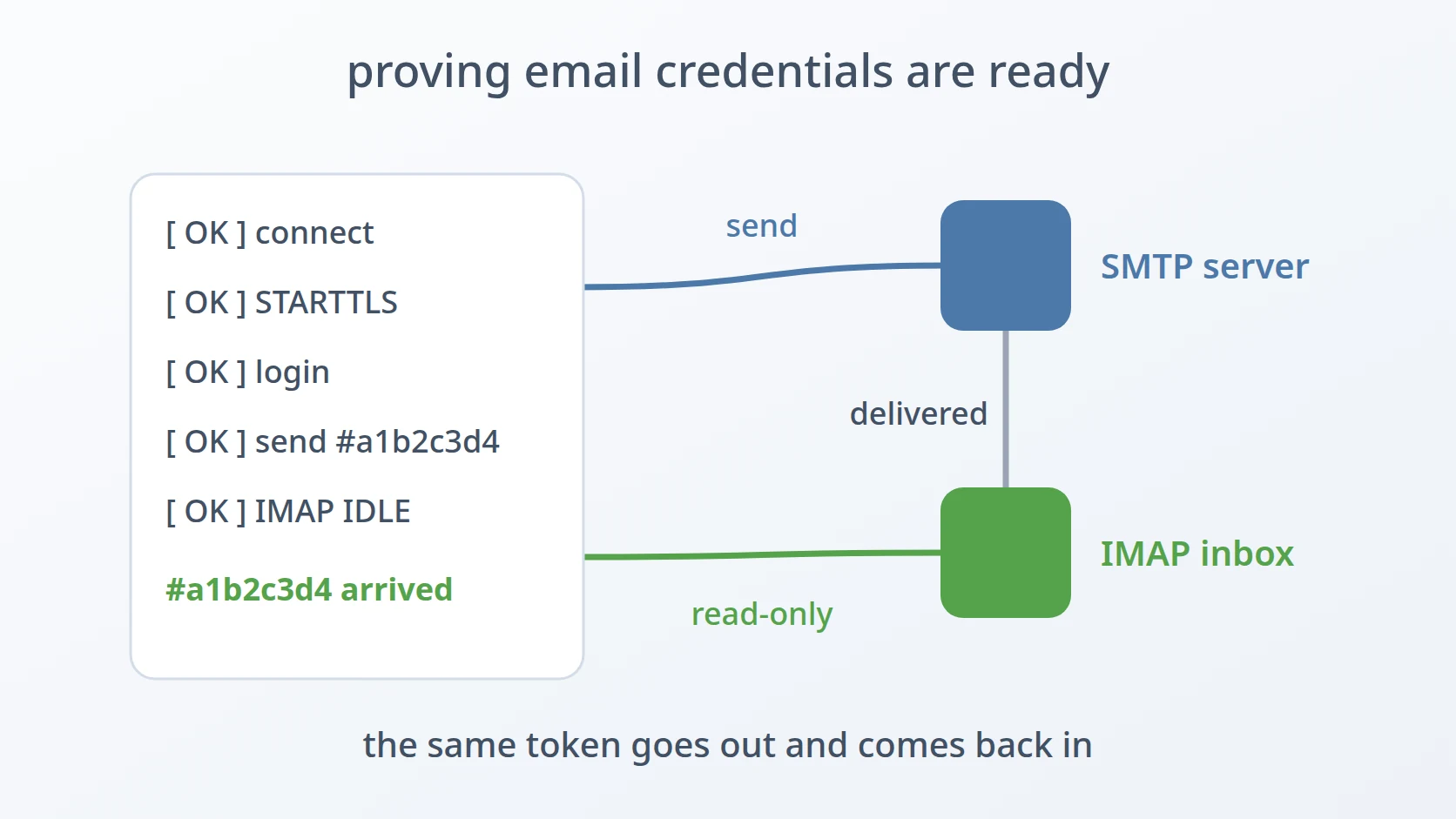
I joined the two directions into one run. The check can run SMTP only, IMAP only, or both in sequence. In the combined mode, when the test message is addressed to the same account the IMAP side reads, the report says so and the message should appear in the inbox table a few seconds later. A shortened run, with the account generalised, looks like this (the tool's own labels are in Indonesian):
===
[
[
[
[ ===
[
| | | That last row is the strongest evidence the check can produce. It shows the message leaving through SMTP, being delivered by the provider, and arriving through IMAP, with the same token at both ends. Two separate tests could each pass while the path between them was broken — a message accepted for sending and then filtered, for instance. The joined run leaves no such gap for this account.
H. Telling a bad configuration from a bad server
I made my own mistakes look different from the server's. The configuration file is validated completely before any connection is opened, and a problem with it ends the run with its own exit code:
= 2
= 130
...
=
The sender address defaults to the username, because for most providers they are the same. For some they are not — a login name without a domain, or a shared account that sends as a different address — and a sender that is not an email address would otherwise fail much later, at the server, looking like the server's fault. Ports must be integers in range, booleans must be real booleans, and the encryption mode must be one of the three known values.
The exit codes carry the distinction to anything that runs the check: 0 when every check passed, 1 when a check failed against the server, 2 when the configuration itself was wrong, and 130 when I cancelled a prompt. A script can tell "fix my file" from "the account is not ready" without parsing the output.
Results and Discussion
A. What a passing run actually establishes
A passing run ends with a summary per protocol — four of four checks on the SMTP side, for instance — and a final status that the account is ready to use. Behind that line are specific facts: the server was reachable on the configured port, the configured encryption was negotiated, the credentials were accepted, the sender and every recipient were accepted, the mailbox opened with the expected number of messages, new mail could be pushed or at least polled, and in the combined mode, a message went out and came back in.
| Decision | What it buys | Alternative rejected |
|---|---|---|
| send a tokenised message and check refusals | proof of sending, not of login | treating a successful login as enough |
| explicit encryption mode | a mismatch fails at a known step | inferring the mode from the port |
| one line per failure layer | the fix is visible from the message | printing the raw exception |
| read-only mailbox, headers only | the inbox is left exactly as it was | opening normally and fetching bodies |
| IDLE with renewal and a UID filter | new mail shown once, as it arrives | blind polling as the default |
| reconnect with growing delay | waiting survives disconnects | exiting on the first dropped connection |
| combined send and receive run | proof across the whole path | two unrelated tests |
| config validated first, separate exit codes | my mistakes never look like the server's | one generic failure code |
B. The failure that is not an error
Two of the eight obstacles are about failures that do not look like failures at all. A partially refused send returns normally. An inbox check that marks messages as read works perfectly and quietly changes the mailbox. Neither produces an error message, and both would pass a check written only to catch exceptions.
That shapes how the whole check is written. Every step records an explicit pass or fail with a reason, rather than relying on the absence of an exception. The summary counts checks rather than reporting "no errors", and it lists every failed check with its detail. A run that says four of four has been asked four specific questions and heard four specific answers.
C. Where this stops being the right tool
A passing run proves that the account works from my machine at the moment of the run. It does not prove that the application's host can reach the same ports; a production network can block outbound SMTP that a laptop can reach freely. It does not measure deliverability either: a message that arrives in my test inbox can still land in a spam folder elsewhere, which depends on the sending domain's records rather than on the credentials.
It also does not test sending limits. Providers cap how many messages an account may send per day or per minute, and a single test message says nothing about where that cap sits. An application that sends in bulk needs a different kind of test, run against the real sending volume.
Conclusion
Email credentials fail late and far from their cause: in a password reset that never arrives, in a reply that is never noticed. The check described here proves both directions before any application code depends on them. It sends a real, recognisable message and checks what the server refused. It states the encryption mode rather than guessing it, and names the layer of every failure. It reads the inbox without changing it, waits for new mail the way an application would, survives the connection dropping, and joins the two directions with one message seen at both ends. Around all of that, a configuration mistake is kept separate from a server problem.
What carries over is the idea behind every one of those decisions: prove readiness by exercising each promise the application will rely on, one at a time, and report each result explicitly, so that a failure later can be traced to the application rather than to the account underneath it.
Terms
- SMTP
- The protocol used to hand a message to a mail server for delivery. Applications use it to send email.
- IMAP
- The protocol used to read a mailbox on a server. Applications use it to find and react to mail that arrives.
- STARTTLS
- A connection that starts in plain text and is upgraded to TLS after a greeting, conventionally on port 587 for SMTP and 143 for IMAP.
- implicit TLS
- A connection encrypted from its first byte, conventionally on port 465 for SMTP and 993 for IMAP.
- app password
- A separate password generated for one application, which some providers require instead of the account's normal password.
- IMAP IDLE
- An IMAP extension that lets the server notify a connected client as soon as new mail arrives, instead of the client asking repeatedly.
- UID
- The number an IMAP server gives each message in a mailbox. It only grows, so it can be used to ask for everything after a given message.
- Message-ID
- A header that gives each email a globally unique identifier, used by mail systems to track and thread messages.
- exit code
- The number a program returns when it ends. Scripts use it to tell success from different kinds of failure without reading the output.
Technologies covered
- Python
- IMAP
- SMTP
- TLS