How I Run Three Environments on One Machine Without Letting Them Erase Each Other
On this page
- Introduction
- A. Why not simply use three machines
- B. The three things that must not be shared
- C. What is at stake in getting this wrong
- D. What "one machine" actually costs
- E. Three obstacles in the way
- Method
- A. One subnet per environment, decided once
- B. State lives outside the project folder
- C. The path must not depend on where the folder sits
- D. The identity the container runtime uses, which is not the one you see
- E. What can safely be shared
- F. Start order, and why a script beats a memory
- Results and Discussion
- A. The failure that would report success
- B. Why the silent failures cluster here
- C. What sharing one host actually costs
- D. Where this approach stops fitting
- Conclusion
- Terms
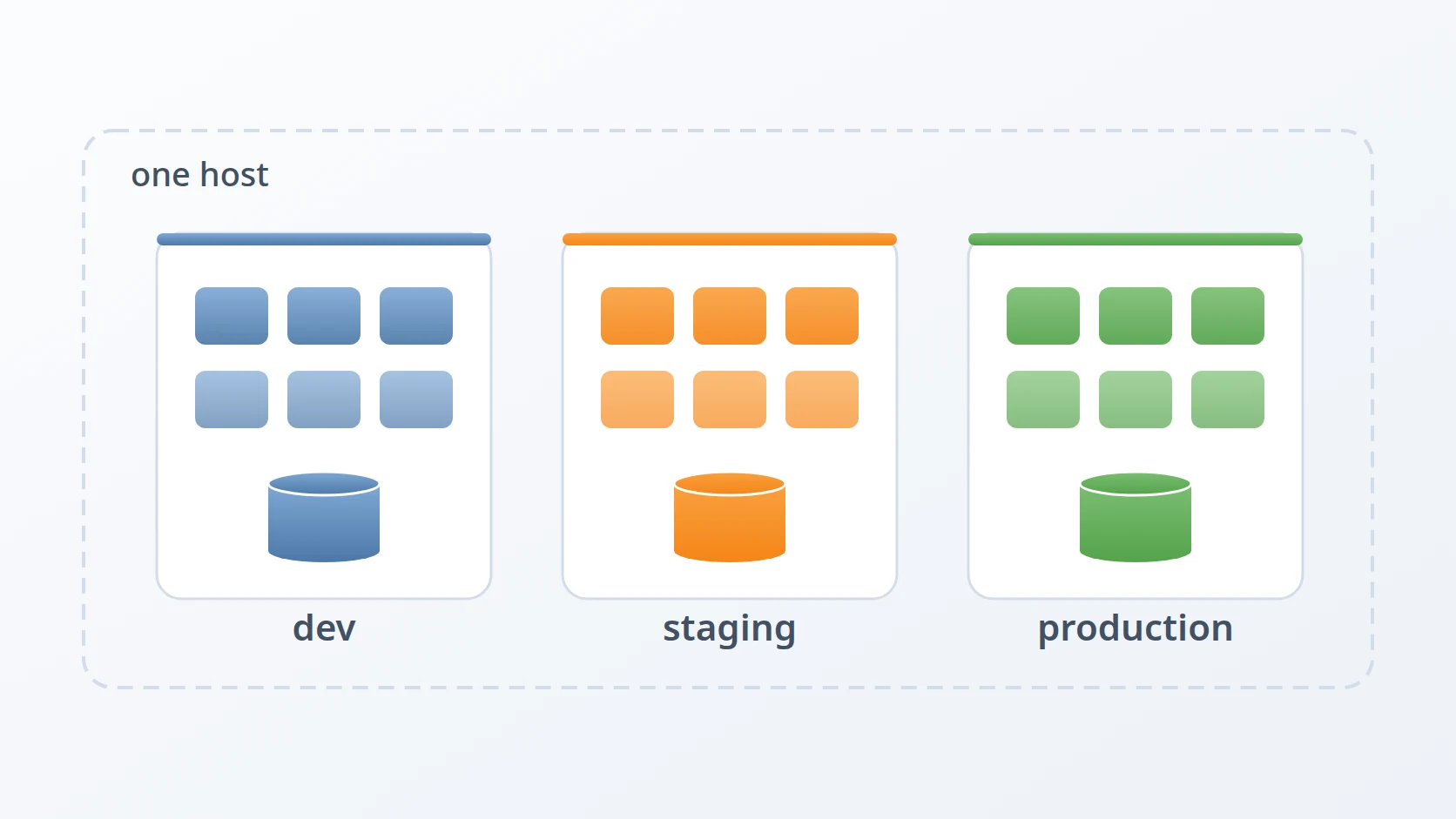
For a long time I ran one environment on my laptop, and that was enough. Then the project I was working on grew a second and a third: a staging environment where a release could be examined before it went out, and a production environment that real people depended on. The obvious answer was three machines. The answer I could actually afford was one.
Running all three on a single host turned out to be possible. It is also an easy way to lose data quietly, and preventing that is what this article is really about.
Introduction
A deployment environment is a complete, running copy of a system: its services, its database, its files, its configuration. Most software projects end up with at least two. One is where new work happens and breaking things is expected. Another is where real users live and breaking things is not.
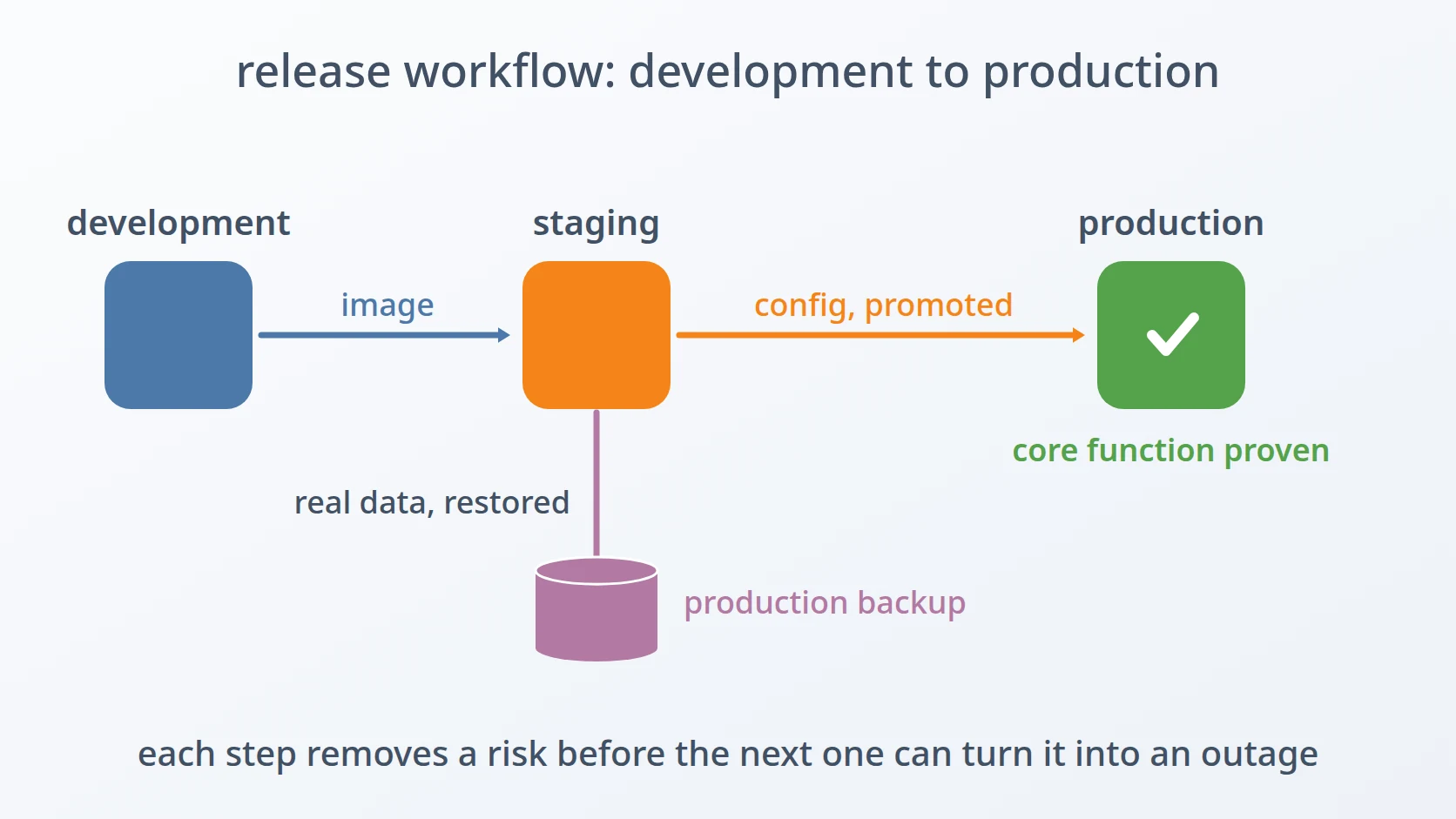
Between them, many teams keep a third. Staging is a rehearsal: the same release that is about to go to production, running against realistic data, so that a failure happens in front of you instead of in front of your users.
The system I work on is a document service for a public institution. It is not one program but a dozen cooperating ones, each running in its own container — a packaged process with its own filesystem and its own view of the network, isolated from whatever else is on the machine. There is an API that the browser talks to, a certificate authority that issues the credentials used for signing, several signing services, a store for uploaded files, a database cluster, and a search cluster that holds the logs.
That count matters for what follows. Whether you run one environment or three, each one needs the full set. Three environments do not mean three programs; they mean three of everything.
The three do not hold the same kind of data, and the difference shapes every decision below. Development holds whatever I happened to type while testing — losing it costs an afternoon. Staging holds a copy of real data, recovered from a backup, so that a release is rehearsed against the shape and volume of the real thing. Production holds the only copy that matters. The further right you go, the more expensive a mistake becomes, and the more the environments need to be unable to touch each other.
A. Why not simply use three machines
Separate machines would make this article unnecessary, and that is worth saying plainly before describing the alternative.
When two environments live on two hosts, isolation comes for free. They cannot collide over the network, cannot overwrite each other's files, cannot confuse one another's processes — not because anyone configured that, but because nothing is shared in the first place.
My constraint was ordinary and probably familiar. I had a development laptop and a single server. Requesting two more servers to hold staging would have meant months of procurement for a system that needed it sooner, and the justification — "so that releases can be rehearsed" — is the kind that does not survive a budget conversation easily.
So the question became narrower and more interesting: what has to be separated, and what can be shared safely? Everything below is an answer to that, and the answers were not obvious. Each of the three separations can fail, and each fails silently.
B. The three things that must not be shared
Because the rest of this article turns on three terms, it is worth defining them before they arrive as section headings.
The first is the network. Containers talk to each other over virtual networks — software-defined networks that exist only inside the host. Each one is given a subnet: a reserved range of addresses, written in a notation like 10.x.42.0/24, where the number after the slash says how much of the address is fixed. Every network also has a gateway, the address the host itself occupies on that network, which containers use to reach anything outside their own network. If two environments share a network, a service in one can reach a database in the other — not because anyone intended it, but because the address resolves and nothing stops it.
# one reserved address range per environment, and a gateway derived from it
The second is state: the data a system accumulates as it runs, as opposed to the configuration it was given. A database's files are state. A container's configuration file is not. The distinction matters because state is the part you cannot recreate — and the part most easily destroyed by an operation that looks harmless.
The third is the identity the container runtime uses internally, which it calls the project name. This one is invisible in a way the others are not: it does not appear in any file you would normally look at, it has a default that is usually right, and when that default is wrong it removes containers without asking. I describe it in full later, because it is the failure I would least have predicted.
C. What is at stake in getting this wrong
Before the mechanics, the reason they deserve care.
The system holds signed documents for a public institution. The record of what was signed, by whom, and when has to remain intact and verifiable for years — that is not an operational preference, it is the reason the system exists at all. Production's data is not merely inconvenient to lose; losing it means the institution cannot demonstrate that something it signed was signed.
Staging complicates this rather than simplifying it. Because staging is restored from production backups, it holds a copy of real data too. So a mistake that muddles two environments does not merely break a test environment — it can put real records where they do not belong, or silently empty a database that everything reports as healthy.
That last phrase is the theme of this article. The failures described below do not announce themselves. Every one of them passes its health check.
D. What "one machine" actually costs
The appeal of separate machines is that isolation comes for free. Put two environments on one host and every shared thing becomes a question: the network, the filesystem, the port numbers, and — as I learned the hard way — the names that the container runtime uses internally.
The answer I arrived at has three parts, matching the three terms above. Networks had to be separated so services could not accidentally talk across environments. State had to live outside the project folder so that copying a folder never copied a database. And the container runtime had to be told, explicitly, which environment each stack belonged to — because its default answer is wrong in a way that deletes things.
E. Three obstacles in the way
Stated as a goal, what I wanted was modest. Run three complete environments — development, staging and production, each with its full dozen services — on the hardware I already had, and have them behave as though they were on separate machines. Without buying a second server, without giving up the rehearsal that staging exists to provide, and above all without any one environment being able to reach into another and empty it.
Easy to state, awkward to build. Three obstacles stood in the way, one for each of the things that must not be shared, and they share a property that took me a while to name: not one of them fails loudly. Each mechanism does exactly what it was asked to do. The request is what is wrong, and a correct execution of a wrong request produces no error anywhere.
The first is that a shared network does not produce a failure — it produces a successful connection to the wrong place. Containers reach each other by name over a virtual network, and if two environments sit on the same one, a service in staging resolves the name of a database and gets production's. Nothing refuses the connection, because from the network's point of view nothing is wrong. The tempting defence is to give each environment distinct container names, or to move the published ports apart; both make the collision less likely to be noticed and neither makes it impossible, because name resolution inside a shared network does not consult either of them.
The second is that a misdirected data path does not produce a failure — it produces an empty directory, which a database is perfectly happy to adopt. When state lives inside the project folder, copying a folder copies a database, and deriving the data path from the code's location means the same configuration points somewhere different on a laptop than on a server. This is the most expensive of the three: a restore can write the recovered database to the correct path while the container reads a different one, the database initialises the empty directory it finds, and every health check goes green over a system holding nothing. The alternative I had to abandon was the clever one — a path derived relative to wherever the project happened to sit, which looks portable and is precisely what makes the same command mean two different things on two hosts.
The third is that a shared runtime identity does not produce a failure — it produces the successful removal of containers that were doing no harm. Docker Compose — the tool that starts a set of containers from one configuration file — decides which containers belong to a stack using a project name that defaults to the folder's name, and my three environments used identical folder names by design, because that is what makes a staging environment cheap to generate from a template. Three folders named the same are, to the runtime, one stack: bringing up production could remove development's running containers without warning. The defence that does not work is the obvious one — a distinct per-environment prefix on every container, which makes docker ps duly show three separate sets. That changes the label, not the ownership.
They are addressed in that order, and the order is not arbitrary. The network comes first because until environments cannot reach each other, separating anything else is decoration — data kept carefully apart is still one wrong hostname away from being shared. State comes second because it is the one whose failure is unrecoverable: containers can be recreated, an erased database cannot. The runtime identity comes last not because it matters least, but because it is the one nobody predicts, and it is easiest to believe once the first two have taught you that the dangerous failures here are the ones that report success.
Method
A. One subnet per environment, decided once
This is the answer to the first obstacle: the network on which a wrong connection succeeds.
Containers talk to each other over virtual networks. If two environments share a network, a service in staging can reach a database in production — not because anyone intended it, but because the address resolves and nothing stops it.
So each environment gets its own network and its own subnet, a reserved range of private addresses:
Every network has a gateway: the address the host itself occupies on that network, which containers use to reach services running outside their own network. It is conventionally the first usable address in the range.
I made one decision early that removed a whole class of mistakes: the gateway is never configured separately. It is derived from the subnet. Given 10.x.42.0/24, the gateway is 10.x.42.1 — computed, not typed. Two values that must agree, but are entered separately, will eventually disagree. The only reliable fix is to stop having two values.
B. State lives outside the project folder
This is the answer to the second obstacle, and the two sections that follow are both part of it — where the state sits, and how its path is written.
The second separation is the filesystem. My first instinct had been to keep each environment's data next to its configuration, which is the arrangement most tutorials show:
volumes:
  - ./data/postgres:/var/lib/postgresql/data   # state beside the config
It reads well and it is wrong for anything that outlives a demo. It means the project folder is no longer just configuration — it is also a database. You cannot copy it, move it, or delete it without thinking hard about what you are about to destroy.
So state moved out, to a path that says what it is:
volumes:
  - ${MODULE_DATA}/data/postgres:/var/lib/postgresql/data   # state -> /data
  - ./config/postgres/init.sql:/docker-entrypoint-initdb.d/:ro
with MODULE_DATA spelled out explicitly in each module's environment file — /data/<project>/<environment>/<module>. Configuration stays in the project and is tracked in version control. State lives under a single root that can be mounted on its own disk, backed up on its own schedule, and — crucially — is never touched by a git checkout.
The project folder becomes stateless: safe to clone, move, or delete.
C. The path must not depend on where the folder sits
The first version of this scheme derived the data path from the current working directory. It looked clever and it worked on one machine.
It breaks as soon as there are two. On my laptop the project lives under my documents folder; on the server it lives in the home directory. Same environment, same configuration, two different data paths — so the same commands would operate on different data depending on which machine typed them.
The rule I settled on: a data path may never be derived from the location of the code. It is an absolute path, written explicitly, identical on every host.
D. The identity the container runtime uses, which is not the one you see
This is the answer to the third obstacle, and the one I would least have predicted.
Docker Compose carries two different identities, and only one of them is obvious:
The second one — the project name — decides which set of containers a given compose command considers to be "its own". When you run down, that is what determines what gets removed. Its default value is the name of the folder.
My three environments used the same folder names by design, because that is what let a staging environment be generated as a copy of the development template. Three folders named api, in three different environments — and therefore, as far as Compose was concerned, one stack.
The consequence: bringing up production could remove the running development containers. Not warn about them. Remove them.
What makes this genuinely dangerous is that the obvious defence does not work. A distinct name for every container through a per-environment prefix makes docker ps show three clearly different sets. That changes the label; it does not change the ownership. The fix is to declare the project name explicitly, once, in each environment's configuration:
COMPOSE_PROJECT_NAME=production_api    # production/api/.env
COMPOSE_PROJECT_NAME=staging_api       # staging/<version>/api/.env
The generators that create staging and production now write this automatically. Folder names can stay identical — which is precisely what makes a staging environment cheap to create.
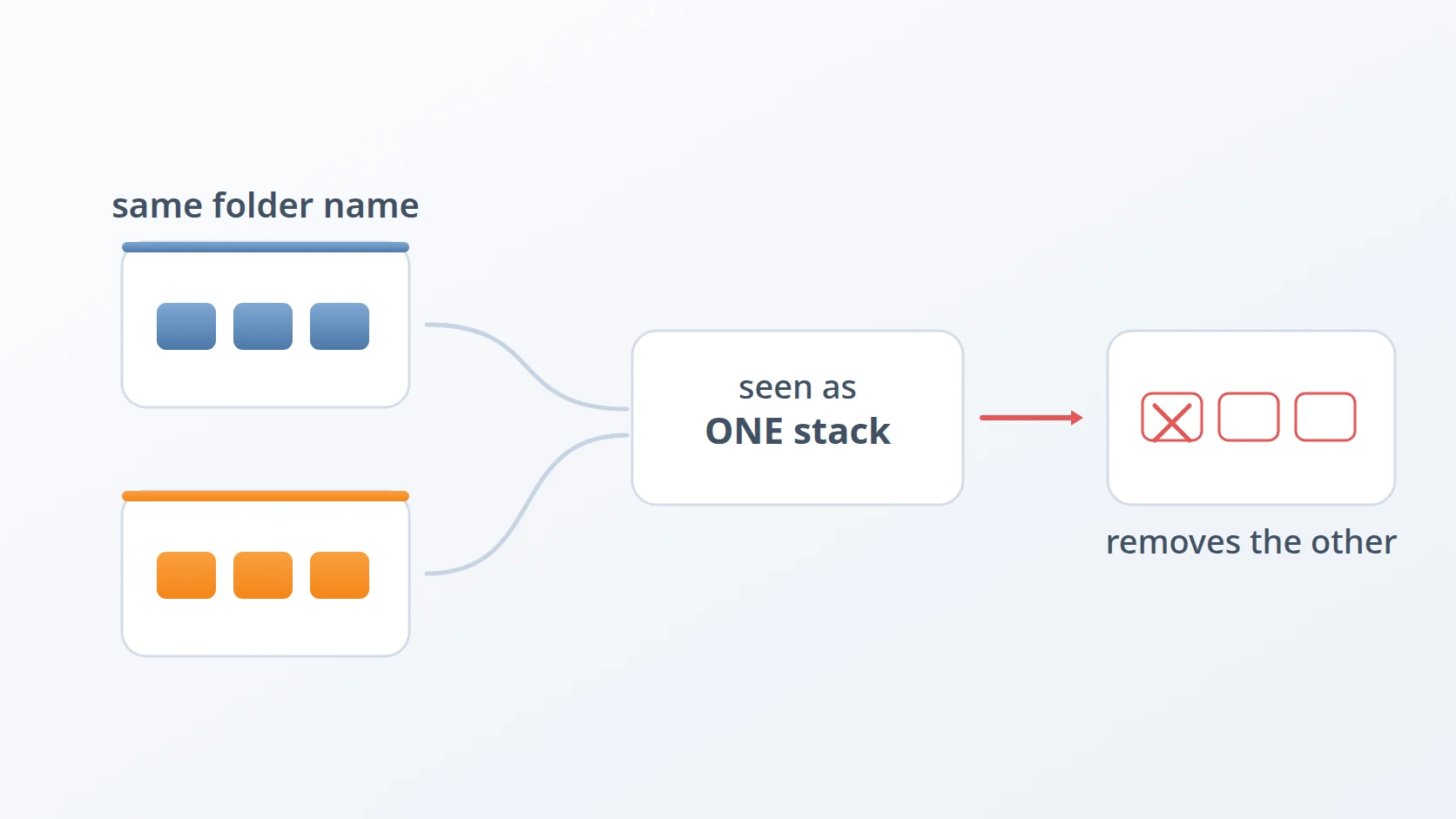
It is worth being fair to the default. Deriving a stack's identity from its folder is a reasonable guess: most people keep one stack per folder, and for them it does the right thing invisibly. The trouble is that it is a guess made from a filename, and filenames carry no information about intent. Two folders with the same name are the same stack, as far as that rule can tell — whether they sit in the same project or on opposite sides of a release boundary.
The general shape of this problem is worth naming, because it recurs: a tool that infers identity from something incidental will eventually infer it wrongly. The defence is not to remember the edge case. It is to state the identity explicitly, so there is nothing left to infer.
E. What can safely be shared
Listing what must be separate makes it easy to assume everything must be. Most of the host is shared without consequence, and it is worth saying which parts.
The container images are shared, and should be. An image is immutable and identified by its content — the same image in three environments is the same bytes, and pulling it once is simply not wasteful. Sharing images is also what makes staging meaningful: the artefact being rehearsed is the exact artefact that will run in production, not a rebuild of it.
The host kernel, the container runtime, and the reverse proxy in front of everything are shared too. The proxy is the interesting one, because it is the single component that must know about all three environments at once. A reverse proxy is the web server that receives every request from outside and forwards it to the service that should answer it. It can be shared safely because its job is that narrow: it only decides which environment a request goes to, by listening on a different address for each one — development on an address that exists only inside the machine, staging and production on addresses reachable from their own networks. It holds no data and does not connect one environment to another; keeping the environments from reaching each other is the work of the separate networks described above.
What is not shared is anything that holds state or claims a name: networks, data directories, and the runtime's notion of which stack is which. That is the whole list, and it is short enough to keep in mind.
F. Start order, and why a script beats a memory
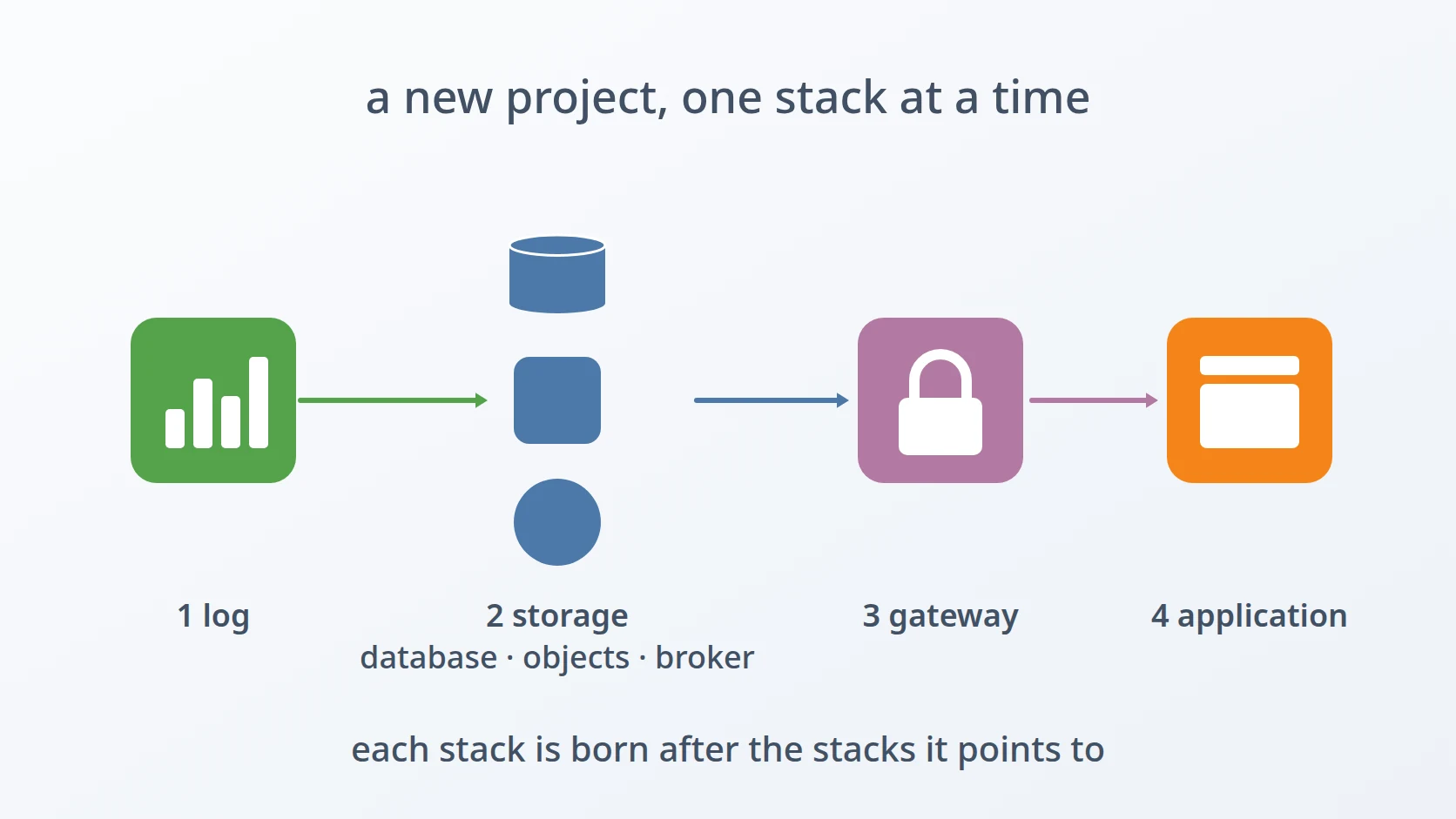
A dozen containers do not come up in an arbitrary order. The object store and the log pipeline have to exist before the services that write to them. This is the kind of knowledge that lives comfortably in one person's head and disappears the moment that person is on leave.
So it lives in a script instead. Bringing an environment up is one command that visits each module in dependency order; bringing it down reverses that order. There is nothing clever in it, and that is the point: it is the difference between a procedure and a habit.
Results and Discussion
A. The failure that would report success
The most expensive failure here would produce no error at all. It is the second obstacle in its fully developed form — worth following step by step, because every individual component behaved correctly throughout.
Generating a new environment works by copying the development environment's configuration and then overwriting the handful of values that must differ. Leave MODULE_DATA — the data path from section B — out of the values being overwritten, and the copy keeps development's path.
The result is an environment whose configuration says "staging" everywhere except in the one place that matters: its volumes point at development's data directories.
Now trace what happens next. The restore process writes the recovered database to the correct staging path. The database container, reading the path from its configuration, opens development's directory instead — which may well be empty, because development is reset often. The container starts cleanly. The health check passes: the database is listening, and answering.
The environment is, by every automated measure, healthy. It contains no data.
Counting tables catches it, so that is a permanent step:
select count(*) from information_schema.tables where table_schema = 'public';The lesson is not "check your paths". It is that health checks answer a narrower question than they appear to. "Is the service responding?" is not "is the service serving the right data?" — and the gap between those two questions is exactly where a silent failure lives. Any check that cannot distinguish an empty database from a full one will report an empty database as healthy, forever.
B. Why the silent failures cluster here
That the three obstacles all fail quietly was stated at the outset. It is worth asking why that should be so — because the reason is structural rather than a run of bad luck, and it changes what a useful check looks like.
Consider what each one guards. A shared network does not produce an error — it produces a successful connection to the wrong place. A misdirected data path does not produce an error — it produces an empty directory, which databases are perfectly happy to initialise. A shared project identity does not produce an error — it produces a successful removal of containers that were doing no harm.
In every case the mechanism does exactly what it is asked. The request is wrong, not the execution. That is why none of these show up in logs: a log records what a component did, and each component did its job correctly.
This has a practical consequence for how these environments are checked. Every verification I trust compares against something outside the system being checked: a table count against an expectation, a running container list against the environment it should belong to, a resolved address against the subnet it should fall in. A check that only asks the system about itself will confirm whatever state that system is in, including a wrong one.
The other two are as short as the table count, and each answers one of the remaining obstacles. The first asks the runtime which stack a set of containers actually belongs to — the label in docker ps cannot answer that, because the label is exactly what was misleading in section D.
# Ownership, not naming: which project does the runtime think these are?
The second resolves a service name from inside an environment and checks the address that comes back against the subnet that environment is supposed to occupy. A name that resolves is not the point; a name that resolves into the wrong range is.
# Expect 10.x.2.x from inside staging. Anything else is a crossed boundary.
C. What sharing one host actually costs
Three environments on one machine is not free, and the cost is mostly memory. Each environment runs its own search cluster, and search clusters are not modest: three full stacks together want roughly fourteen gigabytes.
In practice they are rarely all up at once. Staging exists for the duration of a release review and then comes down; its configuration and data survive, but the containers do not need to. That is a deliberate property of the design — an environment that is cheap to bring back does not need to stay running.
What sharing a host does not cost, once the three separations above are in place, is safety. The environments cannot reach each other over the network, cannot read each other's data, and cannot remove each other's containers.
D. Where this approach stops fitting
I should be clear about the limits, because "three environments, one machine" is not a general recommendation.
It works here because the production load is modest and predictable — an internal service for a known population of users, not a public site under variable traffic. If production had to survive a traffic spike, sharing a host with two other environments would be indefensible: the noisy neighbour would be you.
It also assumes a single operator. Much of what makes this safe is that one person knows which environment is currently up. With a larger team, the same separations would need to be enforced by something stronger than convention.
What does generalise is the reasoning. Whatever your constraints, the question is the same: which things must be separate, and what is the failure when they are not? For networks, the failure is a service reaching the wrong environment. For state, it is a folder operation destroying a database. For the runtime's project identity, it is one environment deleting another's containers — and that one is worth checking today, because its default is silent and its symptom looks like something else entirely.
Conclusion
Three environments on one machine is a deliberate trade, and it holds as long as the separations are real. Networks separated by subnet, state separated from code by an absolute path, and stacks separated by an explicitly declared project identity — those three cover the collisions that can actually happen.
The wider lesson is about a category of failure rather than a configuration setting. The failures that would cost the most here do not announce themselves. A stack bound to the wrong data directory passes every check. A stack sharing a project identity with another does not warn before removing it. Both look exactly like success right up until the moment you count what should be there and find nothing.
So the check that earns its place is the one that asks a question a broken system cannot answer correctly. Not "did the service start?" — a service with an empty database starts beautifully. Count the tables.
Terms
- Environment
- A complete running copy of a system — services, data, and configuration — kept separate from other copies.
- Staging
- An environment used to rehearse a release against realistic data before it reaches production.
- Subnet
- A reserved range of network addresses. Giving each environment its own range keeps their services from reaching one another.
- Gateway
- The address the host occupies on a container network, used by containers to reach services outside it. Best derived from the subnet rather than configured separately.
- Project name
- The identity a container runtime uses to decide which containers belong to a given stack. Defaults to the folder name, which is why identical folder names in different environments are dangerous.
- Stateless folder
- A project directory holding only configuration, so that copying, moving, or deleting it cannot destroy data.
Technologies covered
- Bash
- Linux
- Docker