Monthly Work Report Workflow: From Commits to an Executive Report
On this page
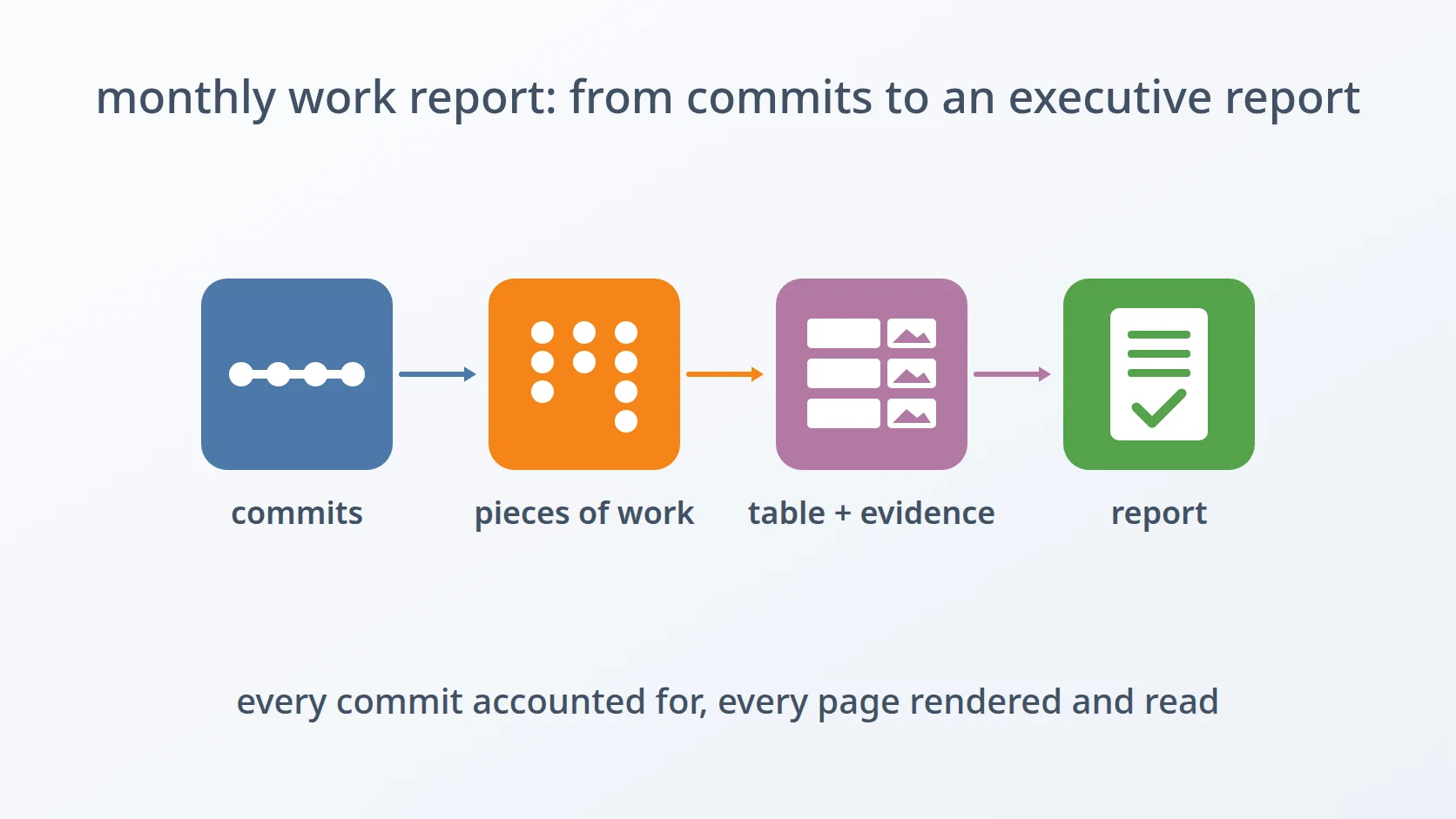
Monthly Work Report Workflow: From Commits to an Executive Report is the procedure I follow at the end of every month to tell the people I work for what I did. It starts from the commit history of every repository I touched that month, and it ends with a formatted document that a non-technical reader can follow, with evidence for each piece of work.
This page is not a tutorial, and it does not share the scripts or AI agent instructions that run it. It describes how I turned a recurring chore into a sequence of decisions I only make once: what the report is built from, which steps an AI agent does, which steps I keep for myself, and why each one sits where it does.
At a glance
| Trigger | The end of a working month |
|---|---|
| Frequency | Once a month |
| Inputs | The commit history of every repository I worked on that month, and access to the code hosts where those repositories live |
| Output | A report document with an opening, a table of the work done with code evidence for each item, and a closing |
| Done when | Every commit of the month is accounted for, every evidence image has passed its checks, and I have reviewed the rendered document |
The recurring work
The people who read a monthly work report do not read code. They want to know what changed, why it matters, and whether there is proof. The material I have, though, is written for a different reader: commit messages are notes to git and to my future self, terse and full of names that mean nothing outside the repository. Translating one into the other by hand, every month, across several repositories, is slow and easy to get wrong: a piece of work forgotten, a screenshot pointing at the wrong lines, a document that looks right on screen and breaks when it is printed.
So the report is built from the record rather than from memory. An AI agent does the reading, the grouping, the drafting, and the capturing; checks between the phases make sure nothing is lost or invented on the way; and the two things only I can do — signing in to the code hosts and judging the result — stay with me.
The flow
- Find the repositories that changed this month, and collect my commits from them.
- Group the commits into pieces of work, and check that every commit is accounted for.
- Draft the report for a non-technical reader.
- Capture code evidence for every item.
- Write the document, render it, and review it.
Steps and the decisions behind them
Find this month's repositories. The list of repositories is detected again every month instead of being copied from the previous one. A new repository appears, an old one has no work in it this month, and a copied list would either miss the first or report nothing for the second.
Collect my commits, and read what they changed. From each repository the agent takes only my own commits, without merge commits, over the whole calendar month. Merge commits are left out because they repeat work already recorded in the commits they join. The agent then reads the changes themselves, not only the messages, because a message says what I intended and the change shows what actually happened; the points worth showing as evidence are found in the change.
Group the commits into pieces of work. Commits that serve one change are grouped under one theme, with a title that names what was achieved and a short account of the situation before and after. A reader does not care how many commits something took; they care what it made possible.
Check that every commit is accounted for. Before anything is drafted, every commit the filter returned must be referenced by exactly one theme, and nothing outside the filter may appear. This check is automatic and it is a gate: a report that silently drops a week of work, or claims work that was not mine, fails here rather than in front of the reader.
Draft for a non-technical reader. The draft has an opening, a table of the work, and a closing. Each row of the table describes a piece of work by its benefit, in plain language, and ends with one measured sentence: how many files and lines it touched, counted from the repository and excluding lock files, vendored code, and generated files, which would inflate the number without reflecting any work. Technical names are kept only where a reader would expect them; raw code and variable names are not.
Sign in to the code hosts myself. The repositories are private, so their pages can only be captured from a signed-in browser. The agent starts a browser with a new, empty profile, and I sign in by hand. It never copies cookies or saved sessions from my own browser profile: borrowing a session is a shortcut I do not allow any tool to take.
Capture the code evidence. Each row gets a screenshot of the code that proves it. The capture starts at the beginning of the code that matters, such as the function or the rule that changed, never at line one of a file full of imports. Every image has the same landscape proportions, shows its line numbers, and avoids the folder views that print commit dates beside every file. Each image is checked automatically: a nearly blank image is taken again, and two identical images mean two rows are pointing at the same lines, so one of them is moved to its own anchor. When the capture is done, the temporary browser profile, which holds my signed-in session, is deleted.
Write the document from the verified draft. The document is built through a document-writing library rather than by converting the draft automatically, so that the layout, the table, and the images land exactly where they should. Its rows are generated from the draft that has already passed its checks, not typed again, so the document and the draft cannot drift apart.
Render the document and look at it. A document that opens is not a document that prints correctly. Every report is rendered to PDF and its pages are inspected: orientation, spacing, the table header repeating across pages, the images inside their cells. The number of rows and images is counted from the document itself, not from its text extracted from the PDF, because justified text breaks words in ways that make such counts unreliable.
Review it, then hand it over. I read the rendered report before it leaves my hands. Whether the report is fair to the month is a judgement, and the one step I would never hand to an agent.
What I automated, and what I did not
| Step | Automated or manual | Why |
|---|---|---|
| Finding repositories and collecting commits | automated | the same filter every month, applied the same way to every repository |
| Grouping commits and drafting | automated, by an AI agent | reading every change and writing it for a non-technical reader is the slow part, and the agent reads all of it |
| Checking every commit is accounted for | automated, as a gate | a missing or extra commit is invisible in a finished report |
| Signing in to the code hosts | manual | my credentials and sessions are never handed to a tool |
| Capturing and checking evidence | automated | many uniform images are exactly what a person produces inconsistently |
| Writing and rendering the document | automated | generated from the verified draft, so it cannot disagree with it |
| Reviewing the report | manual | whether the report is fair to the month is a judgement |
When it fails
The failure I meet is the evidence step finding a sign-in page where the code should be. It happens when the browser session has expired, or when a repository is captured from a mirror that has not yet received the latest commits, so the lines being pointed at do not exist there.
That is why the check happens before the capture rather than after it. I open one code page on each host from the capture browser and expect a normal page, not a redirect to the sign-in form. For a mirror, the latest commit it holds is compared with the latest commit in my local repository. If the session has expired, I sign in again; if the mirror is behind, it is brought up to date. Only the points that failed are captured again, and every image that already passed stays as it is.
Why this order
Every phase uses the result of the one before it, and every check sits where a mistake is still cheap. Commits are accounted for before anything is drafted, so the draft can only describe work that happened. The evidence follows the draft, because the draft decides which lines need proving. The document is written only after the evidence passes, because it is generated from both. Rendering comes last, because only the finished file can show how it will look on paper — and my review comes after that, because it is the only point at which I can see the report as its reader will.
Variations
The repositories change from month to month. A new repository joins the report the first month it has my commits, and a repository with no work that month is simply skipped rather than reported as empty. Nothing in the procedure depends on last month's list.
Terms
- Commit
- One recorded change in a git repository, with a message describing it.
- Merge commit
- A commit that joins two lines of work together, and repeats changes already recorded elsewhere.
- Diff
- The exact lines a commit added and removed.
- Code host
- A web service that stores git repositories and displays their code in a browser.
- Mirror
- A copy of a repository kept on a second code host, which can fall behind the original.
- Render
- To convert a document into its final printed form, here a PDF, to see exactly how it will look.
Technologies covered
- Git