Feature-Based Frontend Architecture
On this page
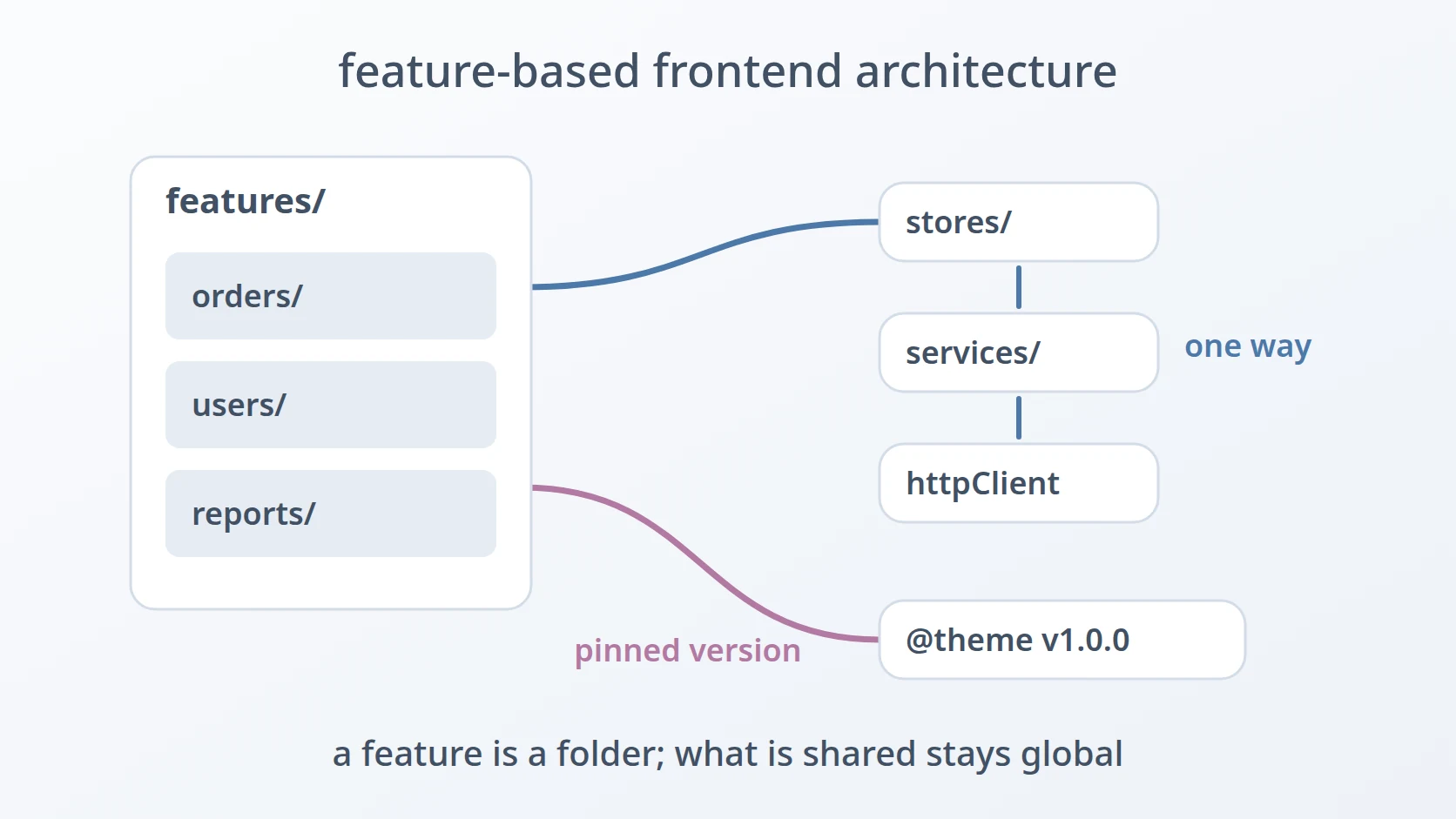
Feature-Based Frontend Architecture is the shape I give to web interfaces built with Vue: every screen and component that belongs to one feature lives in that feature's folder, while what several features share sits in a few global folders, and every request to the backend goes through one HTTP client. It is my own convention, not a design from a book, and I reuse it in every Vue project I start.
It is one of the architectures I use, and it covers the web front end. The business rules of my systems live in the backend services behind the interface, so the front end does not need the layers I use there; it needs a structure that makes screens easy to find, add, and remove.
At a glance
| Origin | My own convention; close to a simplified Feature-Sliced Design with a service layer |
|---|---|
| I use it for | Web interfaces built with Vue: admin panels, dashboards, web applications |
| I do not use it for | Flutter apps, and anything outside the browser |
| Languages | TypeScript with Vue 3 |
The idea in brief
A. A feature is the unit
Each feature of the interface — orders, users, reports — has its own folder holding its pages and the components only it uses. When something belongs to one feature and nowhere else, it lives in that feature's folder, including its own services or types if no other feature needs them.
B. What is shared stays global, by kind
What several features use goes into a small set of global folders, one per kind: services that call the backend, stores that hold shared state, types, layouts, shared components, configuration, translations, and utilities. A piece of code moves from a feature folder to a global one only when a second feature needs it.
C. Data flows one way
A page reads and changes shared state through a store, a store calls a service, and a service calls the backend through one HTTP client. Pages may also call a service directly when no state needs to be shared. Nothing in a service or a store imports a page or a component.
D. One design system, pinned by version
The visual layer comes from my own design system, a separate package of components and design tokens. Each project carries a built copy of it in a folder named with its version, reaches it through one import alias, and never edits it by hand; updating the design system means syncing a new version into that folder.
Why I chose it
I find a page by the name of its feature. When something on a screen needs to change, I know which feature it belongs to, and everything that feature needs is in one folder. I do not have to remember which of several type-based folders hold the page, its components, and its helpers.
A feature is easy to remove or move. Because a feature keeps its own pages and components together, removing it is mostly deleting one folder, and moving it to another project is mostly copying one folder. Global folders only hold what is genuinely shared, so a feature rarely leaves traces elsewhere.
The interface looks the same across projects. Every project uses the same design system, so buttons, tables, forms, and colours behave the same everywhere. Pinning it by version means a project changes its look only when I decide to update it, not by accident.
Access to the backend is in one place. Every request goes through one HTTP client, which attaches the access token and, when the backend answers that the token has expired, refreshes it once and replays the requests that were waiting. No page has to handle authentication or retries itself.
My conventions
A Vue project of mine that follows this architecture has this src/ tree:
| Folder | What lives there | May import |
|---|---|---|
features/<name>/ | pages and components of one feature, plus its own services or types when only it needs them | stores, services, shared, types, the design system |
stores/ | shared state and the actions that change it | services, types |
services/ | one module per backend resource, all built on one HTTP client | the HTTP client, types |
shared/, layouts/ | components and page frames used by several features | the design system, stores |
A service wraps one backend resource and nothing else:
// services/orderService.ts
import { httpClient } from './httpClient'
import type { Order } from '@/types/order'

export const orderService = {
  list: () => httpClient.get<Order[]>('/orders').then((r) => r.data),
  create: (input: Partial<Order>) => httpClient.post<Order>('/order', input).then((r) => r.data),
}
The design system is reached through an import alias, so a page writes import { DataTable } from '@theme' and does not know which version folder stands behind it. Changing the version means changing the folder and the alias, not every import.
How I check a project against it
These are the questions I ask a Vue project, taken from the conventions above:
| Area | Question I ask | Source |
|---|---|---|
| Features | Does every page live in the folder of the feature it belongs to? | a feature is the unit |
| Sharing | Is everything in a global folder used by at least two features? | shared stays global |
| Direction | Do services and stores avoid importing pages and components? | data flows one way |
| Backend access | Does every request go through the one HTTP client? | access in one place |
| Design system | Is the design system used through its alias, at a pinned version, and never edited in place? | one design system |
| Removal | Could a feature be removed by deleting its folder and its route? | easy to remove |
Where I do not use it
Flutter apps
My Flutter apps carry real application logic on the device, so I give them Clean Architecture instead, with a presentation/ layer for the screens. A web interface built with Vue mostly displays and edits what the backend decides, which is why it does not need those layers and a Flutter app does.
References
This architecture is my own convention and has no book behind it. Its closest named relative is Feature-Sliced Design, a methodology for structuring front-end projects by layers and feature slices; mine is a simpler form of the same idea, combined with a service layer for backend access. I mention it as a resemblance, not as the source.
Terms
- Feature
- One area of the interface that a user recognises as a whole, such as orders or users, together with its pages and components.
- Store
- A place that holds state shared by several pages, and the actions that change it. In Vue projects I use Pinia for this.
- Service
- A module that wraps one backend resource and turns its HTTP calls into plain functions.
- Design system
- A shared package of components and design tokens — colours, type, spacing — that keeps several interfaces looking and behaving the same.
- Vendoring
- Copying a built version of a dependency into the project itself, instead of installing it from a package registry.
- Import alias
- A short name, such as
@theme, that the build tool maps to a real folder, so imports do not change when the folder does.
Technologies covered
- Vue