How I Clean Up Recorded Audio Without Re-encoding the Video
On this page
- Introduction
- A. The part of a recording that goes wrong
- B. What "without limits" has to mean
- C. Nine obstacles in the way
- Method
- A. The filter was already installed
- B. Copying the picture, byte for byte
- C. Five models, and a table instead of a guess
- D. A blend control, because full strength is not always best
- E. Finding your own files when you are a symlink
- F. The tilde that arrives as a squiggle
- G. Refusing to destroy the original
- H. Writing somewhere else first
- I. Reporting what changed
- Results and Discussion
- A. What the nine decisions add up to
- B. Where the effort actually went
- C. What this approach does not address
- Conclusion
- Terms
Introduction
A. The part of a recording that goes wrong
A screen recording is two things stitched together, and only one of them tends to come out badly. The picture is whatever the capture software wrote, and it is correct by construction — the window was there, the cursor moved, the frames landed. The audio is a microphone in a room, and a room has a refrigerator in it, a fan, a street outside, a laptop that spins up whenever the encoder gets busy.
What comes back from a session is therefore lopsided: a video track that needs nothing done to it, married to an audio track carrying a constant floor of hiss that was inaudible while recording and impossible to ignore on playback. The recordings this happens to are screen captures for articles and demos, longer tutorial videos, and recorded meetings and interviews — three different shapes of content with the same defect in the same half of the file.
The challenge is to clean up the audio of a recording, as many times as the work requires, without watermarks and without usage limits.
The frequency is the part that matters. A single recording with bad audio is a nuisance you can solve by hand. Recording regularly means fumbling a sentence, re-recording, fumbling a different sentence, and arriving at a directory of takes that all need the same treatment. Any solution that charges per file, or caps minutes per month, or stamps its own audio watermark into the result unless you upgrade, is priced against exactly the pattern of use that creates the need.
Easy to state, awkward to build. The awkwardness is not the noise reduction itself, which turns out to be one filter that ships with a program most machines already have. It is everything around it: not damaging the half of the file that was fine, choosing between models that only an ear can judge, and the handful of environment traps that separate a script that works on your machine from one that works when called by name from anywhere.
B. What "without limits" has to mean
Two requirements follow from processing recordings repeatedly, and both push toward doing the work locally.
The first is that the result must be usable as-is. An audio watermark — a tone, a voice, a burst of silence — is not a cosmetic issue in a tutorial; it is a defect in the deliverable. A tool that produces a preview and charges to remove the mark has not solved the problem, it has demonstrated the solution and withheld it.
The second is that the material should not leave the machine. Recorded meetings and interviews contain other people's voices, and uploading them to a service to be processed is a decision about somebody else's data made for convenience. Running locally removes the question rather than answering it.
Together these rule out the entire category of online cleanup services, which leaves the question of what to use instead — and the answer turned out to be already installed.
C. Nine obstacles in the way
Online cleanup services are priced against repeated use. Watermarks, duration caps, and per-file charges all bite hardest in exactly the situation that produces the need: many takes of the same recording. The alternative I rejected is worth naming plainly, because it is the obvious first move and it fails on the second file rather than the first.
Only the audio is broken, but video tools treat both halves the same. Re-encoding the picture degrades something that was already correct, and costs far more time than the audio work does. This is the central decision of the tool, and it is the one worth proving rather than asserting.
Noise reduction is not one button. There are five RNNoise models, each trained for a different combination of noise character and signal character, and the difference between them is a matter for an ear rather than a number. A tool that exposes no choice is guessing on the user's behalf; a tool that exposes five with no guidance is no better.
Full denoising sometimes sounds worse than partial denoising. Removing all of the noise can leave a voice sounding thin and processed, because the filter cannot perfectly separate the two. The fix is a blend control, and its existence is an admission that audio quality is a judgement rather than a measurement.
A symlink breaks the path to a program's own companion files. Called through /usr/local/bin, the naive way of finding a script's directory points at the symlink's location, where the model files are not. This obstacle exists only because the tool has data files beside it — an earlier tool of mine that was purely shortcuts never hit it.
Bash does not expand a tilde after an equals sign. Written one way, a home-relative path arrives as a real path; written another way, it arrives as a literal squiggle. The difference is invisible until someone types the second form.
The original recording must survive. A take cannot be re-recorded once the room, the light, and the sentence have moved on. A tool that writes over its input is one keystroke away from destroying material that has no backup.
A run that dies halfway must not leave a half-written file that looks finished. Encoding takes time, and interruptions happen. A partial output sitting in the output directory with the correct name is worse than no output at all, because it will be used.
Whether it worked is a question the tool should help answer. "Does it sound better?" is subjective, but "did the noise floor drop while the peaks stayed put?" is measurable, and the second is a good proxy for the first.
The order runs from why the tool exists, through the decision that defines it, to the judgement calls, the environment traps, and finally the three things a tool must do to be trusted with material that cannot be recreated.
Method
A. The filter was already installed
Here is the answer to the first obstacle: nothing needed to be bought or uploaded, because ffmpeg — the free command-line program for converting and processing audio and video — ships a neural noise suppressor called arnndn, which runs the RNNoise model locally.
What it needs is a weights file. The filter itself is compiled into ffmpeg, but the trained model is separate data, and without it the filter refuses to start. Those weights are what the models/ directory holds — five files, about 1.5 MB in total, kept next to the script rather than downloaded on demand so the pipeline works offline and produces the same result next year as it does today.
There is no build step and no library to install, which is the whole reason this approach is cheaper than it sounds. I did not take the alternative that usually gets suggested — building the RNNoise library and wiring it into a processing chain — because the filter is already in the binary.
B. Copying the picture, byte for byte
This answers the second obstacle, and it is the decision the rest of the tool is arranged around. I chose not to re-encode the picture; I copy it.
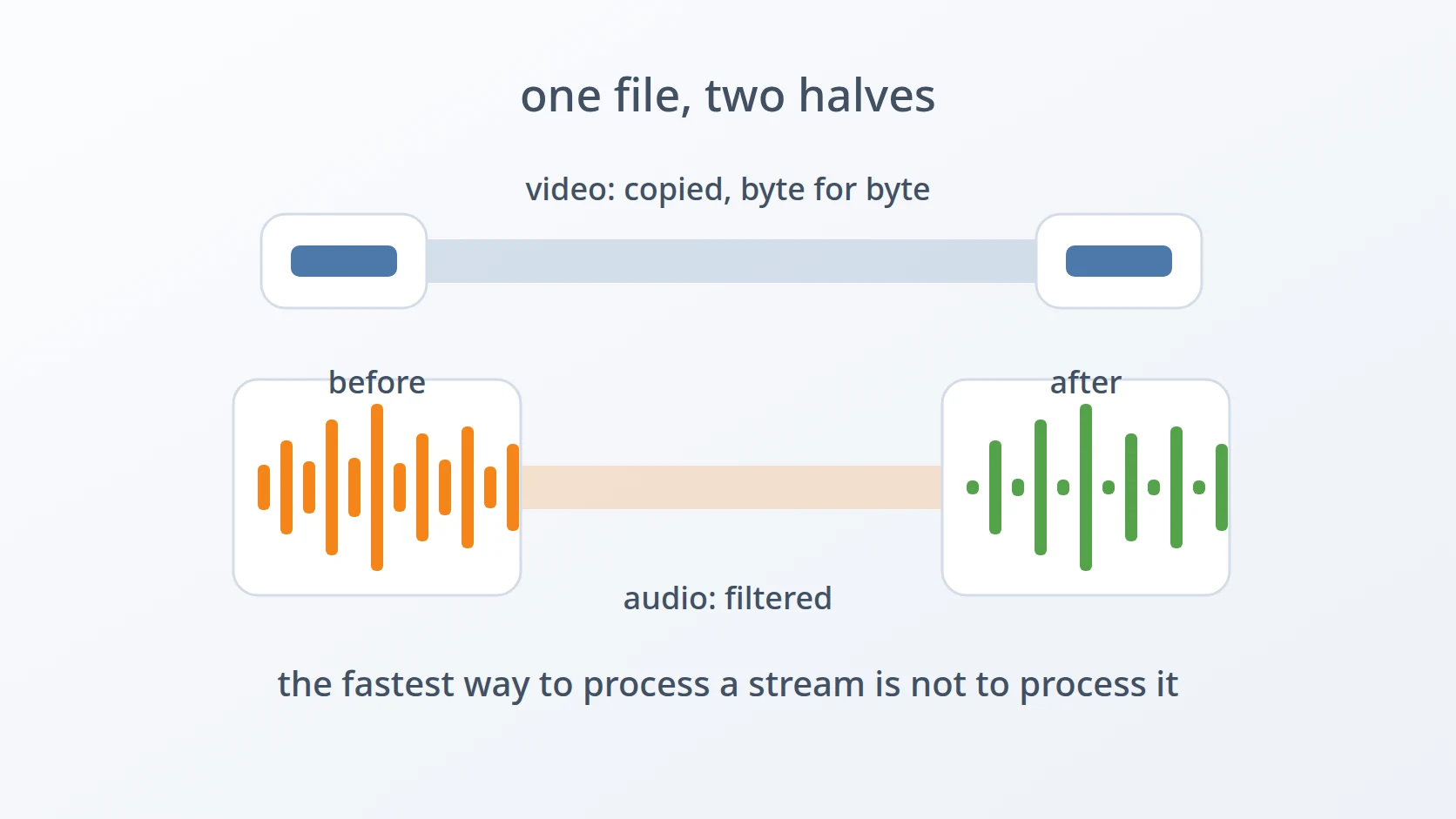
Two streams, two different treatments. The video stream is passed through untouched, and only the audio is decoded, filtered, and re-encoded.
"Untouched" is a strong claim, so it is worth checking rather than trusting. Hashing the video stream of the input and the output answers it directly:
MD5=6665057e1a0aa5e54aec08268ad994ab
MD5=6665057e1a0aa5e54aec08268ad994abIdentical. Not visually similar, not close enough — the same bytes. The audio stream of the same two files hashes differently, which is exactly the intended split: one half rewritten, the other half carried across without being decoded at all.
The cost side is just as clear. On a 1080p clip, processing with a stream copy against re-encoding the video with the same filter applied:
Five and a half times, on twenty seconds of synthetic test footage. The ratio is what matters rather than the absolute numbers: the audio work is a fixed small cost, and everything above it is the price of re-compressing a picture that did not need it. On a tutorial recorded in one long take, that multiplier is the difference between a pause and a coffee break — and at the end of the re-encode the picture is measurably worse than the one that went in.
C. Five models, and a table instead of a guess
This answers the third obstacle. The five models differ along two axes: the kind of noise they were trained to remove, and the kind of signal they were trained to preserve.
| noise ↓ / signal → | General | Voice | Speech |
|---|---|---|---|
| General | mp | lq | not included |
| Recording | cb | bd | sh |
"Voice" and "speech" are not the same column: voice includes human sounds that are not words, such as laughter, while speech is narrower. A screen recording with narration sits at the intersection of recording noise and speech signal, which is where sh is, and that is why it is the default.
I did not choose the default from the table alone. I listened to all five against a real screen capture and picked the one that sounded best, with a second choice noted for when it does not suit a particular recording. That is the honest procedure for something an ear judges, and writing down the runner-up is what makes the note useful later.
The short names resolve to files inside the program's own directory, so the common case needs no paths. A full path is still accepted, for a model that lives somewhere else.
D. A blend control, because full strength is not always best
This answers the fourth obstacle. Denoising at full strength can leave a voice sounding hollow, and the remedy is to mix some of the original back in.
The effect is measurable even though the judgement is not. Running the same file at two settings and measuring the mean volume shows how much noise floor each one removes:
--mix=1
--mix=0.3 At full strength the floor drops by a lot; at 0.3 most of it is still there, because most of the original is still there. Neither number is right on its own — the point is that the control does something substantial across its range, so it is a real dial rather than a decorative one.
The reason this exists at all is that noise suppression is a trade. What the model removes is what it believes is not speech, and when it is slightly wrong it takes some voice with it. Keeping a portion of the original is how you buy back the part it should not have taken, at the cost of keeping some of the hiss.
E. Finding your own files when you are a symlink
This answers the fifth obstacle. The tool lives in a project directory with its models beside it, and is installed by symlinking it into /usr/local/bin. That installation is what breaks the naive way of locating companion files.
SELF=""
SCRIPT_DIR=""Without readlink -f, the path being examined is the symlink's own path, and the directory derived from it is /usr/local/bin — where there is no models/ directory, so the filter fails to initialise with a message about the model file rather than about the installation.
Resolving the link first makes the lookup point at the real directory regardless of how the tool was invoked. This is a trap specific to tools that carry data files; a script that is purely a shortcut has nothing beside it to find, and can be symlinked around freely without noticing the difference.
F. The tilde that arrives as a squiggle
This answers the sixth obstacle, which is small, real, and only ever discovered by use. The shell expands ~ to the home directory in some positions and not in others.
--source=/video.mp4 Separated by a space, the tilde is a word of its own and gets expanded before the program ever sees it. Attached after an equals sign, it is part of a longer word, and the shell leaves it alone — so the program receives a literal squiggle and reports that a file by that name does not exist.
Since the tool accepts both spellings for every option, it expands the tilde itself rather than telling people which spelling to avoid:
Three cases, and the third is the important one: anything that does not start with a tilde passes through unchanged, so the function is safe to apply to every path argument without thinking about it.
G. Refusing to destroy the original
This answers the seventh obstacle. I write the output beside the input with a suffix inserted before the extension, and two separate guards stand between the tool and a lost recording.
;
The first guard compares the resolved output path against the resolved source path, so it catches the case where the options conspire to point both at the same file. The second refuses to replace any existing result unless overwriting is asked for explicitly. Neither is clever; both exist because the input is material that cannot be recreated, and a source recording is not something to be protected by remembering to be careful.
H. Writing somewhere else first
This answers the eighth obstacle. I do not let the encode write to the final filename. It writes to a temporary file, which is renamed into place only after ffmpeg reports success.
tmp=""
# ... ffmpeg writes to "$tmp_out" ...
Two details are doing the work. The temporary file is created in the destination directory rather than in /tmp, which keeps the rename on a single filesystem and therefore atomic — a cross-filesystem move is a copy followed by a delete, which has a visible half-finished state of exactly the kind this is meant to avoid. And the trap removes the temporary file if the run is interrupted, so an abandoned encode leaves nothing behind rather than leaving a plausible-looking fragment.
The result is that the output filename only ever appears once it is complete. There is no window in which something else could pick up a partial file and treat it as the finished article.
I. Reporting what changed
This answers the ninth obstacle. The tool measures the audio before and after, and prints both.
The two numbers answer different questions. mean_volume is dominated by whatever is present most of the time, which in a noisy recording is the noise floor — so a large drop means the constant hiss is gone. max_volume tracks the loudest peaks, which are the voice, so it should stay roughly where it was. A run where both fall by the same amount has not removed noise; it has turned everything down, including the thing worth keeping.
This is not a substitute for listening, and it is not presented as one. It is a fast way to catch the case where the filter did something drastic, before spending a minute of attention on playback.
One more arrangement makes the tool usable from other scripts: the report goes to standard error, and the only thing on standard output is the path of the finished file.
That split is deliberate. Progress information is for the person watching; the path is the tool's actual return value, and keeping it alone on standard output means the next stage in a chain can consume it without parsing around the commentary.
Results and Discussion
A. What the nine decisions add up to
I have not needed to change the tool since I wrote it, and the recordings it processes now go from capture to usable audio without anything leaving the machine. The table below is the design, one row per decision.
| Decision | What it buys | Alternative rejected |
|---|---|---|
arnndn in ffmpeg | no upload, no watermark, no per-file limit | online cleanup services — priced against repetition |
-c:v copy | video stream hashes identically; 5.5× faster | re-encoding — slower and measurably worse |
| models shipped alongside | works offline; same result next year | download on demand — a third party in the pipeline |
| five models, table documented | a starting point plus a named runner-up | one hard-coded model — guessing for the listener |
--mix | buys back voice the filter took by mistake | full strength always — sounds processed |
readlink -f | finds its models through a symlink | naive directory lookup — breaks on install |
expand_tilde | both option spellings work | documenting the quirk — a trap left in place |
| suffix + two guards | the original cannot be lost by accident | in-place edit — one keystroke from permanent loss |
temp file + atomic mv | the final name only ever holds a finished file | writing direct — a fragment that looks complete |
B. Where the effort actually went
One row of that table is the feature. The noise reduction itself is a single filter invocation, and if the job had stopped there the tool would be one line long. Everything else is about the recording being real material rather than a test file: it cannot be re-created, it may contain other people's voices, it arrives in batches, and it gets fed to a next stage.
That proportion is the general lesson. The interesting technical capability — a neural noise suppressor — was free and took a line. The work was in refusing to damage the half that was fine, in making a subjective choice navigable instead of hidden, and in the three separate mechanisms that exist purely so a mistake or an interruption cannot cost a recording. A tool that did only the filtering would work perfectly on every file except the one where it mattered.
Worth stating as a limit rather than a win: this is built for one person's recordings on one machine. It processes one file per run, has no parallelism, and assumes the whole file fits the workflow of encode-then-rename. A batch is a shell loop, which is fine at the scale of a few takes and would not be at the scale of a media library.
C. What this approach does not address
RNNoise removes steady, broadband noise — the fan, the hiss, the hum. It is not a repair tool. A recording with clipping, with a microphone knocked mid-sentence, or with a second conversation audible in the background is not something a noise model fixes, and running it harder does not help; it takes more of the voice instead.
The same boundary applies to the shape of the work. This tool assumes the audio problem is uniform across the file, because a room's noise floor usually is. Audio that needs different treatment in different places is editing work, and belongs in something with a timeline rather than in a command that applies one setting to the whole duration.
Conclusion
A recording is two halves, and usually only one of them is broken. Cleaning up the audio repeatedly, without watermarks or caps, needed a filter already compiled into ffmpeg — and then eight further decisions that had nothing to do with noise: copy the picture instead of re-encoding it, ship the model weights so the pipeline works offline, document the model table so a subjective choice has a starting point, expose a blend control because full strength is not always best, resolve the symlink so the program can find its own files, expand the tilde the shell left alone, and keep three separate mechanisms between a mistake and a lost original.
The measurement worth keeping is the hash. The video stream of the output is byte-identical to the video stream of the input, which is a stronger claim than "the quality is preserved" and a much easier one to check. It also explains the 5.5× speed difference: the fastest way to process a stream correctly is not to process it at all.
What keeps the tool small is the narrowness of the job — one file, one machine, one uniform noise problem. Every feature it does not have is one that narrowness made unnecessary, and the features it does have are mostly there to protect material that cannot be recorded twice.
Terms
- ffmpeg
- A free command-line program that converts and processes audio and video. It reads the recording, runs the noise filter, and writes the result.
- RNNoise
- A noise suppression method using a small recurrent neural network trained to separate speech from background noise. Exposed in ffmpeg as the
arnndnfilter, which needs a trained weights file to run. - stream copy
- Passing an audio or video stream from input to output without decoding and re-encoding it. Written
-c:v copy; the output bytes for that stream are the input bytes. mean_volume/max_volume- Two figures reported by ffmpeg's
volumedetect. The first is the average level across the file, dominated by whatever is present most of the time; the second is the loudest peak. - noise floor
- The constant low-level sound present in a recording even when nobody is speaking — fans, air conditioning, electrical hum, microphone self-noise.
- atomic rename
- Moving a file within a single filesystem, which either completes or does not; no observer sees a partially renamed file. Across filesystems the same command becomes a copy and a delete, which is not atomic.
- weights file
- The trained parameters of a neural network, stored separately from the code that runs it. Here, the
.rnnnfiles thatarnndnloads at startup.
Technologies covered
- Bash
- FFmpeg
- RNNoise