How I Run the Right Command After Months of Not Running It
On this page
- Introduction
- A. The commands that fall through the gap
- B. Why plausible-but-wrong is the expensive case
- C. Three tools that share nothing but a frequency
- D. What these scripts are not
- E. Six obstacles in the way
- Method
- A. Storing the shape rather than the logic
- B. Making the choice explicit rather than clever
- C. Printing the context the situation lacks
- D. Refusing early, and stopping at the first failure
- E. Doing exactly what it does, under a name that suggests more
- F. When passing the arguments through is the right answer
- Results and Discussion
- A. Guards in proportion to what can go wrong
- B. What the emoji in the output are doing
- C. Where this approach stops fitting
- Conclusion
- Terms
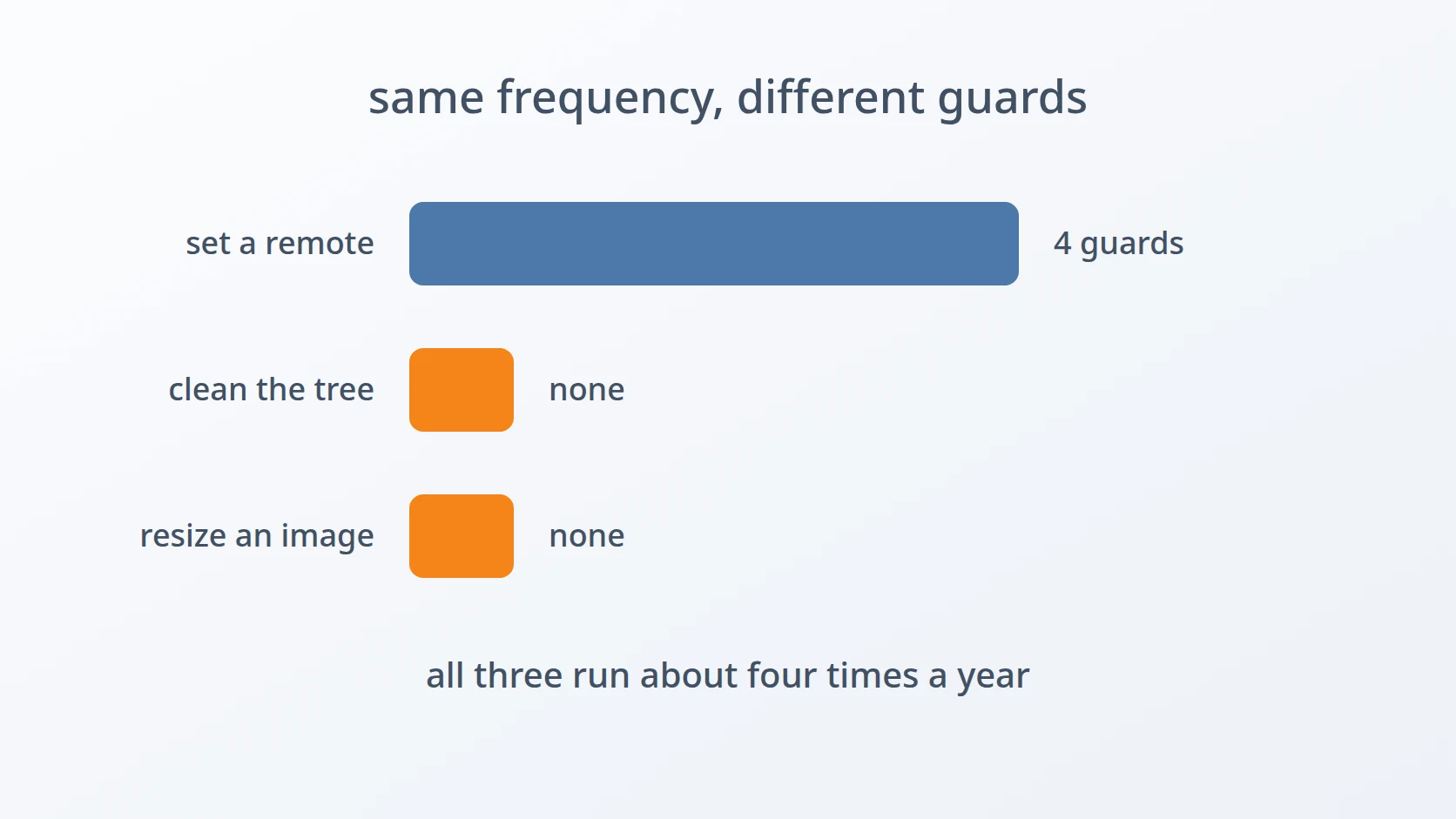
There is a category of command I run roughly four times a year. Not often enough to remember, not rarely enough to look up from scratch each time, and — this is the part that matters — always at a moment when something else has already gone slightly wrong. A repository that needs its remote pointed somewhere new. A working tree that has to go back to clean. A virtual disk that ran out of room while a build was in progress.
Introduction
A. The commands that fall through the gap
Frequency determines how a command is remembered, and it does so in a shape that is less convenient than it sounds.
Commands run daily live in muscle memory. I do not recall the syntax of git status; my fingers produce it. Commands run once ever are looked up from scratch, which is fine, because approaching them with no assumptions is exactly the right posture.
The trouble sits in the middle. A command run every few months feels familiar enough that looking it up seems unnecessary, and that feeling is wrong. What I actually retain after four months is the shape of the thing — that it involves remote, that there is a flag with upstream in it somewhere — which is enough to construct something plausible and not enough to construct something correct.
B. Why plausible-but-wrong is the expensive case
A command I cannot remember at all is harmless. I stop, I read the manual, I proceed carefully because I know I do not know.
A command I half-remember produces a different sequence. I type something, it is syntactically valid, and it does something — just not the thing intended. Git in particular is generous here: there are several verbs that accept similar arguments and behave entirely differently, and none of them will ask whether I am sure.
All three tools in this article touch things that resist being undone. A remote URL that points at the wrong repository sends the next push to a place nobody is watching. A working tree cleaned is a working tree whose uncommitted changes no longer exist anywhere. A disk image is a file containing a filesystem, and operations on it are not transactional.
C. Three tools that share nothing but a frequency
The set is deliberately unalike. Two are git operations; one resizes a disk image for QEMU, the open-source program that runs virtual machines. They were not designed together — each appeared separately, months apart, when the underlying need arrived.
That distance is the interesting part. If the pattern were about git, a git-shaped solution would follow. The pattern is about how often a command is used, which is a property of my working life rather than of any technology, and which is why a virtualisation tool ended up in the same category as two version-control ones.
D. What these scripts are not
None of them implement anything. Between the three there are sixty-six lines, and the part doing real work is three commands that git and QEMU already provide.
What the scripts hold is a decision — which flags, which order, which of two similar-looking operations is the correct one for the situation. That decision was made once, carefully, with the documentation open. Storing it means it does not have to be made again at a moment when attention is elsewhere.
E. Six obstacles in the way
So the goal is easy to state: run the correct command at the moment it is needed, months after last needing it, without reconstructing it from a half-memory. Correct on the first attempt, on operations where a second attempt may not be available.
Easy to state, awkward to build. Six obstacles stand between that goal and three commands I can run without hesitating, and none of them are about the commands being hard.
The first is that the cost is in the recall, not the work. Every one of these operations is a single line once the line is known. The expensive part is retrieving it correctly after a long gap, which no amount of understanding the underlying tool prevents. The rejected alternatives are instructive: a notes file holds the text but cannot be executed, so it still requires reading and retyping, and history | grep surfaces every previous attempt including the wrong ones, with nothing marking which was which.
The second is that two situations which feel identical require entirely different commands. Pointing a repository at a remote is one sentence in English and two distinct operations in git, depending on whether a remote already exists. The commands share no verbs. Choosing wrong produces an error that describes what failed without indicating which operation was actually wanted.
The third is that a rarely-run command is executed with the least context and offered the least. After several months I am not certain which directory I am in, which branch is checked out, or what the current remote points at — and the command that most needs that context is precisely the one that by default prints nothing at all before acting.
The fourth is that running in the wrong place is cheaper to prevent than to repair. A git command issued outside a repository fails harmlessly; one issued inside the wrong repository succeeds. Meanwhile a script running several steps has a failure mode of its own — step one fails, step two runs anyway on the assumption that step one worked, and the result is a state that neither step intended.
The fifth is that a name can promise more than the code delivers. One of these is called a rollback, which suggests undoing commits. It does not do that. It discards uncommitted changes and untracked files, leaving history untouched — a genuinely useful operation with a name that describes a different one, which matters because the person reading the name is the person who has not run it in four months.
The sixth is that adding validation has a cost too. The instinct after writing several guards is to add guards everywhere. But when the underlying tool already produces a clear error for bad input, a wrapper that checks first only duplicates that message — and every duplicated message is one that can drift out of sync with the real one.
Each has a section below. The first four are about one tool that grew guards because it needed them; the last two are about the two tools that did not, and why that asymmetry is deliberate rather than neglectful.
Method
A. Storing the shape rather than the logic
Here is the answer to the first obstacle, and it is the smallest possible idea: put the command in a file with a name that describes the situation rather than the mechanism.
# the name is the index into memory — not "qemu-img", but what I want
What I remember after four months is not qemu-img resize. It is that I want to make a disk image bigger. A command named after the intention is reachable from the intention, which is the only thing still present in memory when the need arrives.
This is also why a notes file does not solve it. A note holds the same text, but reaching it requires remembering that the note exists, finding it, and retyping the contents without transcription errors — three steps that each fail at exactly the moment I am in a hurry. An executable name is reachable by typing the first three letters and pressing tab.
B. Making the choice explicit rather than clever
This is the answer to the second obstacle. Two situations, two modes, stated as the first argument.
The underlying operations have nothing in common. A repository with no remote needs one added and then needs its first push to establish tracking. A repository whose remote is wrong needs that remote's URL rewritten, and pushing is neither required nor wanted.
if [; then
elif [; then
The tempting alternative was to detect the situation — check whether a remote exists, then pick the right branch automatically. I rejected it, and the reason is about what happens when the detection is right but my belief about the situation is wrong. If I think a repository is fresh and it is not, a smart tool quietly does the other thing and reports success. An explicit mode fails instead, and failing is what I want when my model of the situation is incorrect, because that is the only signal that it is incorrect.
C. Printing the context the situation lacks
This is the answer to the third obstacle: say where you are before doing anything, and what changed after.
# ... the operation ...
Neither line is required for the operation. Both exist because the person running this has several terminals open and has not touched this repository since before a holiday. The directory and branch answer "am I where I think I am" at the moment that question is cheapest to answer — before anything is modified.
The closing git remote -v answers the other half. Having pointed a repository at a URL I typed from memory, the immediate question is whether it landed correctly, and the alternative to printing it is running a second command to check, which is a step that gets skipped when the first one appeared to work.
D. Refusing early, and stopping at the first failure
This is the answer to the fourth obstacle, and it is two guards addressing two different failure shapes.
if ! ; then
The repository check is the ordinary kind of guard. Its value is not that it prevents damage — git would reject the command anyway — but that it produces a message naming the actual problem, rather than a git error about an operation the caller did not consciously choose to run.
set -e addresses something less obvious. Create mode runs two commands in sequence, and the second assumes the first succeeded. Without it, a failed remote add is followed by a push that has nothing to push to, and the output contains two errors describing the same underlying cause. With it, execution stops at the first, which is the one that explains what happened.
This is also the difference between a script and a list of commands. A list runs everything regardless; a script can decide that a step's failure invalidates what follows.
E. Doing exactly what it does, under a name that suggests more
This is the answer to the fifth obstacle, and the honest version is that the name is imprecise.
Nothing here touches commits. History is exactly as it was. What disappears is everything not committed: modified files revert, untracked files are deleted, and the working tree returns to whatever the current commit says it should be.
That is a frequently useful operation. An experiment that went nowhere, a dependency install that scattered files, a generated mess — all of it gone in one command, with no reading of git status to decide what to remove.
It is also unrecoverable, and it deliberately does not ask. The synchronisation tool I use for copying folders refuses a dangerous destination and prompts before overwriting a non-empty one, and the contrast is worth stating: there, the destination is an argument that can be mistyped, and the guard protects against a path that was never intended. Here there is no argument at all. The command operates on the directory I am standing in, and I typed a name that says clean. Confirming would mean asking whether I meant the only thing this command can possibly do.
F. When passing the arguments through is the right answer
This is the answer to the sixth obstacle, and the tool is three lines including the shebang.
#!/bin/bash
No validation, no guards, nothing printed. Every check I might add — does the file exist, is the size well-formed, is the image in a resizable format — is a check qemu-img already performs, with a better error message than I would write, because it knows about image formats and I would be pattern-matching on strings.
A wrapper that validates first would produce two error messages for the same problem, and the one I wrote would be the one that goes stale. The script's entire contribution is the name and the argument order, and that is genuinely the whole value: after six months I remember that I want to resize an image and I remember it takes the image and a size, in that order, because that is the order the name implies.
What makes this worth a script rather than a note is what the operation actually does. It grows the image without recreating it, which means the filesystem and everything on it stays where it is — the entire reason to reach for this command rather than building a new image and copying data across.
Results and Discussion
A. Guards in proportion to what can go wrong
The three scripts apply very different amounts of care, and laid side by side the pattern is clearer than it felt while writing them.
| Tool | Lines | Guards | Why that amount |
|---|---|---|---|
| Set a repository's remote | 59 | Argument check, repository check, set -e, context printed before and after | Two modes that are easy to confuse; several steps where one depends on another |
| Return to a clean tree | 4 | None | No arguments to get wrong; the name states the only possible outcome |
| Resize a disk image | 3 | None | The underlying tool already validates, better than a wrapper could |
The first row earned its guards by having something to guard: a choice between modes, an argument that can point anywhere, and a sequence where a failed first step makes the second meaningless. The other two have none of those properties, and adding guards would have produced ceremony rather than safety.
The useful question turned out not to be "is this operation dangerous" — discarding uncommitted work is plainly dangerous — but "is there a decision here that could be made incorrectly". Where there is none, a guard has nothing to catch.
B. What the emoji in the output are doing
One of these scripts prints emoji before each line, which looks decorative and is not entirely.
The output of a rarely-run command is scanned, not read. A wall of uniform text requires reading to locate the line that matters; a leading symbol makes the structure visible at a glance — this is where I am, this is what is about to happen, this is the result. For output appearing perhaps four times a year to someone reconstructing context, that difference is worth more than it would be in a tool running hourly.
It is also a decision I would not repeat in anything called from another script, where output is parsed rather than looked at, and where emoji become an encoding problem instead of a visual aid.
C. Where this approach stops fitting
These scripts encode one person's habits, and the encoding is the point rather than a limitation — but it does bound where they apply.
They assume origin as the only remote name, which is correct for my repositories and wrong for anyone working with forks and upstreams. They print for a human, so none of them belong in a pipeline. And the whole premise — that a decision made once can be stored and reused — holds only while the decision stays valid; a tool whose flags change between versions would need the stored form revisited rather than trusted.
Conclusion
Sixty-six lines across three files, of which the part doing work is three commands I did not write. What the files hold is the decision about how to invoke them: which mode, which order, which flags, and — in two cases — the decision that no further ceremony was warranted.
The thing I did not expect was that the guards would be so unevenly distributed, and that the uneven distribution would be the correct answer. My instinct after building one careful tool was to make the others careful in the same way, and that instinct was wrong. Ceremony that catches nothing is not caution; it is noise that makes the real warnings harder to see. What decides the amount is not how dangerous the operation is, but whether there is a decision inside it that I could make wrongly — and for the commands I run four times a year, that decision is usually the only thing worth writing down.
Terms
- Remote
- A named reference to a repository elsewhere, conventionally called
origin. Adding one and changing an existing one's URL are separate operations with separate commands. - Upstream branch
- The remote branch a local branch tracks, so that pushing and pulling need no arguments. Established on the first push with a dedicated flag.
- Working tree
- The files as they currently exist on disk, as opposed to what is committed. Uncommitted changes live only here, which is why discarding them cannot be undone.
- Untracked file
- A file present in the working tree that git has never been asked to manage. Not affected by commands that operate on tracked files, which is why removing it takes a separate command.
- Disk image
- A file containing an entire filesystem, used by a virtual machine as its disk. Resizing grows the file in place, leaving its contents intact.
- qcow2
- QEMU's copy-on-write image format, which allocates space as it is used rather than upfront, and supports being resized after creation.
Technologies covered
- Bash
- Git
- QEMU



