How I Turned the Docker Commands I Repeat Most Into Commands I Can Type From Anywhere
On this page
- Introduction
- A. What repeated typing actually costs
- B. Why Docker commands in particular grow long
- C. A shortcut is not an alias, and the difference is the whole design
- D. What the ten commands are
- E. Six obstacles in the way
- Method
- A. Executable on PATH, not an alias
- B. A naming pattern rather than ten names
- C. Forwarding arguments instead of hiding them
- D. Rendering the table rather than formatting the fields
- E. Joining what Docker reports separately
- F. Failing before the attempt rather than after it
- Results and Discussion
- A. What actually improved
- B. Where the line-count difference comes from
- C. Where this stops being a good idea
- Conclusion
- Terms
There is a particular kind of waste that never shows up in any measurement. It is the twelfth time in a day that I type docker compose up -d, or reconstruct a --format template from memory to find out which container is holding a port. Each instance costs a few seconds and a small amount of attention, and neither of those is worth mentioning on its own.
What made me take it seriously was noticing where the attention went. Recalling a flag is not free — it interrupts whatever I was actually thinking about, and the interruption outlasts the typing by a long way. So I turned the commands I repeat most into ten short words I can type from any directory, and the interesting part turned out not to be the shortening. It was everything that had to be decided before a shortcut is worth having.
Introduction
This article is about those decisions. It is not a guide to writing shell scripts — most of these are two lines long, and the two-line ones are quoted in full precisely because there is nothing hidden in them. What is worth explaining is why each one takes the shape it does.
A. What repeated typing actually costs
Three things, and only the first is obvious.
The first is time, and it is the least important. A command that takes four seconds to type instead of one costs a few minutes over a week — real, but not enough to justify building anything.
The second is typos. A long command is a long opportunity to get something wrong, and Docker commands are unusually unforgiving about this because a mistyped flag is often still a valid command that does something else. That failure costs more than the retyping: it costs the time spent understanding why the output is not what was expected.
The third is the one that actually motivated this, and it is cognitive. Holding the shape of a dozen command patterns in working memory has a cost that is paid continuously, not per invocation. Every time I reach for a formatting template I have not used in a fortnight, I am spending attention on recall rather than on the thing I was doing. Ten short words remove that entirely, because there is nothing left to recall.
B. Why Docker commands in particular grow long
The command-line interface is built for completeness rather than for daily use, which is the correct priority for a tool of its scope and an awkward one for a person typing it repeatedly.
Listing containers is the clearest example. The default output is wide enough to wrap in most terminals, so anybody using it seriously reaches for --format — which accepts a Go template, a small language embedded inside the flag. The result is a command that is powerful, precise, and impossible to remember correctly a month later.
Compose adds a second word to everything. Networks add a third level, where the information worth having is split across network ls and network inspect and has to be joined by whoever is reading. None of this is a flaw in the tool. It is what happens when a general interface meets a specific habit.
C. A shortcut is not an alias, and the difference is the whole design
The obvious way to shorten a command is a shell alias, and it works well for exactly one situation: a human typing in an interactive shell that has read the file where the alias is defined.
Outside that situation it does not exist. A script cannot call it, because scripts do not read interactive shell configuration. sudo does not see it. A scheduled job does not see it. And because it lives inside a shell's configuration rather than on disk as a program, nothing can compose with it.
An executable file on PATH has none of those limits. It is a program, so anything that can run a program can run it — including another one of these shortcuts, which turns out to matter more than I expected when I started.
D. What the ten commands are
They fall into four groups, and the grouping is what makes them memorable.
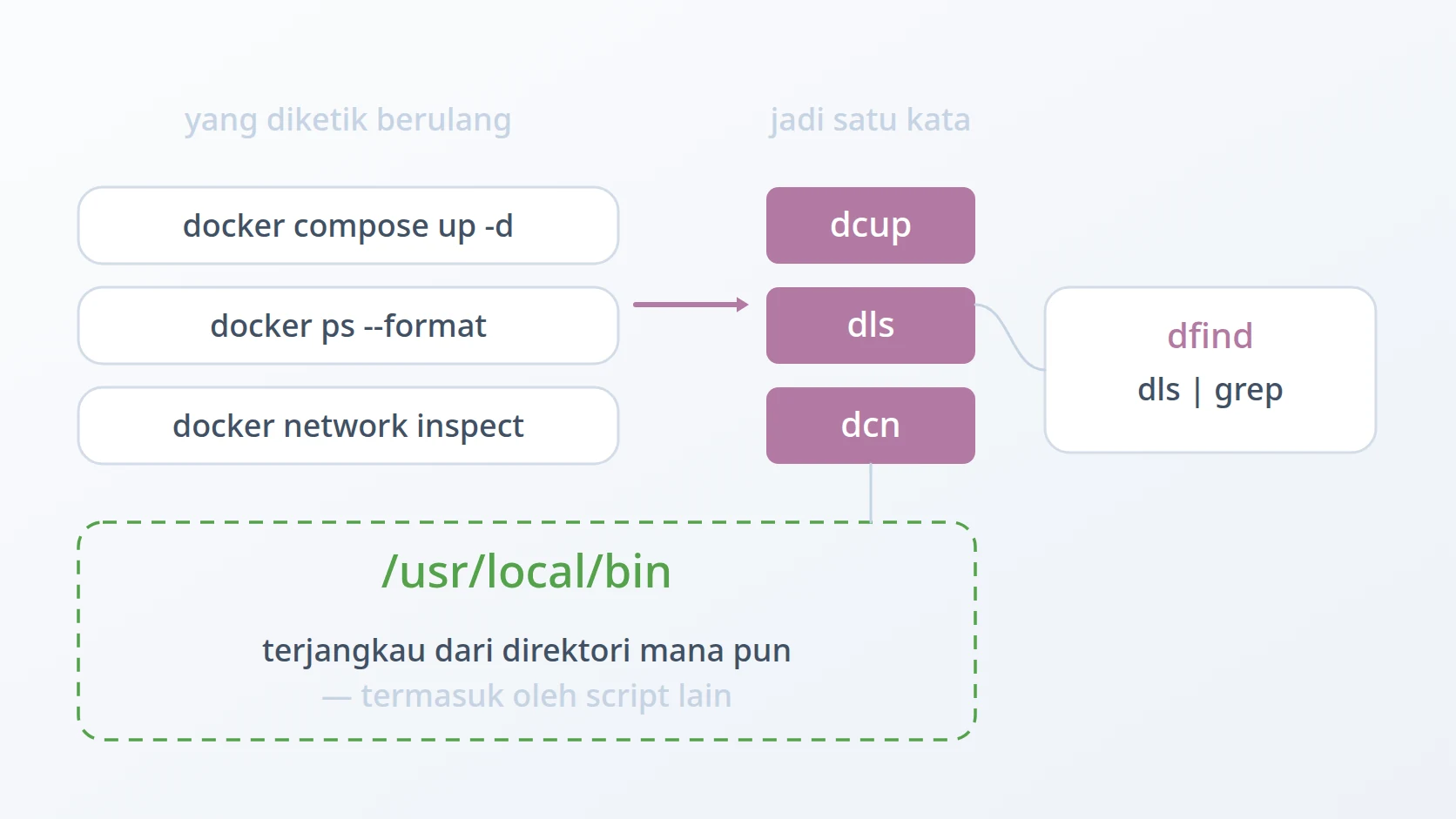
Compose lifecycle: dcup and dcdown bring a stack up and down; dcb builds; dcx opens a shell inside a service. Reading state: dls lists running containers as a numbered table, dcls does the same for the current Compose project, and dfind searches that listing. Images: bdi saves an image to a compressed file and rdi loads one back. Networks: dcn creates, removes and lists them.
Nine of the ten are between two and forty lines. The tenth is two hundred and sixty, and the difference between those two numbers is itself one of the findings below.
E. Six obstacles in the way
Stated as a goal: make the Docker commands I repeat most into single words I can type from any directory, without losing the flexibility of the commands they replace, and in a form that other automation can call rather than reimplement.
Easy to state, awkward to build. Six obstacles stood in the way, and the first two decide the shape of everything else.
The first is that a short command has to work from anywhere, or it has only moved the problem. A script that must be run from the directory it lives in has replaced remembering a flag with remembering a path, which is not an improvement. The rejected alternative is the shell alias, and it is rejected for a specific reason rather than on principle: an alias is invisible to scripts, to sudo, and to scheduled jobs, which rules out the composition described below. What replaces it is making each file executable and placing a symbolic link on PATH, so the shortcut is a program rather than a shell convenience.
The second is that ten arbitrary names would just move the memorisation. If each shortcut is named by whatever seemed reasonable that day, the result is ten more things to remember — the exact outcome the exercise was meant to avoid. The rejected alternative is naming each script independently. What replaces it is a pattern applied consistently: a leading d for Docker, a second c when the command belongs to Compose, and then the verb. Knowing the pattern is enough to guess a name without looking it up, which is a stronger property than any individual name being clever.
The third is that a shortcut which swallows its arguments is only useful for the single most common case. Hard-coding the command makes it shorter and makes it useless the moment a service name or an extra flag is needed, at which point the full command comes back and the shortcut is abandoned. Hard-coding is the rejected alternative; what replaces it is forwarding everything through, so the shortcut is a shorter spelling of the command rather than a narrower version of it.
The fourth is that the default listing output is hard to read at a glance. Columns do not line up once names vary in length, there is no numbering to refer to a row by, and there is no total. These are small deficiencies that add up to reading carefully when glancing would do. Relying on --format alone is the rejected alternative — it fixes which fields appear but not how they are arranged. What replaces it is rendering the table directly, with aligned columns, a row number, and a count at the bottom.
The fifth is that no single Docker command answers the question I actually ask about networks. That question is "which networks exist, what subnet does each hold, and which containers are inside them", and answering it means reading one listing for names, then inspecting each network for its subnet, then inspecting again for its members — and joining three outputs by eye. Doing that manually is the rejected alternative. What replaces it is one command that performs the joins and prints a single table, with column widths computed from the data rather than guessed in advance.
The sixth is that creating a network fails late and unhelpfully when a subnet is already taken. The failure arrives from the daemon after the attempt, and the message names the conflict without naming the network that caused it — so the next step is always a manual search to find out who is holding the range. Letting the daemon reject it is the rejected alternative. What replaces it is checking both the name and the subnet beforehand, and when the subnet is taken, naming the network that holds it in the error.
The order reflects what each obstacle governs. The first two are about form — where a shortcut lives and what it is called — and they apply to all ten equally, which is why nothing else can be decided before them. The third is about the boundary of a shortcut: how much of the original command it is allowed to hide. The last three are different in kind, and they are the ones that produced actual code rather than conventions: two about reading state that Docker reports awkwardly, and one about preventing a failure rather than explaining it afterwards.
Method
A. Executable on PATH, not an alias
This is the answer to the first obstacle, and it is what makes everything after it possible.
Each script is made executable once and linked into a directory that is already on PATH. The link means the file stays where it is edited and version-controlled, while the command is available everywhere.
# …one link per script. The file stays where it is edited;
# the command exists everywhere, including inside other scripts.The consequence that matters most is not convenience. It is that these become composable, and the shortest script in the set is the proof.
#!/bin/bash
| That is dfind in its entirety. It searches the container listing by calling dls — not by duplicating what dls does. It can do that only because dls is a program on PATH rather than a shell alias, and this is exactly the composition that the alias approach forecloses. The same property is why larger automation elsewhere can call these instead of restating a formatting template.
B. A naming pattern rather than ten names
This is the answer to the second obstacle. The names are not individually clever, and that is deliberate.
A leading d means Docker. A c after it means the command belongs to Compose. What follows is the verb, abbreviated to the point where it is still unambiguous.
The test of a naming scheme is whether it lets you guess. Knowing the pattern, dcb is derivable without being memorised, and so is the fact that dls and dcls must differ in scope rather than in behaviour. A person who knows three of these can work out the rest.
C. Forwarding arguments instead of hiding them
This is the answer to the third obstacle, and it is the difference between a shortcut that survives and one that gets abandoned.
if [; then
else
# Everything is forwarded: a service name, extra flags, whatever.
The quoting is the load-bearing part. "$@" preserves arguments as separate words even when they contain spaces, which is what allows dcup to be a shorter spelling of the command rather than a restricted subset of it. Without it the shortcut works until the first argument that needs quoting, and then it fails in a way that is hard to attribute.
The principle generalises: a shortcut should reduce typing, not reduce capability. The moment it cannot do something the original could, it stops being used for everything and the memorisation comes back.
D. Rendering the table rather than formatting the fields
This is the answer to the fourth obstacle. Docker will format fields; it will not lay out a table.
containers=
i=1
while ; do
[ && ports="-" # empty reads as missing, not blank
done
Three small decisions are doing the work. Tab-separated output is parsed rather than printed directly, so alignment is decided here instead of by the longest value. An empty port list becomes a dash, because a blank cell reads as a rendering error while a dash reads as an answer. And the counter that numbers the rows also produces the total at the end, which costs nothing and answers "how many are running" without counting lines by eye.
E. Joining what Docker reports separately
This is the answer to the fifth obstacle, and it explains why one script is two hundred and sixty lines while the rest are under forty.
The question "which networks exist, with what subnets, holding which containers" has no single command behind it. The names come from a listing; the subnet comes from inspecting each network; the members come from inspecting it again with a different template. Assembling the answer is the work.
while ; do
subnet=
raw_containers=
# …collected per network, then printed as one table
doneBecause a network can hold any number of containers, the rows are not uniform: one network occupies one line, another occupies five. Fixed column widths would either truncate names or waste most of the terminal, so the widths are measured from the data before anything is printed.
for; do
[ && col_name=
[ && col_subnet=
done
col_name= # measured, then padded — never guessedThis is where the line count comes from, and it is worth being honest about the trade. Two hundred and sixty lines is a lot of shell for a listing command. It is justified here only because the question is one I ask often and the manual alternative is three commands and a mental join — but it is the point at which "shortcut" stops being an accurate description of what was built.
F. Failing before the attempt rather than after it
This is the answer to the sixth obstacle, and it is the only one that prevents a failure rather than presenting information more clearly.
Creating a network with a subnet that something else already holds fails at the daemon. The message reports the overlap without naming the network responsible, so the next move is always a search. The check moves that search before the attempt, and reports the answer as part of the refusal.
for; do
existing_subnet=
if [; then
existing_net_name=
# The name is the whole point: without it, this is just a slower daemon error.
fi
The name in that message is the entire value of the check. Detecting the conflict earlier saves nothing by itself — the daemon would have detected it too. What the daemon does not do is tell you which network to go and look at, and that single piece of information is the difference between a message you act on and a message that starts an investigation.
Results and Discussion
A. What actually improved
The typing saved is the smallest part, and I would not have built this for that alone. What changed is the number of things I hold in my head while working: the formatting templates are gone, the flag combinations are gone, and what remains is a naming pattern small enough to be reconstructed from three examples.
The typo class disappeared with them. A mistyped flag is often a valid command that does something unintended; a mistyped shortcut is a command that does not exist, and the shell says so immediately. Moving errors from silent to loud is worth more than moving them from frequent to rare.
The composition was the surprise. I built these for interactive use and then found other automation calling them — a deployment script that lists containers by invoking dls rather than restating the template. That only works because they are programs on PATH, which was a decision made for a different reason entirely.
B. Where the line-count difference comes from
Nine of these are short because Docker already does the work and only the spelling needed shortening. One is two hundred and sixty lines because Docker does not do the work at all, and the script is the missing implementation rather than a shorter way to invoke an existing one.
That distinction is worth noticing when deciding whether to build something. A wrapper around an existing command should be small; if it is not, the reason is usually that the command being wrapped does not answer the question being asked. The size is a signal about which of the two situations you are in, and it is the honest measure of what a shortcut is actually doing.
C. Where this stops being a good idea
These are personal tools by design. They travel with me, and anything shared or handed over uses the full commands they wrap, which every one of these shortcuts leaves intact and readable.
They are also a layer that can drift. A shortcut encoding a flag that a future Docker release changes will keep working until it does not, and the failure will be confusing in proportion to how long the shortcut has been reliable.
And the shortening has a floor. Below a certain length the name stops being derivable from the pattern and becomes something to memorise again, which is where the whole exercise began.
Conclusion
The lesson I take from this is not about Docker. It is that the cost worth optimising was the cognitive one, and it was the one I noticed last. Time and typos are measurable and minor; the continuous expense of holding a dozen command shapes in working memory is neither measurable nor minor, and it is the one that a good shortcut actually removes.
The second lesson is about where a shortcut lives. Making these programs rather than aliases was a decision about convenience that turned out to be a decision about capability — because a program can be called by another program, and a shell alias can only be typed by a person.
Terms
- Shell alias
- A short name for a command defined in a shell's configuration. Available to a person typing interactively; invisible to scripts,
sudoand scheduled jobs. - PATH
- The list of directories a shell searches for executables. A file placed there becomes a command available from any working directory.
- Symbolic link
- A filesystem entry pointing at another file. Used here so a script stays where it is edited while the command exists on
PATH. - Go template
- The small formatting language Docker's
--formatflag accepts, powerful enough to extract any field and awkward enough to be worth wrapping. - Compose
- The Docker component that runs a multi-container application from a declarative file, and the reason half of these shortcuts carry a
c. - Subnet
- The address range assigned to a Docker network. Two networks cannot hold the same range, which is the conflict one of these scripts checks for in advance.
- Composability
- The property that lets one tool be used inside another. Here it is the consequence of being a program on
PATHrather than a shell convenience.
Technologies covered
- Bash
- Linux
- Docker
- Docker Compose