New Project Stack Workflow: From Templates to a Running Project
On this page
New Project Stack Workflow: From Templates to a Running Project is the procedure I follow every time a new project needs its infrastructure: the logging, the storage, the messaging, the gateway in front of everything, and finally the application itself. It starts from a set of templates and generators, and it ends when the first request travels through the gateway to the application and its telemetry appears on a dashboard.
This page is not a tutorial. It describes how I turned "set up a new project" from a long session of copying and fixing into a sequence of decisions I only make once: which stacks a project needs, in which order they are born, which steps a generator does on its own, which ones I keep for myself, and why.
At a glance
| Trigger | A new project needs its infrastructure, or an existing project needs another service |
|---|---|
| Frequency | Once per new project, and once per service added later |
| Inputs | The project's name, its Docker network, the credentials for each stack, and which stacks it needs |
| Output | Every stack the project needs, healthy and pointing at each other |
| Done when | A first request passes through the gateway to the application, and its telemetry appears on a dashboard |
The recurring work
A project of mine is never one container. It usually needs a log stack, a database, object storage, sometimes a message broker, a gateway that handles sign-in in front of all of it, and the application. Each of those is a stack of its own, and they refer to each other: the gateway needs the addresses of the storage, the broker, and the log collector; the application needs its database; everything sends its telemetry to the log stack.
The easy way to build all of that is to copy the folders of the last project and edit them, and it is precisely the way that carries old names, old credentials, and old data into the new project without anyone noticing. So every kind of stack got its own generator, built from a template, and the generators got an order. The procedure below is that order, and the reasons behind it.
The flow
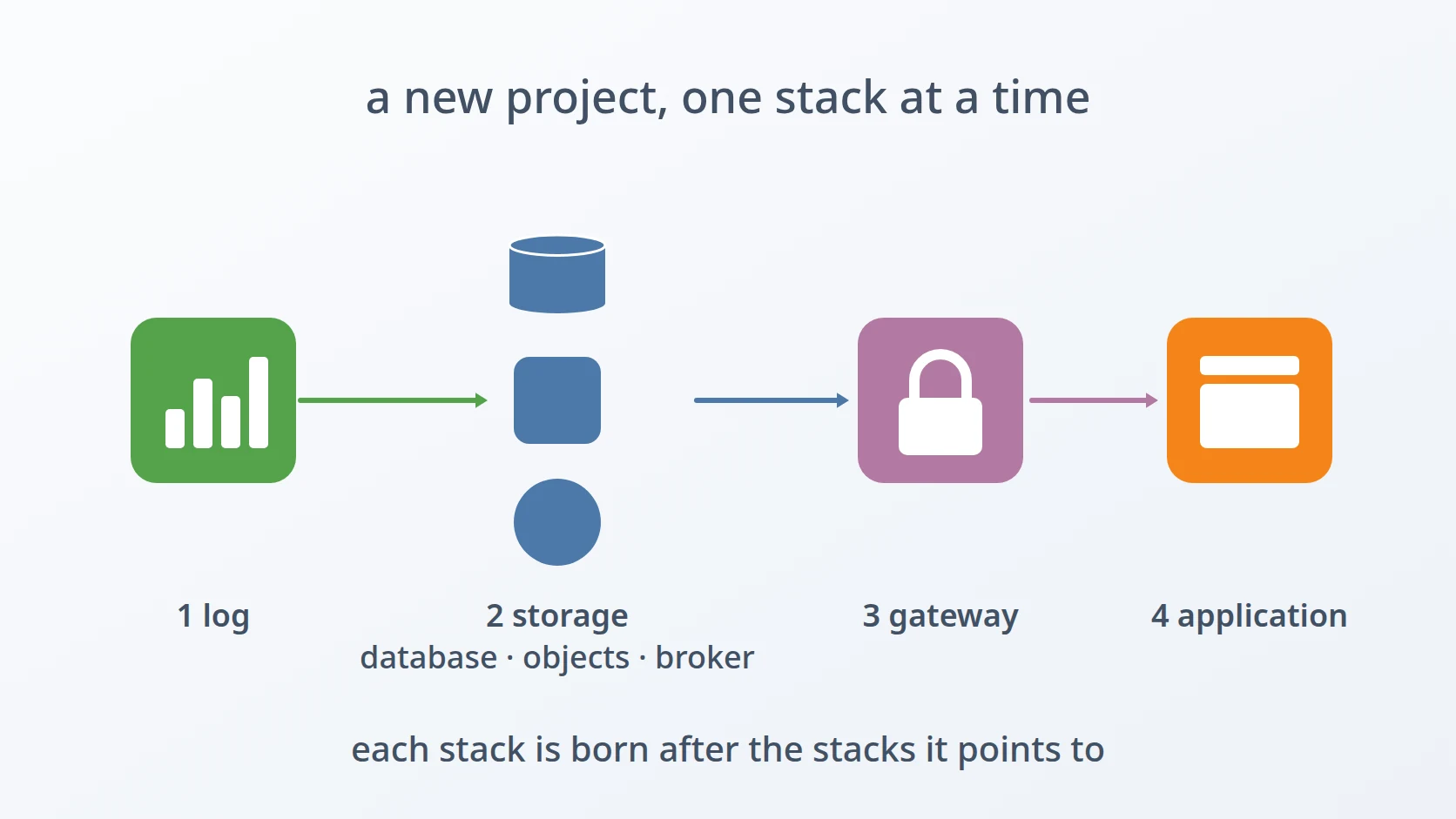
- Decide which stacks the project needs, and prepare its network.
- Generate the log stack.
- Generate storage, object storage, and the broker, as needed.
- Generate the gateway, pointing at all of them.
- Generate the application.
- Register the application with the gateway, and put nginx in front.
- Prove it with a first request.
Steps and the decisions behind them
Decide which stacks the project needs. Not every project needs a broker or object storage, and a stack that is not needed is a stack that still has to be updated, backed up, and watched. Choosing is manual and comes first. All my generators share one shape — a single file per tool, the same way of asking questions, the same answers through environment variables, and one variable that skips every confirmation — so whichever ones I choose, they behave the same way.
Prepare the project's network. Every stack of a project joins one Docker network, named after the project. The first generator I run either uses an existing network or creates it, and every generator reads the network's gateway address from Docker rather than computing it from the subnet; that address is where the stacks publish their ports. Each stack keeps its data under one prefixed directory laid out like the stack folders, so stacks of different projects, or different environments of one project, never write into each other's data.
Generate the log stack first. The log stack is the one every other stack reports to, so it comes before them: when the storage, the broker, the gateway, and the application start, there is already a collector to receive their telemetry, and their very first start-up is visible. Its generator starts the collector, Elasticsearch, and Kibana in the order they need and sets up the dashboards, so data shows from the first minute.
Generate storage and object storage. The database stack creates each additional database with its own owner and walls between them; the object storage stack starts MinIO from an empty data directory with fresh credentials and creates the private and public buckets. Neither carries anything from the template it was made from.
Generate the broker, if the project needs one. The broker's generator writes MQTT and AMQP brokers whose public entrances each accept one kind of credential, and whose tokens are bound to their own names. It comes before the gateway because the gateway publishes its events to the broker, and needs its address.
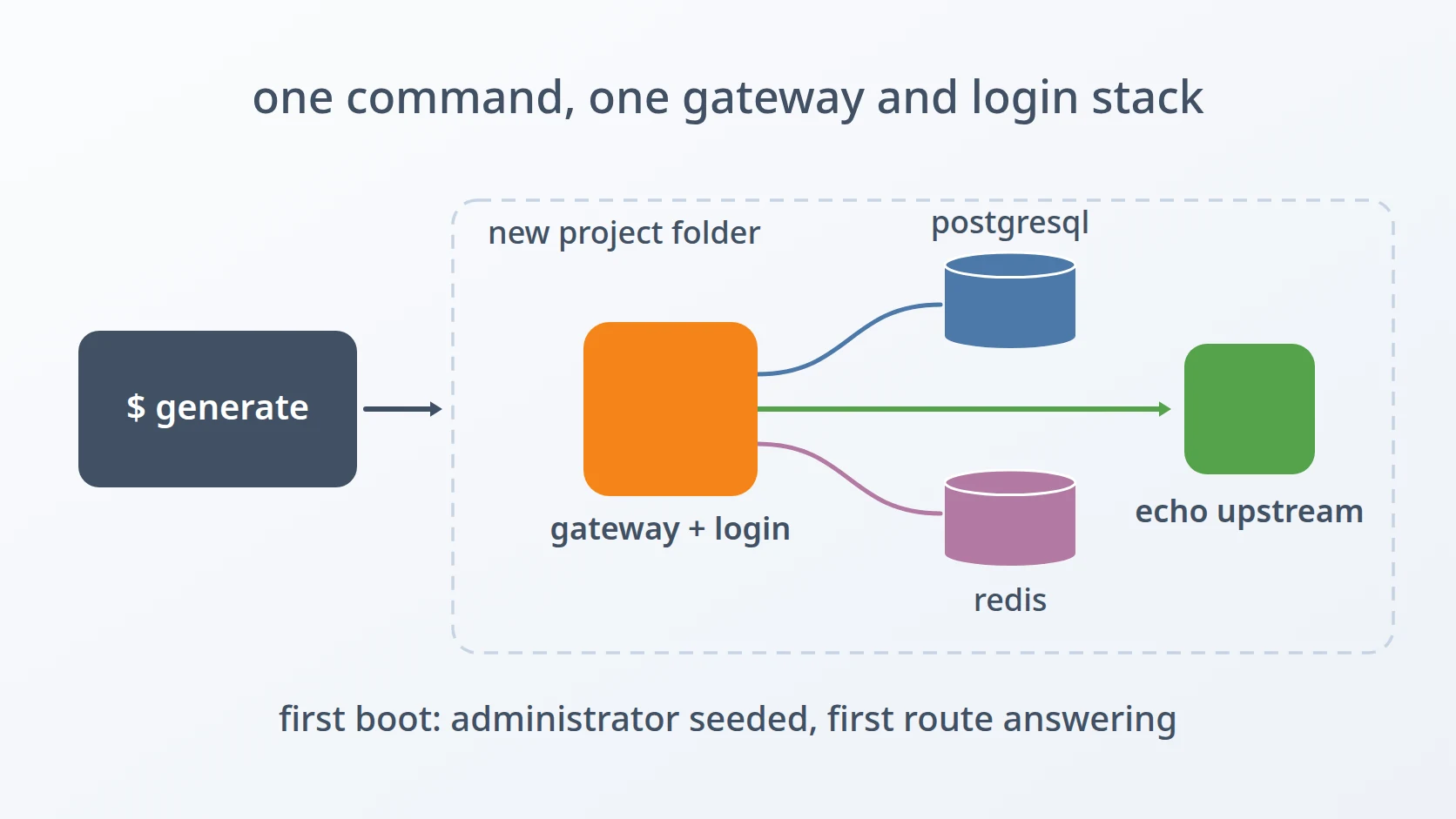
Generate the gateway, pointing at everything before it. The gateway's generator asks for the address of the object storage wrapper, the log collector's endpoint, and the broker, which is why it comes after all three: by now those addresses exist and can be checked, not guessed. It seeds the first administrator and a first route to a small echo server, so the gateway can be tested before the application exists.
Generate the application. The application's generator reads its facts from the application itself: the port from its Dockerfile, its configuration from its own folder, and where that configuration is mounted. If the application has its own database, it waits for that database to be healthy before it starts. It comes last among the stacks because it is the one that depends on all the others.
Register the application with the gateway. This step stays manual. Registering a backend goes through the gateway's management API, which only accepts a signed-in super administrator, and importing the application's permissions is something I review before it runs, because without it every ordinary user is refused before a request reaches the application.
Put nginx and certificates in front. Public traffic reaches the stacks through nginx on the host, which terminates TLS. Activating nginx needs elevated rights, so the generators only write its configuration and ask before installing it, and certificates come from the certificate authority, not from a generator. This step is manual, deliberately: it is the moment the project becomes reachable from outside.
Prove it with a first request. Healthy containers are not the definition of done. A first request is sent through the gateway to the application, signed in, and its trace is looked up on the log stack's dashboards. Only when both happen is the project's infrastructure finished.
What I automated, and what I did not
| Step | Automated or manual | Why |
|---|---|---|
| Choosing the stacks | manual | what a project needs is a design decision, not a default |
| Answering the generators' questions | manual, or from environment variables | names and credentials belong to the project; the same answers can be replayed for a rebuild |
| Network, data directories, ownership | automated | the mistakes here are silent, and the generator never forgets one |
| Generating and starting each stack | automated | start-up order, seeding, and setup are identical every time |
| Registering the application with the gateway | manual | it needs a signed-in super administrator, and its permissions deserve a review |
| nginx and certificates | manual | it needs elevated rights, and it is the moment the project goes public |
| The first request | manual | it is the proof that all the stacks work together, not one by one |
When it fails
I find out where it broke before deciding what to do, and the generators make that easier by waiting for each service to report healthy and saying plainly when one does not.
If a stack does not become healthy, its generator gives up after about two minutes of waiting and says which service it was waiting for. The cause is in that service's own output, read with docker compose logs in the stack's folder: a wrong password, a directory it cannot write to, a dependency that never answered.
If ports collide or a stack cannot reach another, the cause is usually the network: a wrong network name, a different subnet than expected, or ports bound to an address the other stacks do not use. docker network inspect shows the network's real gateway and subnet, which is also what every generator reads.
Then I regenerate from scratch. Every generator offers to replace an existing folder, and the same answers can be given again through environment variables. A stack that has just been created holds nothing worth keeping, so building it again from a corrected answer is faster and cleaner than repairing it by hand.
Why this order
Each stack is born after the stacks it points to. The log stack goes first because everything else reports to it, and a start-up that cannot be seen cannot be debugged. Storage, object storage, and the broker come next because they depend on nothing but the network. The gateway follows because it needs their addresses, and the application follows the gateway because it depends on everything. The manual steps come last because they open the project to the outside world, and that should only happen once everything behind them has been proven.
Variations
A project without a broker or object storage. Their generators are simply not run, and the gateway is told that the broker is disabled. The order of the remaining steps stays the same.
Adding a service to an existing project. A second application only needs the application generator, joined to the project's existing network, followed by registering it with the gateway. The stacks that already exist are not touched.
Testing the generators themselves. When I change a generator, I run it in automatic mode, with every answer given through environment variables and every confirmation skipped, and let it build and start a complete stack. A generator that cannot run without a person at the keyboard cannot be tested this way, which is why every one of them supports it.
Terms
- Stack
- A set of containers described by one compose file and started together, such as a database with its cache.
- Generator
- A script that asks for a project's values and writes a complete stack folder from a template.
- Template
- A folder of files that a generator copies and fills in, with project-specific values replaced.
- Docker network
- A private network that containers join so they can reach each other by name.
- Healthy
- The state a container reports when its own health check passes, which says nothing about whether it works with the others.
- TLS terminator
- A server that handles encryption for the services behind it and forwards decrypted traffic to them.
- Environment variable
- A named value passed to a program from outside, used here to answer a generator's questions in advance.
Technologies covered
- Bash
- PostgreSQL
- Docker Compose